Introduction
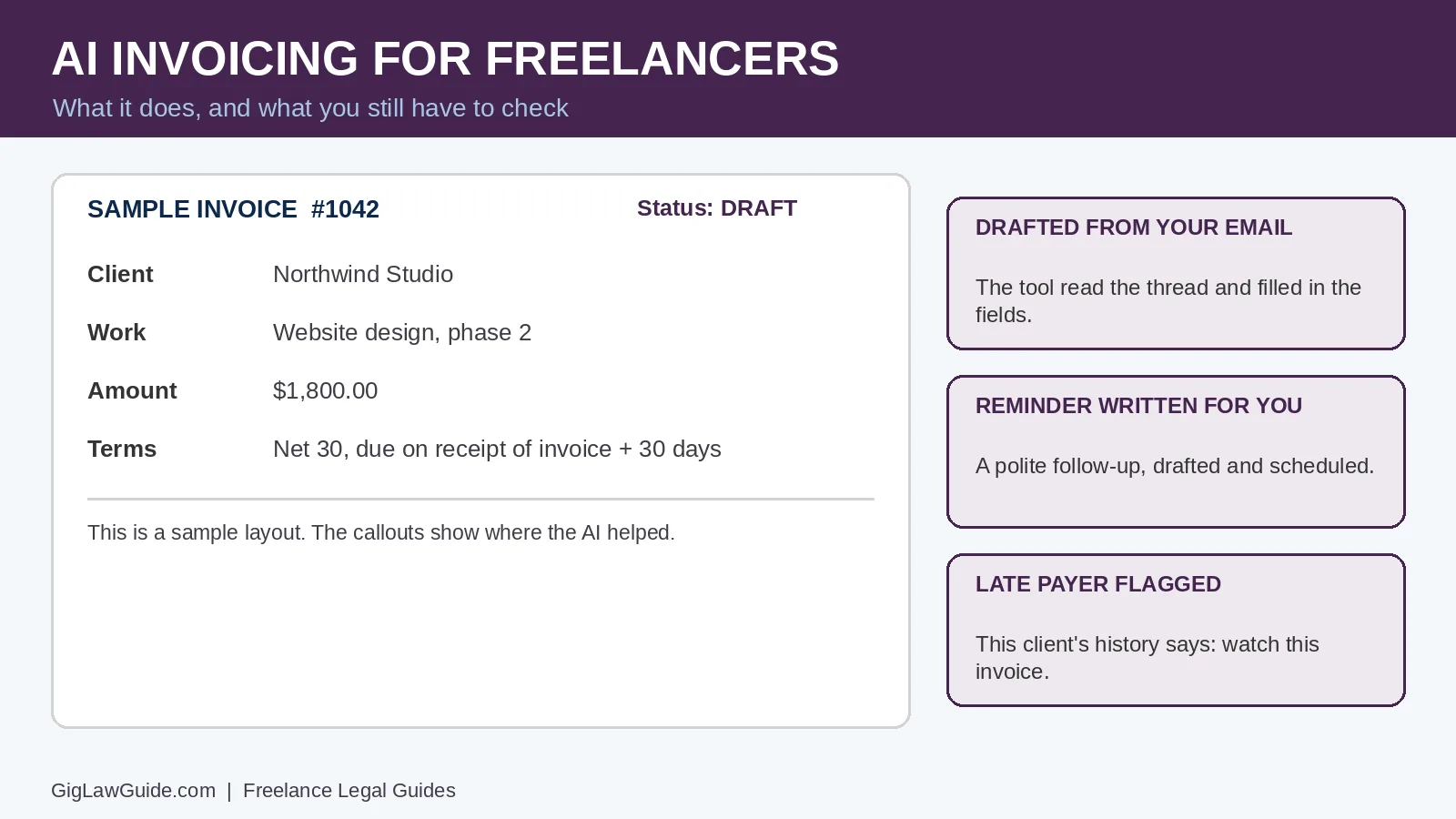
AI invoicing means using invoicing software that can draft an invoice from a sentence, an email thread, or a photo of your notes, write the follow-up reminders for you, and flag the clients most likely to pay late, all inside the billing tools you may already use. It is real, it is already shipping inside mainstream products like QuickBooks, Xero, and Zoho, and it genuinely removes the dullest hour of a freelancer’s week. It also introduces a new failure mode: an invoice that looks perfect and is quietly wrong. This guide explains what AI invoicing actually does today, which tools have verified AI features, the short checklist to run before any AI draft leaves your outbox, and the risks the landing pages leave out.
My own rule for every tool I cover on this site is simple: the software can do the typing, but the responsibility stays with me. An invoice is a legal and tax document wearing casual clothes. It states who owes what, for which work, under which terms, and it becomes part of your records and your client’s. AI can prepare that document faster than you can. It cannot be the person who answers for it.
What Is AI Invoicing?
AI invoicing is invoicing in which artificial intelligence does part of the drafting and decision support: turning plain language or source documents into invoice drafts, extracting amounts and details from receipts and messages, composing reminder emails, and predicting payment behaviour from your history. It helps to separate it from ordinary automation, because the two are sold as one thing and they are not.
Automation follows fixed rules you set: send reminder number two, seven days after the due date, to anyone unpaid. That has existed in invoicing software for years, and my roundup of the best invoicing software for freelancers covers it tool by tool. AI adds judgement-shaped work on top: reading an unstructured email and deciding what the line items probably are, drafting a reminder in a tone matched to the situation, or ranking your open invoices by how likely each is to drift. The output is a draft or a suggestion, not a fact, and treating it that way is the whole skill.
The Five Jobs AI Does in Invoicing
- Draft. It turns a sentence, an email, or a photo of a handwritten note into a ready invoice draft, with the client, items, and amounts filled in for your review.
- Extract. It pulls names, line items, dates, and amounts out of receipts, emails, and documents, so you stop retyping what a client already sent you.
- Remind. It writes follow-up messages in your tone and sends them on a schedule you set, escalating the wording as an invoice ages.
- Predict. It flags the invoices and clients most likely to pay late, based on your payment history, so you chase the risky ones first.
- Organise. It categorises expenses and answers plain questions about your books, such as which invoices are overdue and what you are owed this month.
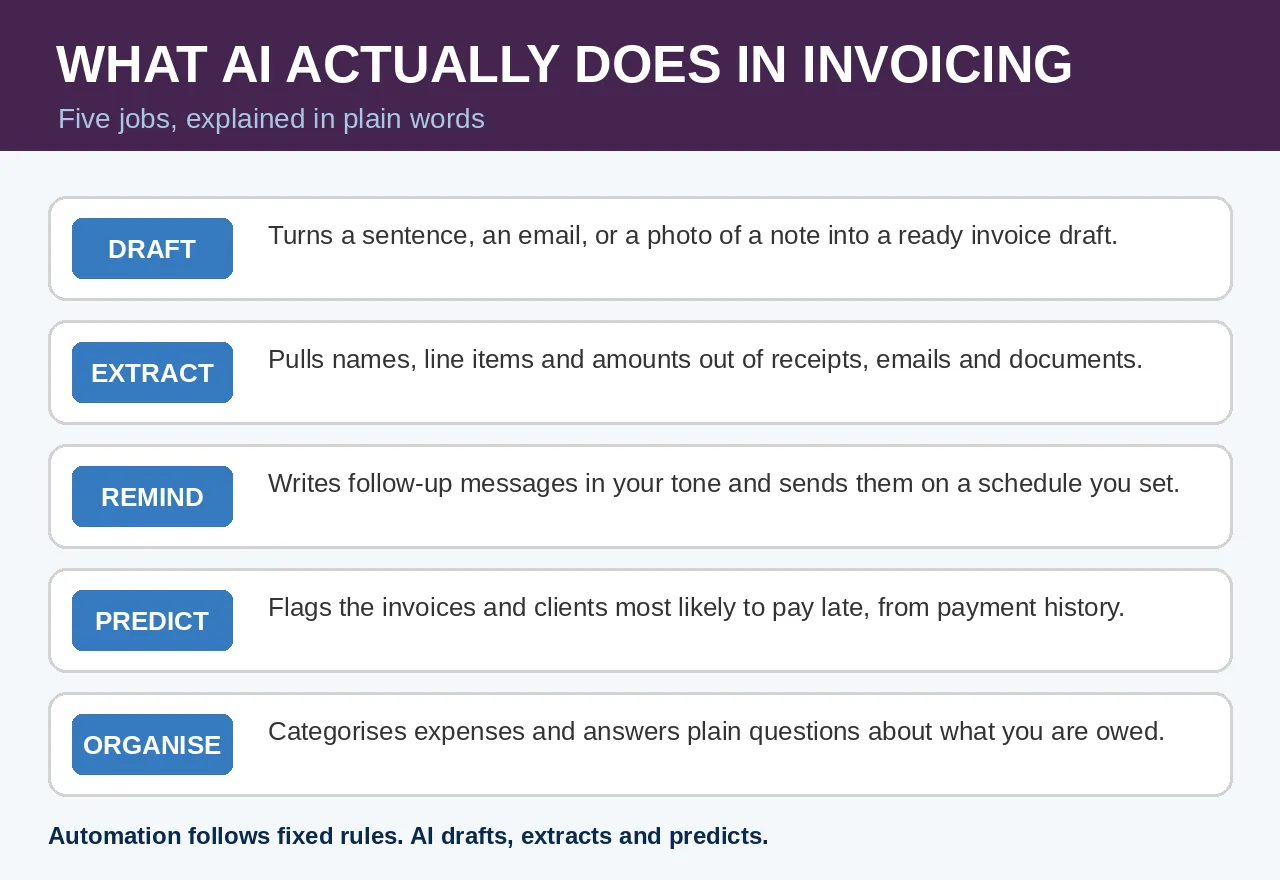
Notice what is not on that list. Nothing there negotiates your rate, decides your payment terms, judges whether a tax line is right, or takes responsibility when a number is wrong. AI invoicing is a drafting and pattern-spotting layer over the invoicing you already do. The freelancers who get the most from it are the ones who were already invoicing properly: clear terms, a signed agreement behind the invoice, and a reminder rhythm. The AI makes that system faster. It does not substitute for it.
Which Tools Actually Have It?
Plenty of products print the letters AI on the box. These are the three mainstream platforms whose AI invoicing features I could verify on the vendors’ own pages, described in the vendors’ own terms, with the honest caveat that features, plans, and regions change constantly.
QuickBooks: Intuit Assist
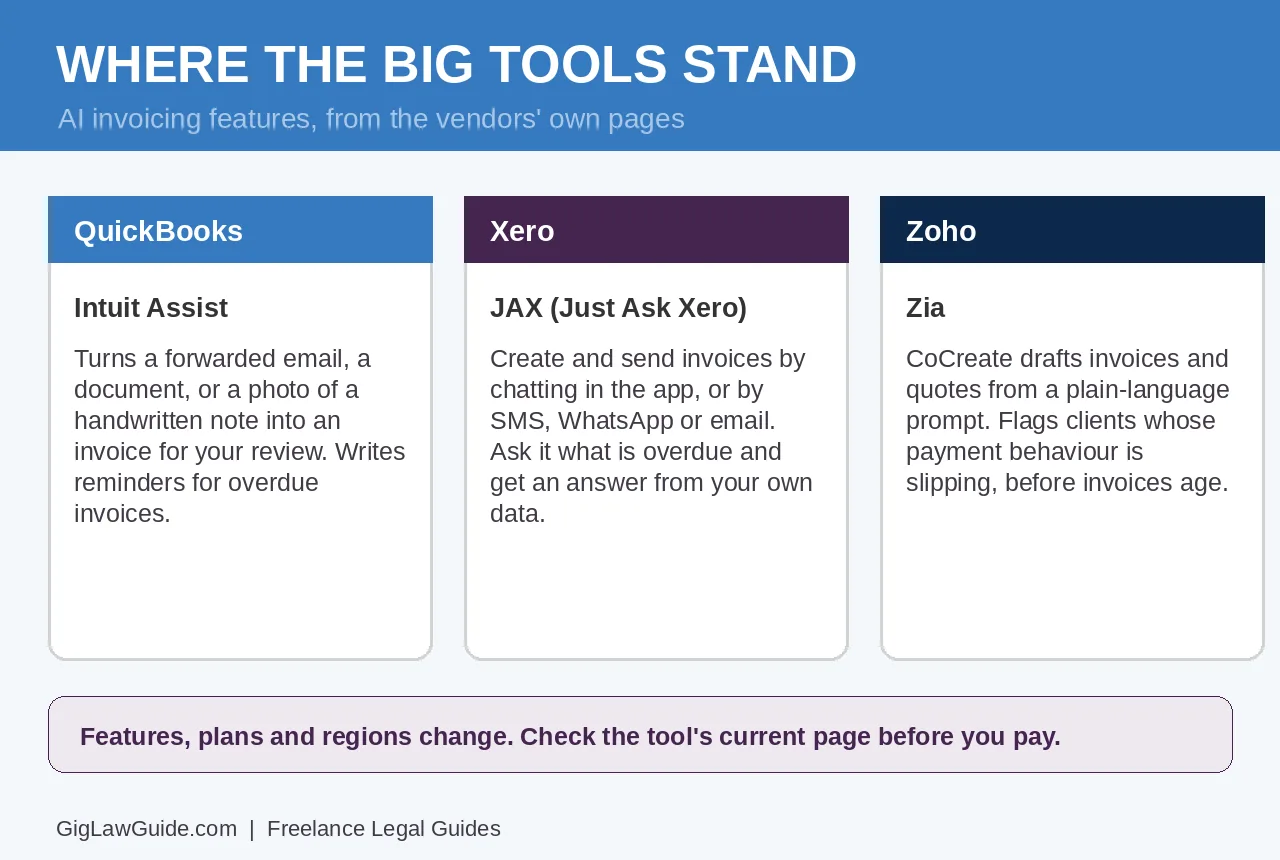
Intuit Assist is Intuit’s generative AI assistant inside QuickBooks. Per Intuit’s own launch material, it can turn a forwarded customer email, an uploaded document, or a photo of a handwritten note into an estimate or invoice for you to review and send, and it generates reminders for overdue invoices. Intuit states that its AI-generated reminders help businesses get paid 45 percent faster, an average of five days sooner; that is Intuit’s own figure for its own product, so treat it the way you would treat any vendor claim, as a reason to test, not a promise. QuickBooks also organises its newer AI features into task-specific agents, including a Payments Agent concerned with invoicing and collections, with availability varying by plan.
Xero: JAX (Just Ask Xero)
JAX is Xero’s generative AI companion. Xero documents that you can create and send invoices and quotes conversationally, inside Xero or by SMS, WhatsApp, or email, and even forward an email to have a quote created from it. You can also ask JAX direct questions about your own numbers, such as what overdue invoices you have, and get an answer drawn from your data. Xero’s own help guidance shows JAX drafting the invoice and the user approving it before it is sent, which is exactly the workflow this guide recommends everywhere.
Zoho: Zia
Zia is Zoho’s in-house AI across its billing products. Its CoCreate feature turns a plain-language description of the customer, items, and pricing into a draft invoice or quote that stays under your control until you approve it. Ask Zia lets you run routine actions and questions by prompt, such as listing invoices overdue by sixty days or triggering a reminder. On the collections side, Zia scans payment history to identify customers who settle late or in part, and prioritises overdue invoices against your own average late-payment cycle. Zoho also uses Zia for forecasting and for drafting email content.
Beyond the big three, a crowd of AI-first invoice generators has appeared, some of them genuinely useful for a one-off invoice. Apply the same test you would apply to any tool holding your client data: who is behind it, where does your data go, and can you export everything if it shuts down. A freelancer’s invoice history is a business asset. Do not park it somewhere you cannot retrieve it from.
A Safe First Workflow: How to Start
- Pick one job to hand over first. Drafting or reminders, not everything at once, so you can see what the AI gets right and wrong on work you understand.
- Check the AI features on your current plan. On the tool’s own current pages, confirm the feature exists on your plan and in your region before you reorganise your billing around it.
- Draft one real invoice with the AI. Use a genuine, current job, and compare the draft line by line against your signed agreement: fee, terms, and tax treatment.
- Run the 60-second check before sending. Verify the client legal name, the amount and currency, the tax lines, the due date and terms, and the late fee wording, every time, until it becomes habit.
- Keep your own copies. Save the sent invoice and every reminder in your own records, outside the tool, so your paper trail survives a cancelled subscription.
The 60-Second Check on Every AI Draft
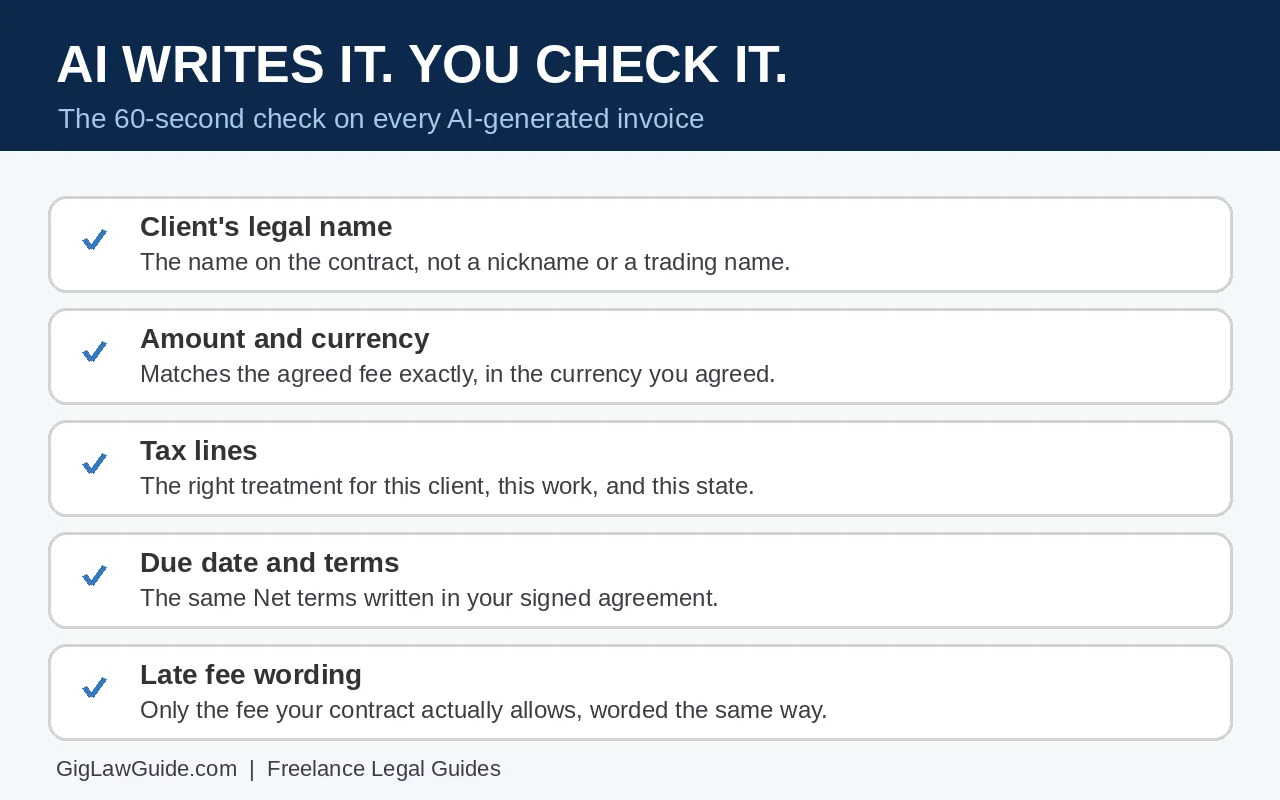
AI drafts fail in predictable places, and they are all on this list. The client name comes from an email signature, which may be a trading name rather than the legal entity you contracted with, and the wrong name can slow payment or complicate a claim. Amounts get rounded, split, or doubled when a thread mentions both a quote and a revised quote. Tax lines follow whatever default the tool guessed, which may not match this client’s situation. Due dates drift from the terms in your agreement, quietly rewriting a Net 30 deal into whatever the software assumed. And reminder text can promise a late fee your contract does not contain, or drop the one it does, and the wording on the invoice is part of what a court would read alongside the agreement. Sixty seconds of checking is the price of the hours the drafting saved you. Pay it gladly. For the terms themselves, my guide to late payment fees on freelancer invoices sets out what you can charge and how to word it.
The Risks the Landing Pages Leave Out
Confidently wrong numbers
A generative tool produces the most plausible invoice, not the correct one. If your email thread contains an old price, a discount you later withdrew, or a second project for the same client, the draft can blend them into a confident, tidy, wrong document. The error will not look like an error. That is why the check above is a comparison against the agreement, not a skim of the draft.
Your clients’ data goes somewhere
To draft from an email, the email has to be processed, and what you paste into a general chatbot may include client names, pricing, and project details that your confidentiality clause covers. Read the tool’s data terms before connecting it to your inbox: what is stored, where, and whether your data trains models. Inside mainstream accounting platforms the terms are at least written down. With a free AI invoice generator you found last week, you may be the product being tested. Where a client’s information is sensitive, draft from your own summary rather than forwarding the raw thread.
Tone is a business asset
An AI reminder that is too soft wastes the escalation; one that is too hard can spend a client relationship to collect a small invoice. Read the first few reminders in full before you let the sequence run unattended, and keep the final steps manual. When reminders stop working entirely, the answer is not a louder AI; it is the escalation path in my guide to collecting unpaid invoices, and behind it, the payment protection laws covered in the guide to freelance payment protection laws.
The invoice is only as strong as the contract behind it
AI can send a beautiful invoice for a deal that was never properly agreed. If there is no signed agreement stating the fee and the terms, the fastest reminder in the world is still asking nicely. Set the paperwork first: a deposit before work begins, as the deposit guide explains, and a written agreement behind every engagement, using the independent contractor agreement template published alongside this guide. Then let the AI run the routine.
AI Invoicing vs Ordinary Invoicing Software
If your current software already sends invoices, applies your terms, and fires rule-based reminders on schedule, you may not need the AI layer yet, and there is no prize for adopting it first. The honest gains are drafting speed when your work arrives as messy emails and notes, and prioritisation when you carry enough open invoices that chasing order matters. The honest costs are a higher plan tier in some products, a new checking habit, and a data relationship you should enter with your eyes open. If you bill two clients a month, a clean template and a calendar reminder will beat any AI. If you bill twenty, the drafting and flagging features will pay for themselves in evenings returned to you. Either way, keep your wider finances in view: the free gig tools here include a rate calculator, and no invoicing feature, AI or otherwise, fixes a rate that was too low when the deal was signed.
Can I Just Use a General AI Chatbot to Make Invoices?
Plenty of freelancers now paste job details into a general AI assistant and ask it to lay out an invoice. As a drafting shortcut it works, and for a one-off document it can be faster than opening your accounting software. But it has three structural weaknesses. First, the chatbot is not connected to your books: it does not know what you already invoiced this client, which invoice number comes next, or what has been paid, so duplicates and gaps creep in. Second, nothing is recorded: no sent copy in a system, no view tracking, no reminder schedule, and your audit trail is a chat window you may not be able to find in a year. Third, whatever you paste is processed under that chatbot’s data terms, which are written for general chat, not for your clients’ commercial details. If you use one, use it the way you would use a blank template: draft there if you must, then issue the real invoice from your invoicing software, where the number, the record, and the reminders live.
Frequently Asked Questions
How does AI invoicing work?
You describe the job in plain language, forward the client’s email, or upload a note or receipt. The AI extracts the client, the work, and the amounts, and produces a draft invoice inside your invoicing software. You review and correct it, then send. After sending, the same system can draft and schedule reminders, and flag invoices it predicts will be paid late, based on your payment history.
Is AI invoicing safe for client data?
It depends on the tool. Mainstream accounting platforms publish data terms describing how your information is processed and stored. Small or free AI invoice tools may not. Before connecting any AI feature to your inbox or uploading client documents, read what the tool stores, where, and whether your data is used to train models, and never paste information your confidentiality clause protects into a tool whose terms you have not read.
Which invoicing software has AI features?
Among mainstream tools, verified on the vendors’ own pages: QuickBooks has Intuit Assist, which drafts invoices from emails, documents, and photos of notes and generates overdue reminders. Xero has JAX, which creates and sends invoices conversationally and answers questions about overdue invoices. Zoho has Zia, whose CoCreate drafts invoices from prompts and which flags late-paying customers. Availability varies by plan and region.
Can AI send payment reminders automatically?
Yes. AI features in tools like QuickBooks and Zoho can draft reminder messages and send them on a schedule, adjusting the wording as the invoice ages. Set the sequence up deliberately, read the first reminders in full, and keep the final escalation steps manual, because tone with a real client is a business decision, not a template.
Can AI predict which clients will pay late?
Tools such as Zoho’s Zia analyse your payment history to identify customers who habitually settle late or in part, and prioritise the overdue invoices drifting furthest from your normal cycle. It is a ranking based on your own past data, useful for deciding where to chase first. It is not a credit check and it is not a guarantee about any individual client.
What should I check on an AI-generated invoice?
Five things, every time: the client’s legal name, the amount and currency against the agreed fee, the tax lines, the due date and payment terms against your signed agreement, and the late fee wording, which must match what your contract actually allows. The draft should be compared with the agreement, not skimmed on its own.
Will AI invoicing get me paid faster?
It removes delay on your side: invoices go out the day work finishes instead of at the end of the month, and reminders go out on schedule instead of when you remember. Intuit states its AI reminders help businesses get paid an average of five days sooner, which is the vendor’s own claim. What AI cannot do is make an unwilling client pay; that still depends on your contract, your deposit, and, if needed, the legal routes.
Does AI invoicing replace my contract or bookkeeping?
No. The invoice is generated from a deal, and the deal lives in your signed agreement; without one, the invoice is a request, not evidence of agreed terms. And your records remain your responsibility: keep your own copies of invoices and reminders, because tax authorities will ask you for them, not your software vendor.
Is AI invoicing worth it for a freelancer with few clients?
Probably not yet. With a handful of invoices a month, ordinary invoicing software with automatic reminders does nearly everything that matters, at no extra cost or risk. AI features earn their place when drafting from messy inputs and chasing many open invoices is eating real time, typically once you are billing many clients or juggling several projects at once.
Sources
- Intuit, “Intuit Launches AI-Powered Intuit Assist for QuickBooks” (email and document to invoice generation, AI-generated overdue reminders, and Intuit’s paid-faster claim): https://quickbooks.intuit.com/r/news/intuit-launches-ai-powered-intuit-assist-for-quickbooks/ and the Intuit investor release: https://investors.intuit.com/news-events/press-releases/detail/1222/intuit-launches-ai-powered-intuit-assist-for-quickbooks-giving-millions-of-businesses-a-competitive-edge
- Xero, “JAX expands beta access and introduces new features” (conversational invoicing, invoice creation by message and email): https://blog.xero.com/hk/product-updates/jax-beta-expands/
- Xero Central, “Invoice like a pro” (drafting an invoice with JAX, with the user approving before sending): https://central.xero.com/0/guide/a5B3m00000BtFpvEAF/invoice-like-a-pro
- Zoho, AI Billing Software and AI Features Overview (Ask Zia, CoCreate, late-payer identification, Zia Forecasting, Writing Assistant): https://www.zoho.com/fr/billing/features/ai-features/ and https://www.zoho.com/ke/billing/help/ai/ai-features-overview.html
I am not a lawyer, and this post is general information, not legal advice. If a project is worth a meaningful amount of money, or a dispute has already started, talk to a licensed attorney in your state before you act.
