

This guide is a business continuity plan for a solo freelancer. It is built around five essential functions you must keep working when something goes wrong: client communication, primary work tools, payment processing, data storage and access, and key platforms and vendors. The most effective solo plan starts with a Business Impact Analysis (BIA), clearly set Recovery Time Objectives (RTOs), redundant tools and data, crisis communication templates, and regular restore testing. It draws on ISO 22301 for business continuity management and, for its federal contingency-planning definitions of BIA, Maximum Tolerable Downtime (MTD), RTO and Recovery Point Objective (RPO), on NIST SP 800-34 Rev. 1, Contingency Planning Guide for Federal Information Systems — a U.S. federal publication, not an international standard.
What Happens When Your Business Goes Down? (And Why Most Small Businesses Aren’t Ready)
Here’s something nobody in the business continuity industry wants to say out loud: most small businesses and freelancers are one bad week away from a complete operational collapse.
Not because they’re poorly run. Not because they’re reckless. But because they’ve never had to think about what happens when the thing they depend on every single day, their laptop, their internet connection, their primary client, their cloud storage, their payment processor, just stops working.
Hypothetical example: a solo freelancer whose only copy of active client work lives on one laptop, with no second copy, loses access when that laptop fails. Another hypothetical: a solo operator whose single platform goes down has no alternate way to take payments or contact clients. Those are the gaps this plan is designed to close — not a claim about any real person or business.
The problem isn’t that these people were unprepared. The problem is that nobody ever told them what “prepared” actually looks like for a business of their size.
That’s what this guide is for.
The Hidden Costs of Business Downtime Nobody Talks About
Most conversations about downtime focus on the obvious stuff. Lost revenue. Missed deadlines. The number of hours you couldn’t bill.
But the real costs go much deeper than that.
For a solo freelancer, the relevant downtime cost is your own lost billable time. Work it out as: your daily revenue multiplied by the number of days you cannot deliver, plus any direct costs of recovery you actually pay. No vendor average is used here, because an enterprise average does not describe a one-person business.
When your business goes down, here’s what’s actually happening simultaneously:
You’re losing active billable hours. You’re potentially breaching contract deadlines, which opens you up to legal liability. Clients are losing confidence in your reliability and that confidence is extraordinarily hard to rebuild. Your vendors and suppliers may start questioning your stability. And depending on your industry, regulatory bodies may require incident reporting, even for brief outages.
There’s also the psychological cost. The panic. The all-nighters are trying to catch up on work. The apologetic emails. The feeling that everything you built could vanish in an afternoon.
That’s not dramatic. That’s what actually happens.
What Happens If You Don’t Have a Business Continuity Plan?
Without a business continuity plan, a solo freelancer has no pre-agreed way to restore client communication, work tools, payments, files or platforms — so a short outage can turn into missed deadlines and lost work. No average recovery time is claimed here, because recovery depends on which function failed and what backup you already have.
Operating without a business continuity plan doesn’t just mean you’re unprepared for disasters; it means you’re unprepared for disasters. It means every operational decision during a crisis is made reactively, under pressure, with incomplete information, by people with no pre-assigned roles and no pre-approved authority to act.
That’s how small problems become catastrophic ones.
Business Continuity Strategies vs. Disaster Recovery: Stop Confusing the Two
This distinction matters more than most guides admit. And getting it wrong leads to genuinely bad planning decisions.
What Business Continuity Strategies Actually Mean for Small Businesses
Business continuity strategies are the operational playbook that keeps your business functioning during a disruption. They’re proactive. They’re built before anything goes wrong. And they cover everything from how you’ll communicate with clients to where your data lives to how your team keeps working when your office becomes inaccessible.
ISO 22301 is the international framework for business continuity management. In plain terms, it is about an organisation being able to keep delivering its products or services at acceptable levels after a disruptive incident. For a solo freelancer, that means keeping the five functions in this guide working, not running a corporate programme.
For a solo freelancer, that might mean: keeping client projects moving even when your primary computer fails.
If you have a team, the same five functions still apply, but you would also need named cover for each role. This guide is written for the solo case; team cover is noted only as a short aside at the end of the checklist section.
The strategies aren’t about recovering from a disaster. They’re about not stopping in the first place.
Disaster Recovery vs. Business Continuity: A Side-by-Side Comparison
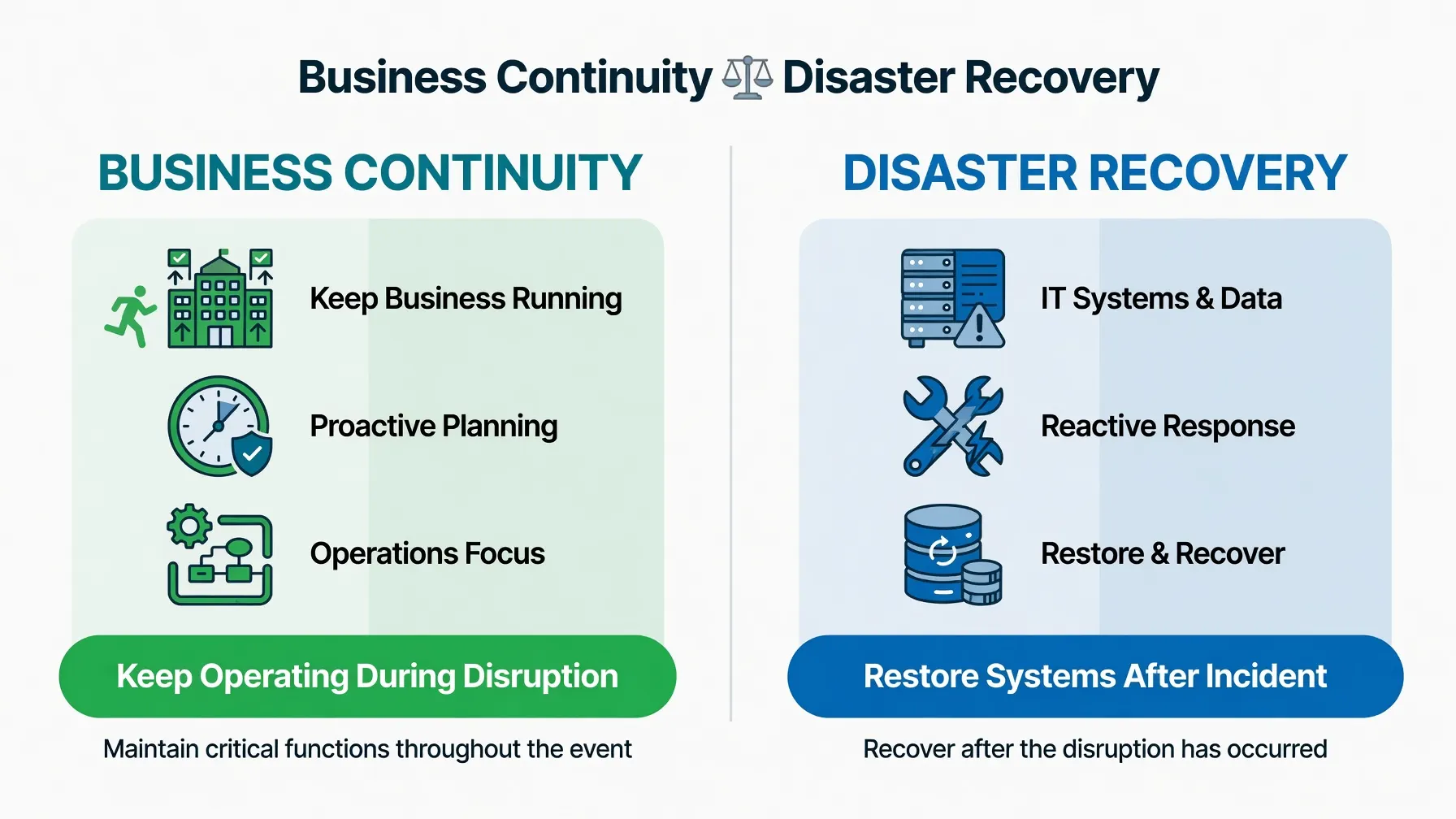
| Factor | Business Continuity | Disaster Recovery |
|---|---|---|
| Primary Goal | Keep operating during disruption | Restore systems after disruption |
| Timing | Proactive, ongoing | Reactive, post-incident |
| Scope | Entire business operations | Primarily IT and data systems |
| Key Metric | Maximum Tolerable Downtime (MTD) | Recovery Time Objective (RTO) |
| Who Leads It | Executive/owner level | IT department or managed service provider |
| Applies To | All business sizes | Primarily mid-market and enterprise |
| Example Action | Activating a remote work protocol | Restoring a server from backup |
| ISO Standard | ISO 22301 | NIST SP 800-34 |
Disaster recovery is a subset of business continuity. Not a synonym. Not an alternative.
What’s the Difference Between a Backup and a Continuity Plan?
A backup is a copy of your data. A business continuity plan is the documented, tested strategy for how your entire operation keeps running when your primary systems, people, locations, or suppliers become unavailable.
Backing up your files to an external hard drive every Friday night does not give you a continuity plan. It gives you recoverable data, which is one small component of a much larger operational strategy. The difference becomes brutally clear the first time your building floods, your backup drive is also inside the building, and you realise you have no documented process for literally any other part of your operation.
Before You Build Anything, Ask These Questions First
Most small business owners skip straight to templates. That’s the wrong move. The questions you ask before building your plan determine whether that plan will actually function under pressure or just sit in a folder somewhere looking official.
What’s the First Step in Creating a Business Continuity Plan?
The first step in creating a business continuity plan is conducting a risk assessment and a Business Impact Analysis (BIA), identifying which threats are most likely to affect your specific business, and quantifying the operational and financial consequences of each critical function going offline.
Before you write a single policy or fill out a single template, you need two things:
A clear inventory of every operational function your business depends on. And an honest assessment of what happens financially, legally, operationally, if each of those functions stops working for one hour, one day, one week.
Everything else follows from that.
How to Identify the Critical Functions You Must Protect First
Not everything in your business is equally critical. A freelance graphic designer losing access to their social media scheduler for three days is inconvenient. Losing access to their design software during a major deliverable week is a crisis.
Start by listing every function, system, tool, person, and vendor your business depends on to generate revenue and serve clients. Then rank them using two criteria:
How quickly does this function need to be restored before the impact becomes unacceptable? And what is the financial and reputational damage for each day it remains unavailable?
The functions that score high on both criteria are your Priority 1 assets. Those get protected first. They get the most redundancy, the clearest documented recovery procedures, and the most frequent testing.
For a solo freelancer, the five essential functions in this plan are: (1) client communication, (2) primary work tools, (3) payment processing, (4) data storage and access, and (5) key platforms and vendors. These five are the spine of this guide and of the fill-in plan table below. Protect these five first; everything else is secondary.
How Long Can Your Business Realistically Survive Without Operations?
This question has a technical name: Maximum Tolerable Downtime, or MTD. It’s the maximum amount of time your business can be non-operational before the damage becomes irreversible.
For a freelancer mid-contract, that MTD might be 24 to 48 hours before a client legally has grounds to terminate. For a small retail business operating on thin margins, it might take 72 hours for cash flow to become critical. For a healthcare adjacent business, it could be measured in minutes.
Your MTD defines your Recovery Time Objective. Your RTO must always be shorter than your MTD. If your business can survive 48 hours of downtime without permanent damage, your recovery systems need to restore operations within 36 hours at the absolute maximum, leaving a buffer for the unexpected complications that always arise during real incidents.
The Business Continuity Lifecycle: A Framework Built for Small Operations
The business continuity lifecycle isn’t a one-time project. It’s a continuous loop. Understanding it as a loop rather than a checklist is what separates plans that actually work from plans that gather digital dust.
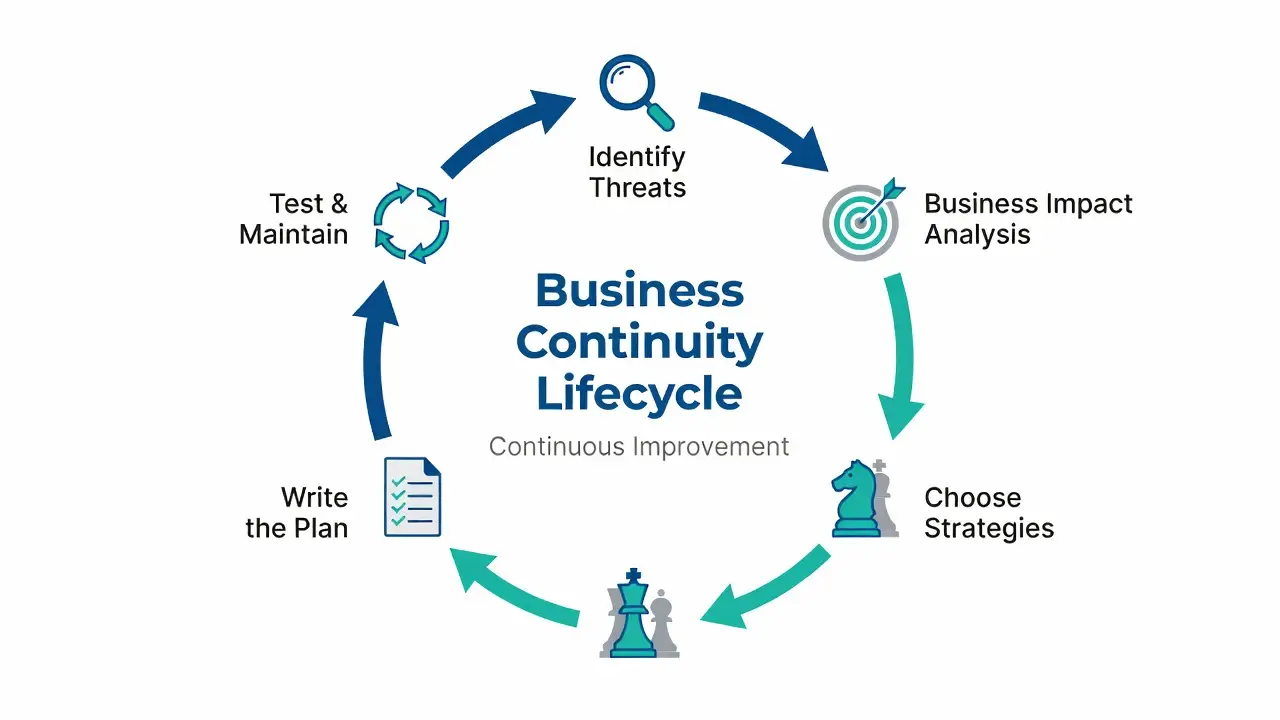
Phase 1: Identifying Threats That Are Actually Relevant to Your Business
Generic threat lists are almost useless for small businesses. Yes, earthquakes exist. But if your business is a two-person digital marketing agency in Nebraska, an earthquake is probably not your top operational risk.
Start with the threats that are statistically and geographically relevant to your specific situation. Cyberattacks affect virtually every online business. In 2026, ransomware attacks on small businesses increased by 82% between 2020 and 2024, according to Verizon’s Data Breach Investigations Report. Supply chain disruptions remain a top-three risk for any business with physical product dependencies. Key person risk, the risk that your business stops if you become personally unavailable, is the number one unaddressed threat for solo operators and freelancers.
Build your threat list from real data, not a generic template written for a Fortune 500 company.
Phase 2: Running a Business Impact Analysis Without a Consultant
A Business Impact Analysis sounds expensive and corporate. It doesn’t have to be.
For a small business, a functional BIA is simply a structured exercise in which you systematically ask: “If this function stops working, what happens?”
Here’s a simplified BIA framework you can run in an afternoon:
List every critical business function. For each function, document: what systems or people it depends on, what the immediate operational impact is if it fails, what the financial impact is per day of failure, and what the minimum resources needed to restore it are.
Then assign each function a Recovery Time Objective (how quickly it must be restored) and a Recovery Point Objective (how much data loss is acceptable, typically measured in hours of work).
That’s your BIA. It’s not glamorous. But it’s the foundation for every other strategy in this guide.
Phase 3: Choosing the Right Strategies for Your Size and Budget
The strategies covered in the next section vary significantly in cost, complexity, and relevance depending on whether you’re a freelancer, a 5-person agency, or a 50-person small business. Phase 3 is where you match strategies to your actual operational profile, not to what a large enterprise would do.
A rule of thumb I’ve found useful: spend your continuity budget proportionally to your MTD. The shorter your Maximum Tolerable Downtime, the more you need to invest in redundancy and rapid recovery. If your business can survive a week of disruption with minimal permanent damage, you have more flexibility to build cost-effective, lower-tech continuity systems.
Phase 4: Writing the Plan Down (And Making It Usable)
The best business continuity plan in the world is useless if nobody can find it, read it, or act on it during an actual crisis.
Your plan needs to live somewhere accessible, even when your primary systems are down. A physical printed copy in a fireproof location. A copy on a personal device that doesn’t depend on your primary network. A shared secure cloud location that team members or trusted contacts can access independently.
The content needs to be written in plain language. Step by step. With named individuals responsible for each action. With contact numbers that don’t require internet access to retrieve.
This is where most small business plans fail not in strategy, but in accessibility and clarity.
Phase 5: Testing, Training, and Keeping It Current
A plan that hasn’t been tested isn’t a plan. It’s a hypothesis.
Testing doesn’t have to mean a full organisational simulation. For most small businesses, it starts with a tabletop exercise: gather the people involved, walk through a simulated scenario, and identify where the plan breaks down. Because it will break down somewhere. That’s the point.
The goal of testing isn’t to prove your plan works. The goal is to find every way it doesn’t work before an actual crisis forces you to find out.
Strategies for a Solo Freelancer, Organised by the Five Essential Functions
These aren’t theoretical frameworks from a corporate risk management textbook. These are the specific, actionable strategies that keep small businesses and independent operators running when something goes wrong. I’ve structured each one with a clear definition, when to use it, a real-world example, and the first concrete implementation step.
1. Risk Avoidance: Kill the Threat Before It Reaches You
What it is: Eliminating or restructuring operations to remove specific risks entirely before they can cause disruption.
When to use it: When a risk is both high-probability and high-impact, and the cost of avoidance is lower than the cost of recovery.
Hypothetical example: a solo freelancer who repeatedly loses work to hard drive failures decides to remove that single point of failure by moving active work to a synced, backed-up system before the next project starts.
First step: Review the top three threats identified in your BIA. For each one, ask: “Can I restructure my workflow to eliminate this risk entirely, rather than building recovery systems around it?” Sometimes the best continuity strategy is simply not exposing yourself to the risk in the first place.
2. IT Redundancy and Failover Systems: What Happens When Your Main System Goes Down
What it is: Building parallel or backup technical systems that automatically or manually take over when primary systems fail.
When to use it: Any time your primary IT infrastructure, your main computer, internet connection, software platform, or server, is a single point of failure for your revenue-generating operations.
Hypothetical example: a solo freelancer whose internet connection fails during a client call switches to a pre-tested phone hotspot and a pre-written message to the client, instead of improvising.
First step: Map every technical system your business depends on and identify which have no backup. Start with your internet connection because it affects everything else, and add a secondary mobile connection as your first line of redundancy.
Business continuity strategies for IT redundancy require small businesses to identify every single technical system that generates revenue and build at least one parallel backup for each. The goal of IT redundancy is not to prevent failure, but to make individual failures operationally invisible.
3. Data Backup and Cloud-Based Recovery: More Than Just “Save to Google Drive”
What it is: A systematic, tested, multi-location data protection strategy that guarantees your critical data can be recovered to an acceptable point with zero permanent loss.
When to use it: Always. Without exception. For every business, regardless of size, industry, or technical sophistication.
The 3-2-1 backup rule is general backup practice, not a rule stated in NIST SP 800-34: three copies of your data, on two different media types, with one copy stored offsite. For a freelancer, this translates directly: your working files on your primary device, synced to a cloud platform, and periodically exported to a physical external drive stored somewhere physically separate from your primary workspace. NIST SP 800-34 Rev. 1, Contingency Planning Guide for Federal Information Systems, is a U.S. federal guide that defines BIA, MTD, RTO and RPO and covers backup methods, offsite storage and backup testing; see https://csrc.nist.gov/pubs/sp/800/34/r1/upd1/final .
Hypothetical example: a solo freelancer who keeps an offsite backup can restore active files after a device failure, while a freelancer with only one copy cannot. The lesson is to test the restore, not to assume the backup worked. Do not treat paying a ransom as a recovery plan.
First step: Identify today where every critical business file currently lives and whether it exists in more than one physical location. If the answer is no, your first step is to set up an automated cloud backup service and configure it before you do anything else on this list.
4. Supply Chain Diversification: What to Do When Your Supplier Disappears
What it is: Proactively building relationships with multiple suppliers, vendors, and service providers so that the failure of any single source does not halt your operations.
When to use it: Any time your business depends on a single vendor, supplier, platform, or service provider for a critical operational function.
Single-source dependency is risky for a solo freelancer too: if your only platform, supplier or tool goes down, you have no alternate route. That is why the fifth essential function in this guide is key platforms and vendors, narrowed to the few you actually depend on.
Hypothetical example: a solo freelancer who relies on one platform for all orders lists a second way for clients to reach and pay them, so a single platform outage does not stop all work.
First step: List every external vendor, platform, or supplier your business cannot operate without. For each one, research and contact at least one viable alternative before you need them, and document that relationship in your continuity plan.
If you work as a freelancer, this applies to your tools too. If Canva goes down and every deliverable you have due this week requires Canva, you have a single-source dependency on software. Knowing which alternative tools can produce comparable output is your supply chain diversification strategy.
5. Remote Work and Distributed Operations Planning
What it is: A documented, tested protocol that enables your business to maintain full or partial operations from any location, independent of your primary physical workspace.
When to use it: Proactively, before any disruption forces the issue. Remote work continuity is no longer optional infrastructure for small businesses; it’s baseline operational hygiene.
For freelancers, this strategy often already exists informally. But “informally” means untested, undocumented, and dependent on assumptions that may not hold under actual crisis conditions.
Hypothetical example: a solo freelancer who has never tested working away from their main desk discovers, on a test day, that a key file is only on that desk computer. Testing in advance finds that gap.
First step: Test your remote work capability right now by working a full day from a location other than your primary workspace, using only the equipment and access you would have during an actual emergency. Document every friction point you encounter. Those friction points are your implementation backlog.
For freelancers managing client relationships and contracts remotely, having your key legal and financial documents accessible on devices other than your primary device is equally important. Your freelance contract essentials should be stored in at least two independently accessible locations.
6. Crisis Communication: Talking to Clients When Everything Is on Fire
What it is: A pre-written, pre-approved communication protocol that defines exactly who communicates what, to whom, through which channels, and in what sequence during a business disruption.
When to use it: The moment any disruption is confirmed not after you’ve assessed the full scope, not after you’ve started recovery, not when someone asks why they haven’t heard from you.
The single most consistent finding in post-incident reviews of small business disruptions is this: clients who were communicated with proactively, even when the communication was just “we’re experiencing an issue and here’s what we know so far”, retained significantly higher confidence in the business than clients who had to chase for information.
Silence during a crisis doesn’t signal professionalism. It signals chaos.
First step: Write three crisis communication templates right now, before anything goes wrong. One for clients (what happened, what you’re doing about it, what they can expect). One for vendors (same structure, adapted). One for any regulatory bodies you’re required to notify. Store them somewhere accessible without internet if needed.
If you’re a freelancer dealing with a client who’s already frustrated because of a delay, knowing how to invoice a client who ignores you is a related skill but proactive crisis communication prevents you from ever needing to navigate that situation.
7. Financial Continuity and Liquidity Reserves
What it is: Maintaining sufficient liquid financial reserves and pre-established emergency credit access to sustain business operations through a disruption period without requiring immediate revenue generation.
When to use it: Continuously, as a structural component of your business financial management not reactively when a crisis is already underway.
For a solo freelancer, the practical step is to decide, in advance, how many months of your own operating expenses you want held as a reserve, and to keep that reserve separate from client money. This guide makes no survey claim about other freelancers’ reserves.
During a disruption, the ability to meet your operating expenses without generating new revenue determines how long you can focus on recovery rather than scrambling for emergency income. That margin is what separates businesses that recover strategically from businesses that make desperate, damaging decisions under financial pressure.
First step: Calculate your actual monthly operating expenses not your revenue, your expenses. Then determine how many months of those expenses you currently have in liquid, accessible savings. If that number is below three, building it toward three months is a higher-priority continuity investment than most software or infrastructure upgrades.
Building a separate bank account for your freelance business is one of the most structurally sound financial continuity moves a solo operator can make. It provides natural financial visibility and significantly simplifies the reserve-tracking process.
8. Vendor and Third-Party Risk Management
What it is: A systematic process for evaluating, monitoring, and managing the continuity risk posed by every external party your business depends on.
When to use it: Before you sign any vendor agreement, and on a recurring basis for every existing vendor relationship.
Here’s the uncomfortable truth about third-party risk: your vendor’s disaster is your disaster. Their data breach is potentially your data breach. Their bankruptcy is your supply chain disruption. Their technical outage is your service delivery failure.
And yet most small businesses conduct zero formal assessment of their vendors’ business continuity capabilities before entering into dependency relationships with them.
A practical third-party risk assessment for a small business doesn’t require a formal vendor audit. It requires asking three direct questions before signing any significant vendor agreement: What is your documented uptime guarantee, and what are the contractual remedies if you fail to meet it? Do you have a published business continuity plan, and when was it last tested? What is your communication protocol if you experience a service disruption?
Vendors who can’t or won’t answer these questions clearly are vendors whose failure you have no way to anticipate or mitigate.
9. Alternate Site Strategy: Hot, Warm, and Cold Sites Explained Simply
Solo version: you do not need an alternate office site. You need a tested alternate workspace and device — a second location with internet, a charged spare device, and offline access to client contacts and active files.
If you work from an office, a formal alternate site may matter. For a solo freelancer, a tested alternate workspace and device is the proportionate equivalent. The hot, warm and cold site terms below describe office arrangements, included only so you recognise them if a client uses them.
The three office-site terms, for reference only:
A hot site is a fully equipped, immediately operational alternate location that mirrors your primary workspace in real time. For large businesses, this is a secondary office with live data replication. For a freelancer, a hot site equivalent is a second fully configured device with all software installed and all credentials accessible.
A warm site is a location that requires some setup time before it’s operational, typically 4 to 24 hours. A coworking space you have a pre-established membership with is a warm site. A family member’s home with adequate internet and your essential software pre-installed is a warm place.
A cold site is a basic space with power and connectivity but no equipment or software a last resort that requires days to make operational.
For a solo freelancer, do not buy an alternate site; test your alternate workspace and device instead.
10. Incident Response Integration with Your BCP
What it is: The process of ensuring your immediate crisis response actions are explicitly connected to and compatible with your longer-term business continuity strategy, so that early incident decisions don’t accidentally make recovery harder.
When to use it: Always incident response and business continuity planning must be designed together, not bolted together after the fact.
The most common failure mode here is organisations treating incident response and business continuity as separate documents owned by separate people with separate budgets. When an actual incident occurs, the two teams (or the two plans, in a small business context) give contradictory guidance, and operational paralysis follows.
Your incident response checklist should explicitly reference your BCP at each decision point, indicating which continuity strategies to activate at which stages of the incident.
11. Regulatory and Legal Continuity: Yes, Compliance Still Applies During a Crisis
What it is: Maintaining documented processes to ensure legal and regulatory obligations continue to be met during and immediately after a business disruption.
When to use it: This strategy is non-negotiable for any business operating in a regulated industry, such as healthcare, finance, legal, or accounting, and is increasingly relevant for any business that handles personal data under regulations like GDPR, CCPA, or HIPAA.
Here’s what gets missed consistently: a business disruption doesn’t pause your legal obligations. Contract deadlines don’t automatically extend because you experienced a cyberattack. Under GDPR Article 33, a personal data breach must be notified to the supervisory authority without undue delay and, where feasible, within 72 hours, unless the breach is unlikely to result in a risk. Other regimes have their own timelines; check each regime that applies to you rather than assuming one timeline covers all. Tax filing deadlines don’t disappear because your systems are down.
For freelancers, this is particularly relevant in the context of contract obligations. Understanding what your contracts say about force majeure the legal provision that may excuse non-performance during extraordinary, unforeseeable events is a fundamental part of your legal continuity strategy. The force majeure clause in your freelance contract is one of the most underread and underutilised protections available to independent operators. Limits: force majeure only helps if the clause exists in that contract and covers that event. It is usually construed narrowly, usually requires notice and mitigation, and does not automatically extend deadlines or excuse payment. Check each contract separately; it is not a substitute for a continuity plan.
Is business continuity planning legally required? In the United States, it depends on your industry and on the specific obligations that apply to you. Some regulated sectors have explicit continuity or contingency requirements. NIST SP 800-34 Rev. 1 is a U.S. federal contingency-planning guide for federal information systems, not a blanket rule for every contractor. For businesses outside regulated industries, a formal BCP is not universally legally mandated, but contract obligations, data protection regulations, and industry-specific requirements may effectively require it.
12. Cyber Resilience: How to Protect Your Business from Cyberattacks
What it is: A comprehensive, layered approach to cybersecurity that assumes breaches will occur and builds operational continuity systems that function even when digital assets are compromised.
When to use it: Now. Yesterday. The threat is not theoretical.
Cyber resilience as a business continuity strategy requires small businesses to implement layered security controls, including multi-factor authentication, endpoint protection, and air-gapped backups, combined with a documented incident response plan that enables operations to continue or rapidly resume even when primary digital systems are compromised by ransomware, phishing, or unauthorised access.
The cybersecurity threat to small businesses and solo freelancers cannot be addressed with a single antivirus subscription and a strong password policy. Phishing emails targeting individuals remain a common attack route, which is why layered controls and tested backups matter more than any single tool.
For freelancers, protecting your digital work legally goes beyond cybersecurity tools. Understanding how to issue a DMCA takedown notice for stolen digital assets is a continuity skill in its own right because content theft disrupts your intellectual property operations and requires a documented response protocol, not just a panicked email.
First step: Enable multi-factor authentication on every account that contains client data, financial information, or work product. This single action eliminates the majority of credential-based attack vectors. Do it before you continue reading.
How the Strategies Map to the Five Essential Functions
| Strategy | Primary Threat Addressed | Business Size | Cost Tier | ISO 22301 Alignment |
|---|---|---|---|---|
| 1. Risk Avoidance | Operational + Structural Risks | All sizes | Low | Section 8.3 |
| 2. IT Redundancy | Infrastructure Failure | SMB + Freelancer | Low to Medium | Section 8.4 |
| 3. Data Backup and Cloud Recovery | Data Loss + Ransomware | All sizes | Low | Section 8.4 |
| 4. Supply Chain Diversification | Vendor/Supplier Failure | SMB + Product-Based | Medium | Section 8.3 |
| 5. Remote Work Planning | Location-Based Disruption | All sizes | Low to Medium | Section 8.4 |
| 6. Crisis Communication | Reputational + Client Risk | All sizes | Low | Section 8.4 |
| 7. Financial Reserves | Cash Flow Disruption | All sizes | Medium | Section 8.3 |
| 8. Third-Party Risk Management | Vendor Dependency | SMB | Low | Section 8.3 |
| 9. Alternate Site Strategy | Physical Location Loss | SMB + Office-Based | Medium to High | Section 8.4 |
| 10. Incident Response Integration | Multi-threat | All sizes | Low | Section 8.4 |
| 11. Legal and Regulatory Continuity | Compliance + Contract Risk | All sizes | Low | Section 8.3 |
| 12. Cyber Resilience | Cyberattack + Data Breach | All sizes | Medium | Section 8.4 |
How Much Does a Business Continuity Plan Actually Cost?
This is the question competitors consistently either avoid or answer with vague corporate ranges that mean nothing to someone running a $150,000-per-year freelance operation or a small 8-person service business.
For a solo freelancer, cost it yourself instead of relying on a generic range:
DIY costing method: list each of the five essential functions, note the tool or subscription that keeps that function running, and add up only the annual prices you actually pay for those items, plus any spare device or second internet connection. Use current vendor prices, not a generic range.
If you have a team, costs change with headcount and insurance, so do not apply a solo budget to a team plan; price each function separately for the team size you actually have.
Consultant help is optional for a solo freelancer. If you hire help, get a fixed quote for a defined scope rather than relying on a generic first-year range.
Can You Build a Business Continuity Plan Without Hiring Consultants?
Yes. Completely. And for most small businesses and freelancers, that’s exactly what I’d recommend starting with.
Ready.gov publishes business continuity resources for small businesses. NIST SP 800-34 Rev. 1 is a free U.S. federal publication that provides guidance on contingency planning for federal information systems.
None of these requires a consultant to interpret or implement. They require time, honesty about your operational vulnerabilities, and the discipline to actually complete the process rather than starting it and stopping at the first inconvenient finding.
Consultants add genuine value when your regulatory requirements are complex, when your operation is large enough that coordination across departments creates planning complexity, or when you need third-party validation for client or investor requirements. For everyone else, the free resources are genuinely adequate.
Free vs. Paid Tools: What You Actually Need vs. What Gets Oversold
| Tool Category | Free Option | Paid Option | Who Actually Needs the Paid Version |
|---|---|---|---|
| Cloud Backup | Google Drive / iDrive Free Tier | Backblaze Business ($99/yr, per computer) | Any business with over 2TB of critical data |
| BCP Documentation | Google Docs / Notion Free | Castellan / Fusion Risk Management | Businesses with formal ISO 22301 certification requirements |
| Communication During Outage | WhatsApp / Signal | Everbridge / AlertMedia | Businesses with 20+ employees requiring mass notification |
| Password and Credential Management | Bitwarden Free | 1Password Teams | Any business sharing credentials across 3+ people |
| Cyber Threat Monitoring | Have I Been Pwned alerts | Managed Detection and Response service | Businesses in regulated industries or with high-value digital assets |
| Recovery Testing | Manual tabletop exercise | Automated DR testing platform | Businesses with complex multi-system recovery dependencies |
How to Balance Cost and Risk When You’re Running Lean
The framework I use is straightforward: calculate your daily revenue (or the daily cost of not generating revenue). Then calculate the annual cost of the continuity investment. If the investment pays for itself in fewer than 10 days of prevented downtime per year, it’s justified.
Hypothetical illustration: for a freelancer earning $1,000 per day, a $300/year backup solution that prevents even a single day of data-loss-related downtime would give (1000−300)/300 = 233% in that illustration. This is an example, not a promised return. What’s complicated is making the investment before the loss occurs rather than after.
If You Have a Team: A Short Aside (Solo Freelancers Can Skip to the Client Section)
If You Have a Team: Briefing Them on the Plan
This aside is only for solo freelancers who also work with a team. If you work alone, skip to the client section below.
That approach doesn’t work. Here’s what does.
Role-specific briefings rather than organisation-wide sessions. Each person needs to know exactly what their responsibilities are during a specific type of disruption not a comprehensive overview of the entire plan. A customer service team member needs to know the crisis communication protocol and who to escalate to. They do not need a detailed briefing on the technical failover architecture.
Scenario-based learning rather than policy recitation. Walk people through a realistic, specific scenario and let them work out the response using the plan as a reference. The gaps they encounter during the exercise are the training content. The plan document itself is the reference material, not the teaching tool.
Quarterly 20-minute refreshers rather than annual all-day sessions. Memory retention research consistently shows that shorter, more frequent exposures to procedural information produce significantly better recall under pressure than single extended training events.
If You Have a Team: What the Owner Must Own
Business continuity planning cannot be delegated entirely to an IT manager, a risk consultant, or an operations coordinator. The strategic decisions that function are truly critical, such as what level of financial reserve to maintain and what risk tolerance is acceptable, which require executive authority and owner-level commitment.
For a small business owner, this means personally reviewing and approving the BCP at least once a year. It means ensuring the financial reserves necessary for continuity are actually maintained, not raided for operational convenience. And it means modelling the behaviour that continuity planning matters by participating in drills, by asking about plan status, by treating a continuity gap as a serious operational risk rather than an administrative technicality.
What to Tell Clients About Your Continuity Capabilities
This is a competitive differentiator that almost no small business or freelancer uses, and it’s sitting right there, free, ready to be leveraged.
When a potential enterprise client or sophisticated small business client is evaluating whether to hire you or your business, they’re implicitly assessing operational risk. Can this vendor stay operational? What happens to my project if something goes wrong?
If you can say specifically and documentably, “I maintain a tested remote work continuity protocol, a 3-2-1 backup strategy with 24-hour recovery capability, and a documented crisis communication process,” you have just meaningfully differentiated yourself from the 90% of competitors who have never thought about this question.
Business Continuity Templates, Checklists, and RTO/RPO Planning Tools
RTO and RPO: What They Mean and How to Set Yours in 20 Minutes
Recovery Time Objective (RTO) is the maximum amount of time your business can afford for a specific system or function to be offline before the disruption becomes operationally unacceptable.
Recovery Point Objective (RPO) is the maximum amount of data loss your business can tolerate, expressed in terms of time. An RPO of 4 hours means you can afford to lose up to 4 hours of data in a worst-case scenario, so your backup systems need to capture data at intervals of 4 hours or less.
| Business Function | Suggested RTO | Suggested RPO | Why |
|---|---|---|---|
| Client communication (email) | 2 to 4 hours | 1 hour | Client-facing, time-sensitive |
| Primary work tool access | 4 to 8 hours | 2 hours | Revenue-generating capability |
| Payment processing | 4 hours | Real-time preferred | Direct revenue impact |
| Project file access (data storage and access) | 8 to 24 hours | 4 hours | Deliverable continuity |
| Internal documentation | 24 to 48 hours | 8 hours | Operational reference, not client-facing |
| Website and public presence | 4 to 8 hours | 24 hours | Reputational and lead generation impact |
Setting your RTO and RPO is a 20-minute exercise if you’ve already completed your BIA. Map the rows above to the five functions: client communication = client communication (email); primary work tools = primary work tool access; payment processing = payment processing; data storage and access = project file access and internal documentation; key platforms and vendors = website and public presence. The RTO and RPO values are starting-point examples, not guarantees; adjust them to your own deadlines.
What Customer Data Protection Looks Like During an Outage
This is a specific concern that sits at the intersection of business continuity and legal compliance, and it’s one that most small business continuity guides completely ignore.
If your business stores customer data, names, emails, payment information, health information, or any other personally identifiable information, your data protection obligations don’t pause during a disruption. Under the California Consumer Privacy Act (CCPA), which applies to businesses meeting certain thresholds that collect California resident data, and under HIPAA for healthcare adjacent businesses, you may have active legal obligations to protect, encrypt, and in some cases report the status of that data during an incident.
Your continuity plan needs to include a specific protocol for customer data during an outage: where it is, whether it’s encrypted, who has access, and what your notification obligations are if it’s been potentially compromised.
Checklist: Turning the Guidance Above Into Your Plan
The Small Business BCP Starter Checklist 27 Items to Cover Before the Next Crisis
Risk Assessment and BIA
- List the five essential functions in this plan (client communication; primary work tools; payment processing; data storage and access; key platforms and vendors)
- Assign RTO and RPO to each critical function
- Identify the Maximum Tolerable Downtime for the business overall
- Map all external dependencies (vendors, platforms, suppliers)
- Identify all regulatory and contractual compliance obligations
Technology and Data
- Implement a 3-2-1 backup strategy for all critical data
- Verify backup restoration actually works (test it, don’t assume)
- Enable multi-factor authentication on all critical accounts
- Document all software license credentials in a secure, accessible location
- Identify and arrange a secondary internet connection
- Identify and configure an alternate device if the primary fails
Operations
- Document step-by-step recovery procedures for the top 5 critical functions
- Identify and document an alternate vendor for each critical supplier
- Arrange alternate workspace and device access
- Verify remote work capability through an actual test
Financial
- Calculate monthly operating expenses
- Verify a minimum of 3 months of liquid reserves exist
- Review business interruption insurance coverage
- Establish an emergency credit line before it’s needed
Communication
- Write a crisis communication template for clients
- Write a crisis communication template for vendors
- Create an offline contact list for key stakeholders (no internet required)
- Assign communication responsibilities by name
Legal and Compliance
- Review force majeure provisions in all active client contracts — note the limits: clause-dependent, narrowly construed, requires notice and mitigation, and does not automatically extend deadlines or excuse payment.
- Document data breach notification obligations and timelines (for GDPR, Article 33: notify the supervisory authority without undue delay and, where feasible, within 72 hours)
- Verify insurance covers cyber incidents and business interruption
Testing
- Schedule a quarterly tabletop exercise (a discussion, not a restore test) and a separate actual restore test
- Document the results of the last plan test
- Assign plan review and update responsibility by name and date
| Function | Responsible contact (offline method) | Backup method | RTO | RPO | Restore-test procedure (test, frequency, pass mark, log) |
|---|---|---|---|---|---|
| Client communication | Your name; offline contact list (printed or on a second device) | Second email or messaging account; offline contact list | 2 to 4 hours (starting-point example) | 1 hour (starting-point example) | Send a test message from the backup route; every 90 days; pass if the message arrives and you can reply; log the date and result. |
| Primary work tools | Your name; offline note of tool logins and support route | Second device with the tool installed; offline installer or licence note | 4 to 8 hours (starting-point example) | 2 hours (starting-point example) | Open the tool on the second device and complete a small task; every 90 days; pass if the task completes without the primary device; log the date and result. |
| Payment processing | Your name; offline note of the payment provider support route | Second payment route (second provider or invoice fallback) | 4 hours (starting-point example) | Real-time preferred (starting-point example) | Run a test payment or invoice through the second route; every 90 days; pass if the payment completes and is recorded; log the date and result. |
| Data storage and access | Your name; offline note of where backups live | 3-2-1 backup: working copy, second copy, offsite copy | 8 to 24 hours (starting-point example) | 4 hours (starting-point example) | Restore a sample project file from backup to a second device; every 90 days; pass if the restored file opens and matches the original, and the restore finishes within the RTO above; log the date and result. |
| Key platforms and vendors | Your name; offline vendor contact list | Second sales or delivery route; vendor status route noted offline | 4 to 8 hours (starting-point example) | 24 hours (starting-point example) | Switch to the second route and confirm it accepts orders or messages; every 90 days; pass if the second route works end to end; log the date and result. |
Hypothetical Examples: What Business Disruption Can Look Like
Hypothetical Example: A Freelancer’s Ransomware Wake-Up Call
Hypothetical example: a solo freelancer opens what appears to be a project brief from a new client. It is a phishing email, and ransomware encrypts every file on their primary laptop, including design assets, active client project files, and invoicing history. With no backup, they cannot restore from a copy.
In this hypothetical, paying a ransom is not presented as a recovery plan; it does not guarantee decryption and does not restore a tested backup.
Recovery is slow and partial because there is no tested backup to restore from, and client work must be rebuilt or renegotiated.
Afterwards, the freelancer in this example implements a 3-2-1 backup strategy, a password manager, and multi-factor authentication, and tests a restore before the next incident.
The lesson is to test a restore in advance, not to pay after the fact.
Hypothetical Example: How a Small E-Commerce Business Survives a 4-Day Outage
Hypothetical example: a small e-commerce business selling handmade home goods experiences a complete platform outage after its primary e-commerce host is targeted by a distributed denial-of-service attack affecting many merchants at once.
In this hypothetical, the outage lasts several days during a busy period, but the business does not lose everything, because it had prepared in advance.
In this hypothetical, an earlier planning exercise had identified the single-platform dependency and prepared a second sales route and a client message.
During the outage in this example, they activate their crisis communication template, redirect traffic to their second sales route, and keep clients updated.
Supply Chain Lessons from the 2020 to 2022 Disruptions
The operational lessons from the 2020 to 2022 supply chain disruptions haven’t expired. They’ve become foundational.
Hypothetical illustration: businesses that had diversified supplier relationships before a disruption, even partially by maintaining secondary supplier contacts they did not regularly use, are better placed than those with single-source dependencies. A diversified supplier base does not guarantee a fixed share of production; it gives more routes to restore supply.
The lesson isn’t complicated. The implementation is the hard part, because pre-diversifying suppliers costs time and sometimes money before a crisis exists to justify it. That’s what continuity planning requires: making investments in resilience before it’s obviously needed.
What If Your Continuity Plan Fails During a Real Crisis?
This is the question nobody wants to answer, because answering it honestly requires admitting that no continuity plan is perfect. But this is also exactly where most guides stop being useful.
Every plan fails at some point during a real crisis. The disruption is bigger than modelled. A key person is unavailable. A vendor relationship that looked solid turns out to be unreliable under pressure. A backup system that was never actually tested fails to restore properly. These aren’t hypothetical scenarios; they’re documented patterns in post-incident reviews across every industry.
How to Rebuild After a Major Business Disruption
Recovery from a major disruption has three distinct phases, and conflating them leads to poor decision-making.
Stabilisation is the immediate phase: stopping the bleeding, communicating with stakeholders, activating available continuity measures, and ensuring compliance with legal and regulatory obligations. This phase is measured in hours.
Restoration is the intermediate phase: systematically restoring critical functions to operational status in priority order as defined by your BIA. This phase is measured in days.
Normalisation is the long-term phase: returning to pre-disruption operational capacity, capturing lessons learned, updating the continuity plan based on what failed, and rebuilding client confidence. This phase spans weeks to months.
The most common mistake during recovery is skipping stabilisation and jumping straight to normalisation, attempting to appear fully operational before operations are actually stable. This burns through reserves, creates new errors, and often prolongs the total recovery timeline.
For freelancers dealing with clients who are demanding delivery during your recovery period, having clear contractual protections matters. Understanding your rights when a client cancels a freelance project mid-way during a disruption is a real and practical legal continuity concern.
How Insurance and Business Continuity Planning Work Together
Business interruption insurance and business continuity planning address the same problem from different angles and they need to be designed with explicit awareness of each other.
Business interruption insurance covers lost income and operating expenses during a covered event. But here’s what most small business owners don’t fully understand: business interruption insurance typically has a waiting period (often 48 to 72 hours) before coverage kicks in, covers only specific named perils, and requires documented evidence of lost income that your bookkeeping needs to be able to produce even during the disruption.
Your continuity plan must address the coverage gap. Check your policy’s waiting period: before coverage begins, the early period of a disruption is typically the most chaotic and expensive. Your financial reserves and your immediate response protocols need to cover that window.
Cyber insurance is now a separate and increasingly important category for small businesses. Standard business owner’s policies typically do not cover ransomware payments, data breach notification costs, or regulatory fines from cyber incidents. A separate cyber liability policy fills that gap and in 2026, for any business storing customer data or operating primarily online, that gap is significant.
Running a Post-Incident Review: What to Do After the Dust Settles
Within two weeks of any significant disruption, including test exercises, conduct a structured post-incident review. Not a blame session. Not a celebration that you survived. A documented analysis of exactly three things:
What worked as planned? What failed to work as planned? What scenarios did the plan not anticipate?
The answers to those three questions become your plan update backlog. They get assigned to named individuals with specific deadlines. And the updated plan is formally reviewed and approved before it is returned to active documentation.
How to Test Your Business Continuity Plan (And Know It Actually Works)
Tabletop Exercises vs. Full Simulation Drills: Which One Is Right for You?
A tabletop exercise is a facilitated discussion in which key stakeholders walk through a hypothetical scenario, using the existing plan as a guide. No systems are actually activated. No real disruption is simulated. The goal is to identify logical gaps and procedural conflicts.
A full simulation drill activates actual recovery systems, tests actual failover procedures, and measures actual recovery times against documented RTOs. Some simulations are announced (everyone knows it’s a drill). Some are unannounced (nobody knows until it’s underway).
For most small businesses and freelancers, the progression looks like this:
Start with a 90-minute tabletop exercise in year one. Identify the most critical gaps. Fix them. Then move to a partial technical test: restoring from backup, testing the secondary internet connection, and logging into the secondary device. Then, when you have confidence in the individual components, run a half-day full simulation.
The full simulation will still find problems. That’s the point.
How Often Should You Update Your Business Continuity Plan?
| Trigger | Required Action |
|---|---|
| Annually (minimum) | Full plan review and formal re-approval |
| After any actual disruption | Post-incident review and plan update within 2 weeks |
| After any significant operational change | Update affected sections within 30 days |
| After significant technology change | Update IT recovery sections within 30 days |
| After key personnel change | Update contact lists and role assignments immediately |
| After new regulatory requirement | Update the compliance section within the compliance deadline |
| After each test or exercise | Document findings and update within 2 weeks |
The single most common reason continuity plans fail during real incidents is not poor strategy. It’s that the plan reflects an operational reality that no longer exists. Key contacts have changed. Software has been replaced. Vendors have shifted. Recovery procedures reference systems that have been retired.
Metrics That Tell You Your Plan Is Ready: Not Just Written
The difference between a written plan and a ready plan is measurable. Here are the specific metrics that indicate readiness rather than just completion:
Backup restoration success rate: Have you actually restored from backup in the last 90 days? If yes, and the restoration was successful, your backup strategy is validated. If you’ve never tested it, your backup strategy is theoretical.
RTO achievement in testing: During your last simulation or partial test, did your critical functions actually restore within their documented RTOs? If the plan says 4 hours and the test took 11 hours, your RTO is aspirational, not operational.
Your own recall: can you locate and follow your continuity procedures without your primary system? If not, simplify them and keep an offline copy. If you have a team, test the same question with each person who has a role.
Plan currency date: When was the plan last formally reviewed and updated? If the answer is more than 12 months old, assume it’s outdated in at least one significant way.
What to Do Before the Next Disaster Strikes: A Proactive Checklist
The time to prepare is not when you can smell the smoke. These are the ten actions that have the highest impact-to-effort ratio for small businesses and freelancers starting from scratch:
Enable multi-factor authentication on every critical account today. Run a 3-2-1 backup verification test this week not setup, verification of an existing backup. Identify your single largest operational dependency and research one alternate. Write one crisis communication template for clients and save it somewhere accessible without internet. Calculate your MTD for your top revenue-generating function. Review your active client contracts for force majeure provisions. Establish a minimum financial reserve target and automate a monthly transfer toward it. Identify your warm site and verify you can actually work from it. Schedule a 90-minute tabletop exercise with anyone else involved in your operations. Assign a 90-day review date to assess your progress on all of the above.
Trending FAQs
What are the 5 key components of a business continuity plan?
The five essential functions in this plan are: (1) client communication, (2) primary work tools, (3) payment processing, (4) data storage and access, and (5) key platforms and vendors. Separately, building any plan also involves plan-building steps — a Business Impact Analysis, a risk assessment, documented recovery strategies, a crisis communication plan, and a testing and maintenance protocol — but those steps are not the five functions.
What happens to my business if my main system goes down?
When a primary business system fails without continuity measures in place, the immediate consequences include halted revenue generation, communication breakdowns with clients, potential contract deadline violations, and cascading failures across dependent systems. The severity and duration of the impact depend directly on whether pre-established failover systems, backup data access, and documented recovery procedures exist and have been tested before the failure.
How do I keep my business running during an emergency?
Keeping a business operational during an emergency requires pre-established protocols across four areas: technology (backup systems and remote access), operations (documented procedures for continuing critical functions with reduced resources), communication (pre-written client and vendor notification templates), and finance (liquid reserves covering at least 30 days of operating expenses). The key is that all four must be established and tested before the emergency begins.
How do I know if my continuity plan actually works?
A business continuity plan is validated only through testing, not by completing the documentation. The three minimum validation tests are: a successful data restoration from backup (proving that recovery systems function), a tabletop exercise that reveals and resolves logical gaps in the procedures, and a staff recall test that verifies that key individuals can correctly execute their assigned roles without guidance.
What’s the minimum viable continuity plan for a freelancer?
The minimum viable continuity plan for a freelancer covers four areas: a 3-2-1 data backup strategy with verified restoration capability, a secondary device or access method for primary work tools, a pre-written client communication template for disruption scenarios, and a documented list of critical account credentials stored securely offline. This baseline can be implemented in a single afternoon and costs less than $200 per year to maintain.
Is business continuity planning required by law in the USA?
In the United States, formal business continuity planning is legally required for specific regulated industries, including healthcare organisations covered by HIPAA, financial institutions regulated by FINRA and the SEC, federal contractors subject to NIST SP 800-34, and critical infrastructure operators under post-2022 federal requirements. For businesses outside regulated industries, BCP is not universally mandated but may be effectively required by client contracts, insurance conditions, or state-level data protection regulations.
What are the hidden costs of business downtime?
The hidden costs of business downtime extend beyond lost revenue to include: emergency vendor fees (IT recovery specialists, expedited equipment replacement), client compensation or contract penalty obligations, regulatory notification costs if personal data is affected, reputational damage resulting in lost future client relationships, and the productivity cost of the recovery effort itself which is typically 3 to 5 times more expensive per hour than normal operations.
How do I create a recovery timeline?
Creating a business continuity recovery timeline requires completing a Business Impact Analysis to identify critical functions, assigning a Recovery Time Objective to each function, mapping the specific technical and operational steps required to restore each function, and sequencing those steps in dependency order, restoring foundational systems like communication and data access before dependent systems like client-facing platforms.
What should my employees know about the continuity plan?
If you work alone, this question does not apply directly: your plan should record what you will tell clients and, if you have any helpers or subcontractors, what each of them needs to know — their role, how to reach you offline, and where the plan is stored.
Can my suppliers affect my business continuity?
Yes, supplier failure is one of the three most common causes of business continuity disruption for small businesses, alongside cyberattacks and physical location loss. Any supplier providing a product, service, or platform that your business cannot operate without for more than your Maximum Tolerable Downtime represents a direct continuity risk that requires either a pre-established alternate supplier relationship or a formal contractual uptime guarantee with documented remedies.
The Bottom Line: Building Continuity Into How You Work, Not Just What You Document
The businesses that survive disruption aren’t the ones with the thickest binder on the shelf labelled “Business Continuity Plan.” They’re the ones where continuity thinking is embedded into how operational decisions get made every day.
That means choosing vendors with explicit awareness of dependency risk. It means maintaining financial reserves as a non-negotiable operational baseline rather than a nice-to-have. It means building redundancy into technology choices before a failure makes it obvious. It means having the crisis communication template already written, already stored somewhere accessible, already reviewed by anyone who might need to send it.
For freelancers, this is particularly direct: your ability to keep delivering for clients during a disruption is a core component of your professional reputation. It affects your invoicing leverage, your contract renewal rates, and your ability to command premium rates. A freelancer who can demonstrate tested operational resilience is a meaningfully different professional proposition than one who hasn’t considered the question.
Managing your freelance business finances with continuity in mind, from the reserves you maintain to the payment terms you negotiate, is inseparable from your continuity strategy. Understanding your legal rights regarding payments during disruption periods is part of what makes continuity planning real rather than theoretical.
Start with the checklist. Complete the BIA. Work through the five essential functions above, and fill in your plan table for each one, starting with the function whose failure would cost you the most.
The next disruption isn’t waiting for your plan to be perfect.


