Best invoicing software for freelancers, also known as freelance invoicing software, can be the difference between getting paid on time and chasing clients for weeks. If you are still creating invoices manually, copying details into Word, emailing PDFs, and hoping for payment, you are quietly losing both time and money, especially if you don’t know how to collect unpaid invoices as a freelancer.
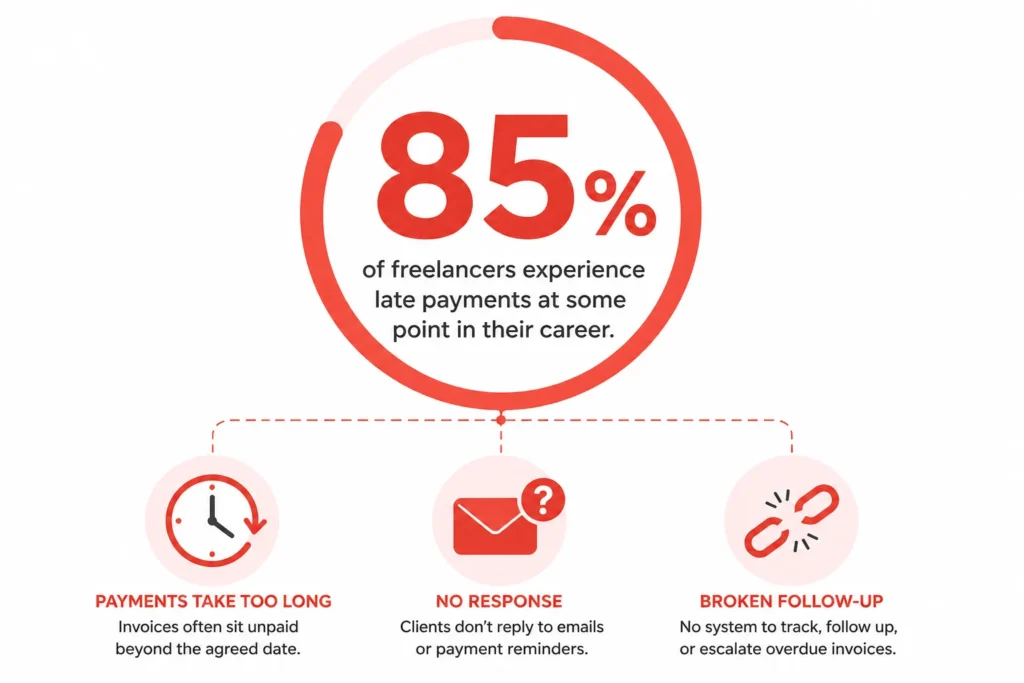
The numbers back this up. Around 85% of freelancers experience late payments at some point in their career. Manual invoicing makes this worse. No automatic reminders or clear payment terms like Net 15, which often leads to delays, no way to know if a client even opened your invoice, and no built-in payment button to make paying easy.
The good news is simple. The right invoicing tool can fix all of these problems, and some of the best options are completely free.
In this guide, I tested and compared the top invoicing software options available in 2026. Whether you send two invoices a month or twenty, whether you are a writer, developer, or designer, and whether your budget is zero or fifty dollars there is a tool in this list that fits exactly how you work.
By the end, you will know which tool to pick, how to send your first professional invoice in under five minutes, and which mistakes to avoid so clients pay you faster.
This guide reflects the latest updates in invoicing software for freelancers 2025 and beyond.
Still Sending Invoices Manually? Here’s What It’s Costing You
The short answer is simple. Manual invoicing is slowing down your payments and quietly eating your time.
I learned this the hard way. Early in my freelance work, I relied on spreadsheets, Word documents, and manually emailed PDFs. At first, it felt manageable. But over time, the cracks started to show.
Manual invoicing means creating, tracking, and sending invoices without any automation or system support. It sounds simple, but it quickly turns into a messy system that is hard to control.
One clear reality is this: most freelancers deal with late payments. In fact, around 85 percent of freelancers experience delayed payments at some point.
Another hard truth is that manual systems often cause those delays, not just client behavior.
The Hidden Problems With Manual Invoicing
The biggest issue with problems with manual invoicing is not just time loss. It is the lack of consistency and follow up.
When I handled invoices manually, I often faced:
- Forgetting to send invoices on time
- Missing follow-ups for overdue payments
- Losing track of which clients have paid
- Spending hours every week organizing billing
Manual invoicing creates gaps in your workflow. Those gaps directly lead to delayed cash flow.
Freelancers using basic methods like spreadsheets rarely have a reliable system for reminders. That means payments depend too much on memory instead of process.
Why This Matters More Than You Think
Getting paid quickly and professionally should be the main goal of any billing system. Everything else is secondary.
If you manage multiple income streams, things get even more chaotic. I experienced this when juggling different clients and projects. Each invoice looked different, each timeline varied, and tracking became stressful.
Small business invoicing becomes harder when there is no centralized system. Modern online billing systems solve this by centralizing invoices, payments, and tracking in one place.
Freelance billing tools are designed to remove friction. They automate reminders, standardize invoices, and reduce human error.
Freelance invoicing software is not just about convenience. Freelance invoicing software directly improves how fast you get paid.
Once I moved away from manual methods, I noticed something immediate. Payments came in faster, and I spent less time chasing them.
Accounting Software vs Invoicing Software Do You Know the Difference?
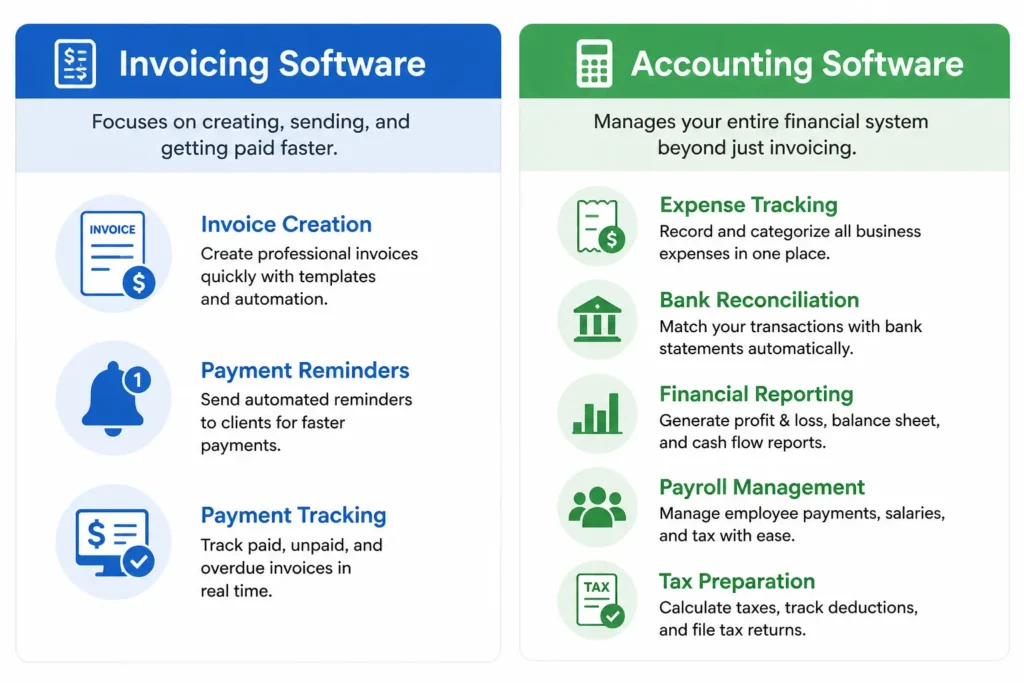
The clear answer is this. Invoicing software helps you get paid, while freelance accounting software manages your entire financial system.
I used to confuse these two myself. At the beginning, I assumed I needed a full accounting setup. I signed up for complex platforms and quickly felt overwhelmed.
Freelance accounting software is designed to handle everything from expense tracking to tax preparation and financial reporting. It acts like a complete back office for your business.
Invoicing software, on the other hand, focuses on one job. It helps you create, send, and track invoices efficiently.
What Invoicing Software Actually Does
If your main goal is to get paid faster, invoicing tools are enough.
Good billing software tools usually include:
- Creating professional invoices
- Sending automated payment reminders
- Tracking paid and unpaid invoices
- Accepting online payments
Invoicing software removes friction from the payment process. Invoicing software is built for speed and simplicity, not complexity.
I found that simple SaaS tools designed for invoicing helped me stay consistent and avoid unnecessary complexity.
What Accounting Software Adds
Freelance accounting software goes much deeper into financial management.
These platforms often include:
- Expense tracking for every transaction
- Bank reconciliation and financial reports
- Payroll management if you have a team
- Tax calculations and filing support
Full accounting platforms like QuickBooks or Xero can feel like overkill if you only need basic billing.
Accounting systems are powerful, but they require time to set up and maintain.
Which One Do You Actually Need?
If you are just starting out, you probably do not need full accounting software.
Most freelancers only need a simple system to send invoices and receive payments. That is where focused billing software tools shine.
I realized that trying to manage everything too early slowed me down. Once I switched to a lightweight invoicing tool, my workflow became much clearer and faster.
You can always move to full freelance accounting software later. But in the beginning, keeping things simple is often the smarter choice.
How to Pick the Right Invoicing Software Before You Read Any Reviews
From my experience, here’s what actually matters.The right invoicing software depends more on your workflow than on any feature list.
I made the mistake of jumping straight into an invoicing tools comparison without understanding my own needs. Everything looked useful, but nothing truly fit. Once I stepped back and asked the right questions, the decision became much easier.
Invoicing solutions are not one size fits all. The best tool is the one that matches how you actually work, not the one with the most features.
Five Questions to Ask Before Choosing Any Tool
If you are wondering how to choose invoicing software, start here. These five questions will guide your decision better than any review.
- How many invoices do I send each month?
- Do I need time tracking invoicing?
- Do I work with international clients?
- Do I manage multiple businesses?
- What is my budget and how accurately can I calculate your freelance hourly rate?
Some invoicing solutions are free, while others charge monthly or per invoice.
Answering these questions creates clarity. Most freelancers pick the wrong tool because they skip this step.
A simple truth I learned is this. The right tool feels obvious once your needs are clear.
Monthly Subscription vs Pay Per Invoice Which Model Fits Your Workflow
Pricing models matter more than most people think. Choosing the wrong pricing structure can quietly waste money every month.
Most SaaS tools use monthly subscriptions. These plans work well if you send invoices regularly and need consistent invoice automation.
But here is something many freelancers overlook. If you only send one to three invoices per month, a subscription may not make sense.
Pay per invoice models exist for this exact reason. Some tools offer low cost plans that charge based on usage rather than a fixed monthly fee. For example, certain plans cost around five dollars for a few invoices, which is enough for low volume freelancers.
Invoice automation works best when pricing matches your volume. Paying for unlimited features you do not use is inefficient.
When I switched to a pay-per-use tool, I stopped wasting money on subscriptions I barely used. I stopped overpaying and started using tools that actually fit how often I billed clients.
The key takeaway is simple. Do not just compare features. Match the tool and its pricing model to how you actually work.
The 5 Best Invoicing Software Options for Freelancers (2026) Ranked
The short answer is this. The best invoicing software for freelancers depends on how you work, but a few tools consistently stand out for reliability, speed, and ease of use.
I have tested multiple invoicing apps over time, and many of the best invoice apps follow the same pattern. The best invoice apps are not the ones with the most features. The best invoice apps are the ones that match your workflow and help you get paid without friction.
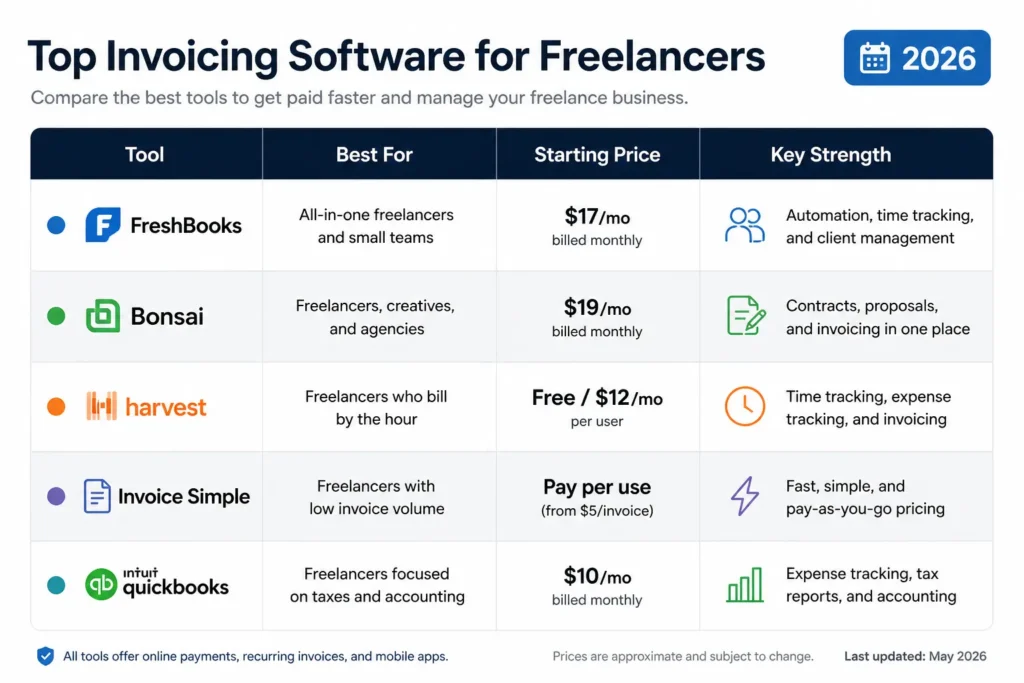
Before diving deeper, here is a quick comparison to guide your decision.
Quick Comparison Table
| Tool | Best For | Starting Price | Key Strength |
|---|---|---|---|
| FreshBooks | All-in-one freelancers | $17/month | Automation + client management |
| Bonsai | Creatives | $19/month | Contracts + proposals |
| Harvest | Hourly billing | Free / Paid | Time tracking |
| Invoice Simple | Low volume | Pay per use | Fast invoicing |
| QuickBooks | Tax-focused | $10/month | Expense tracking |
Each tool solves a different problem. Choosing the right one depends on your billing style and business complexity.
FreshBooks Best for Freelancers Who Want Everything in One Place
FreshBooks is ideal if you want one platform to manage invoices, clients, and finances.
FreshBooks combines invoicing with client management, expense tracking, and reporting. FreshBooks allows you to send recurring invoices and automate payment reminders, which reduces late payments significantly.
FreshBooks pricing typically ranges from about 17 to 55 dollars per month depending on features.
FreshBooks includes a client portal where clients can view invoices and make payments easily. FreshBooks also automates tax tracking, which saves time during tax season.
The limitation is simple. FreshBooks can feel like too much if you only send a few invoices per month.
Bonsai Best for Freelancers Who Also Need Contracts and Proposals
Bonsai works best if you manage full client relationships, not just billing.
Bonsai invoicing is only one part of the platform. Bonsai also includes contracts, proposals, and project management tools in one place.
Bonsai helps freelancers manage the entire client lifecycle from proposal to payment. Bonsai is especially useful for designers, writers, and consultants who handle multiple stages of work.
Pricing starts around 19 dollars per month.
The downside is that Bonsai can feel unnecessary if you only need simple invoicing platforms without extra features.
Harvest Best if You Bill Clients by the Hour
Harvest is built for freelancers who charge based on time.
Harvest invoicing connects directly with built in time tracking. Harvest allows you to convert tracked hours into invoices without manual calculations.
Time tracking invoicing reduces errors and saves time for hourly billing. Harvest is popular among developers, consultants, and agencies.
Harvest offers a free plan with limited features and paid plans for advanced use.
The limitation is clear. Harvest focuses heavily on time tracking, so it may not suit freelancers who charge fixed project fees.
Invoice Simple Best for Freelancers Who Just Want to Get Paid Fast
Invoice Simple is perfect if your only goal is fast and simple billing.
Invoice Simple focuses on speed. The design is mobile first, so you can create and send invoices in minutes.
One standout feature is invoice tracking through read receipts. Invoice Simple lets you see exactly when a client opens your invoice, which helps with follow ups.
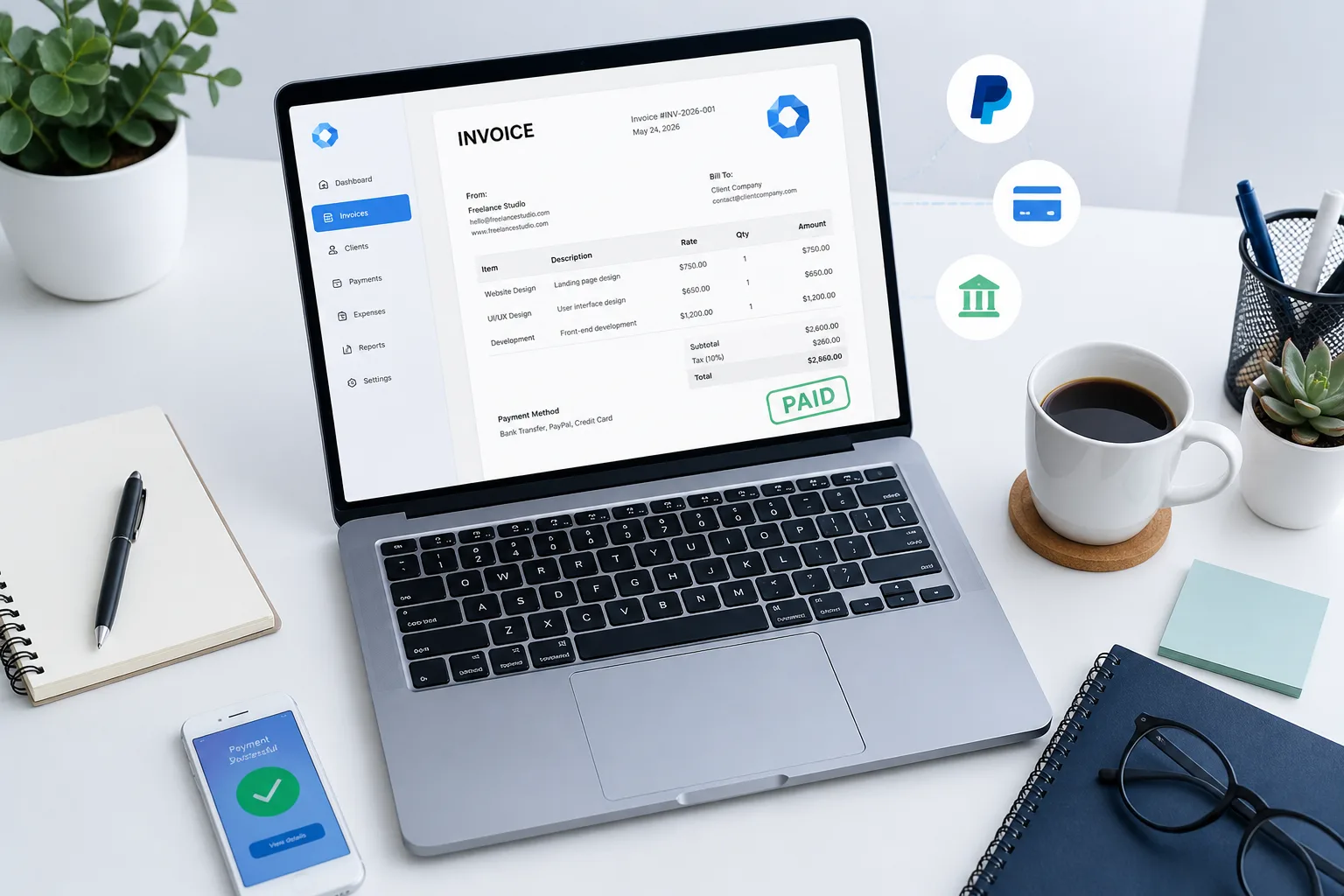
Invoice Simple supports payment processing directly from the invoice. Clients can pay using cards, PayPal, or other options without extra steps.
Invoice Simple uses a pay per use model, which works well for freelancers who send only a few invoices per month.
The limitation is that Invoice Simple does not offer deep accounting or advanced reporting features.
QuickBooks Self Employed Best for Freelancers Who Hate Tax Season
QuickBooks Self-Employed is more than an invoicing tool. It is a full freelance accounting software solution.
QuickBooks Self Employed focuses on expense tracking, tax preparation, and financial organization. QuickBooks automatically tracks mileage, which is valuable if you travel for client work.
QuickBooks allows you to separate personal and business transactions even if you use the same bank account. This makes financial management easier for freelancers without separate accounts.
Pricing starts around 10 dollars per month.
The limitation is that QuickBooks can feel complex if your only need is simple billing systems.
The best invoicing software for freelancers is not the same for everyone.
Some invoicing apps focus on simplicity and speed. Other invoicing apps offer full financial management with deeper features.
I found that choosing the right tool depends on how you work daily. Once the tool matches your workflow, everything from invoice tracking to client management becomes much easier.
Best Free Invoicing Software for Freelancers You Don’t Need to Pay
Here’s what I’ve learned after trying multiple tools. You can manage professional invoicing without spending anything, especially if you already set up a proper business account.
I used to think free tools were limited or unprofessional. That assumption turned out to be wrong. Many of the best free invoicing software for freelancers offer features that are more than enough for daily work.
Free digital invoicing tools today can handle invoice creation, tracking, and even basic financial reporting. The key is choosing the right tool for your workflow.
Wave Free, Unlimited, and Surprisingly Powerful
Wave Accounting completely changed how I viewed free tools.
Wave invoicing allows unlimited invoices, clients, and income tracking without any subscription cost. Wave also includes built in expense tracking and simple financial reports.
One standout feature is multi business management. You can manage multiple income streams under one login, which is rare for free tools. You can also add unlimited accountants or collaborators.
Wave supports invoice automation with recurring billing and payment reminders.
The limitation is that payment processing comes with transaction fees, which is standard for most platforms.
Zoho Invoice The Best Free Tool for International Freelancers
Zoho Invoice is ideal if you work with global clients.
Zoho Invoice offers full multi currency invoicing, which makes international payments much easier. Zoho also includes automated payment reminders and client portals.
Zoho Invoice is completely free with no hidden upgrade pressure. Zoho Invoice provides strong mobile apps, so you can manage invoices on the go.
Multi currency invoicing is essential when dealing with clients in different countries. Zoho handles currency conversion smoothly.
The limitation is that Zoho’s interface can feel slightly complex when you first start.
Invoice Ninja Best Free Option if You Want Deep Customization
Invoice Ninja is a powerful option if you want control and flexibility.
Invoice Ninja features include custom invoice templates, client portals, and advanced invoicing solutions. Invoice Ninja also supports recurring invoices and multiple payment gateways.
Invoice Ninja is open source, which means you can customize it based on your needs.
This level of flexibility is great for tech savvy freelancers who want more control over their system.
The limitation is setup. Invoice Ninja takes more time to configure compared to simpler online invoicing tools.
No Signup Invoice Generators When You Just Need One Invoice Right Now
Sometimes you do not need full software. Sometimes you just need one invoice, fast.
Tools like Invoice Generator let you create invoices instantly without signing up. You enter your details, download the invoice, and send it.
Many browser based invoice generator tools store data locally in your browser. That means your information stays private and is not saved on external servers.
These tools often support VAT or GST calculations and allow export in PDF, PNG, or JPG formats.
If you want branded invoices, Canva is a great option. Canva lets you design clean, professional invoice templates that match your brand style.
Some platforms like Razorpay also allow you to attach payment links directly to invoices, which simplifies freelancer payments.
The limitation is obvious. These tools lack automation, client tracking, and long term organization.
Free online invoicing tools are more capable than most freelancers expect.
The best free invoicing software for freelancers is not just about price. It is about efficiency and ease of use The best free invoicing software is about whether the tool supports your workflow without adding complexity.
I found that starting with free tools is often the smartest move. You can always upgrade later when your business grows.
The Features That Actually Matter And the Ones You Can Ignore
The honest answer is simple. A few core features drive faster payments, while most others are just distractions.
I used to get impressed by long feature lists. Advanced reports, inventory systems, payroll add ons. None of those helped me get paid faster. Once I focused on what actually mattered, everything became simpler.
Invoice automation is not about adding more features. It is about removing friction between sending an invoice and getting paid.
Automatic Payment Reminders The One Feature That Pays for Itself
If there is one feature I would never skip, it is payment reminders.
Most freelancers deal with late payments. Automated reminders solve that problem without awkward follow ups.
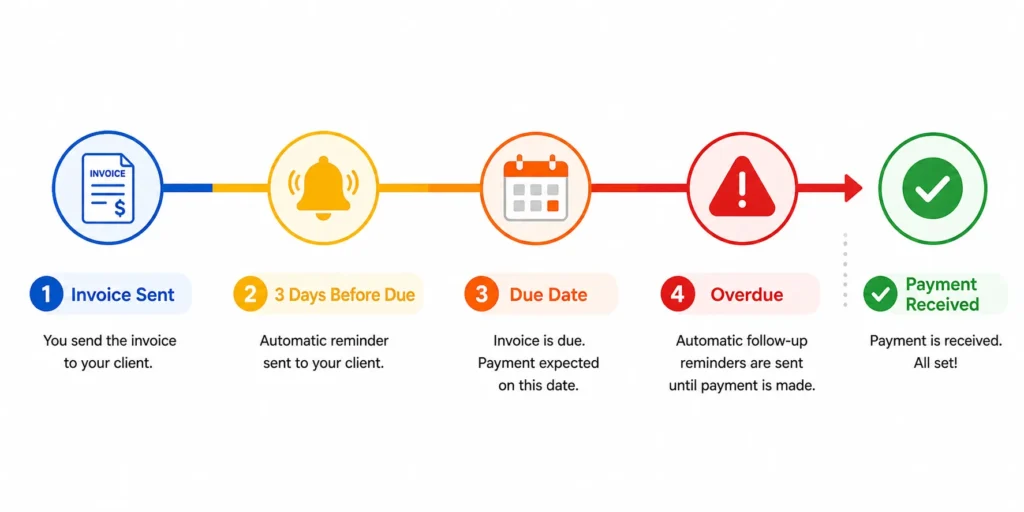
Payment reminders send notifications before and after the due date. A typical setup looks like this:
- 3 days before due date
- On the due date
- 3 to 7 days after
Payment reminders improve freelancer payments without extra effort. Payment reminders keep your cash flow consistent and professional.
I noticed that once I turned on invoice automation for reminders, I stopped chasing clients manually.
Read Receipts on Invoices Know Exactly When to Follow Up
This is one feature most people overlook, but it completely changed how I work.
Invoice tracking with read receipts shows when a client opens your invoice. That means you no longer guess whether the invoice was seen.
If a client opens the invoice at 2 PM and does not pay, you can follow up later the same day with confidence.
Invoice tracking improves client management because you act on real information, not assumptions.
This small feature removes uncertainty. It also makes your follow ups feel timely instead of random.
Payment Gateways Make It as Easy as Possible for Clients to Pay
The easier you make payment processing, the faster you get paid.
I always look for tools that integrate with platforms like Stripe and PayPal. These integrations let clients pay directly from the invoice.
Some systems even allow payments through cards, digital wallets, or QR codes without leaving the invoice page.
Every extra step between invoice and payment reduces the chance of quick payment. Removing friction is the goal.
Direct payment links built into invoices are one of the most effective ways to improve freelancer payments.
Time Tracking That Converts to Invoices Automatically
If you bill hourly, this feature is essential.
Time tracking invoicing connects your work hours directly to your invoices. That means no manual calculations and fewer errors.
Tools that support this feature allow you to start a timer, track work, and convert hours into invoices instantly.
Time tracking invoicing improves accuracy and saves time. Time tracking invoicing also ensures you never undercharge for your work.
What You Can Safely Ignore
Some features sound impressive but rarely matter for freelancers:
- Inventory tracking
- Payroll systems
- Advanced financial forecasting
- Complex reporting dashboards
These features are designed for larger billing systems, not solo freelancers.
I learned that the best tools are not the ones with the most features. The best tools are the ones that help you send invoices, track them, and get paid without delay.
Send Your First Professional Invoice in Under 5 Minutes
The fastest way to create a professional invoice is to use a simple invoice generator that requires no signup.
I have done this myself when I needed to send an invoice quickly. You do not need complex software. You just need a clean workflow and the right online invoicing tools.
An invoice generator is a browser based tool that lets you create, preview, and download invoices instantly without installing anything.
Step by Step: From Blank Page to Paid Invoice
Here is exactly how I create an invoice in under five minutes.
1. Add your business details
Start on the left side of the screen. Enter your name, business name, email, and phone number.
You can also upload your logo and choose colors that match your brand.
Most tools let you save these details locally in your browser. That means next time, everything loads instantly without retyping.
2. Enter client information
Add your client’s name, company, and contact details.
You can save client profiles as well, which makes repeat invoicing much faster.
3. Add line items and pricing
List your services or products with clear descriptions.
Enter quantity, rate, and total amount.
You can also apply discounts if needed.
4. Add taxes and payment terms
This is where payment processing details matter.
Most invoice templates support VAT, GST, or similar taxes. You just enter the percentage and the tool calculates everything automatically.
Then set your payment terms. Common options include:
- Due on receipt
- Net 7 or Net 30
You can also include bank details or preferred payment methods.
5. Choose a template and preview
Good invoice templates usually include styles like Modern, Professional, or Minimal.
I use the Minimal template when printing on branded letterheads. For digital invoices, Professional works best.
The live preview on the right shows exactly how your invoice will look before sending.
6. Download and send
Export the invoice as a PDF, PNG, or JPG file.
Then send it directly to your client.
Why This Workflow Works
This process removes all friction from invoicing. You enter details once, reuse them, and generate invoices instantly.
Online invoicing tools that follow this structure make invoicing simple and repeatable. Once you do it once, the next invoice takes less than two minutes.
I found that speed and clarity matter more than complexity. A clean invoice sent quickly always gets better results than a perfect invoice sent late.
Which Invoicing Software Fits Your Type of Freelance Work?
The most accurate answer is this. The right invoicing apps depend on the kind of freelance work you do, not just the features you want.
I realized this after trying the same tool for different types of projects. What worked perfectly for one workflow felt frustrating in another. Different freelancers need different freelance billing tools.
Choosing based on your work style is more effective than comparing features alone.
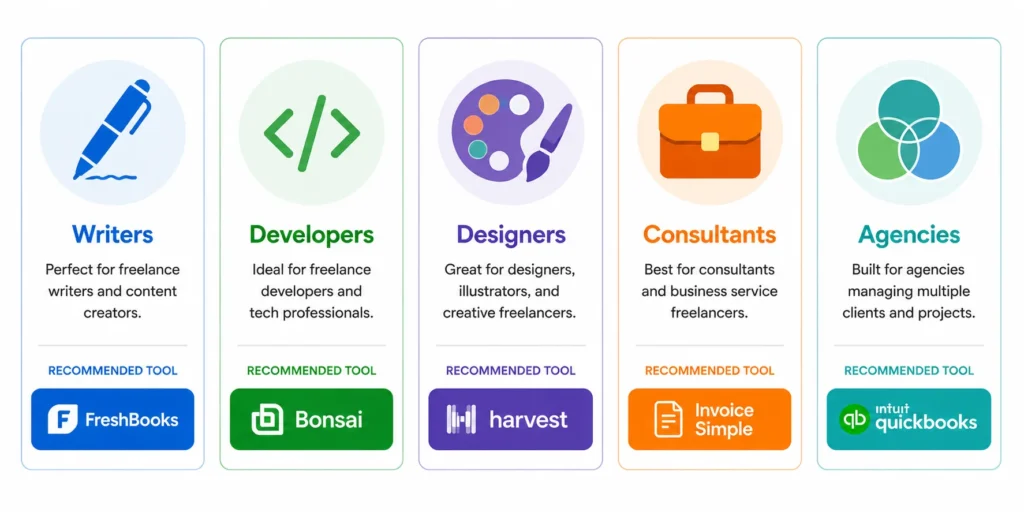
Writers and Journalists Keep It Simple
If you send a few invoices each month, simplicity matters most.
I recommend tools like Wave Accounting or Invoice Simple.
These tools focus on clean, professional invoices without extra complexity. They are ideal for low volume freelancers who just want to send invoices and get paid quickly.
Developers and Tech Freelancers Track Time and Projects
If you bill hourly, you need structure.
Tools like Harvest or FreshBooks work best here.
Harvest invoicing connects time tracking directly to invoices. FreshBooks adds client management and reporting.
Time tracking and automation reduce errors and save hours every week.
Designers and Creative Freelancers Focus on Branding
If presentation matters, your invoice should reflect your brand.
I often suggest Canva or Bonsai.
Canva lets you create visually strong invoice templates that match your style. Bonsai invoicing combines branding with contracts, similar to using a freelance contract template to structure your work and proposals.
For creatives, a well designed invoice can strengthen your professional image.
Consultants Manage Ongoing Client Work
Consultants usually deal with recurring work and international clients.
Tools like Zoho Invoice or FreshBooks are strong options.
Zoho supports multi currency invoicing and automated reminders. That makes it easier to manage long term client relationships.
Recurring invoices and structured billing cycles are essential in consulting work.
Multi Income Freelancers Keep Everything Organized
If you manage multiple income streams, organization becomes critical.
This is where Wave stands out. Wave allows you to manage multiple businesses under one account, which keeps everything separated but accessible.
I found this especially useful when handling different types of work at the same time.
The best invoicing apps are not universal.
The best invoicing apps match your workflow, billing style, and client type. Once you align your tool with your work, everything from tracking invoices to managing clients becomes much easier.
Three Invoicing Mistakes Freelancers Make That Delay Their Payments
The biggest reason freelancers get paid late is not the client. It is the invoicing process.
I made these mistakes myself early on. Once I fixed them, my payment timeline improved almost immediately. Small changes in your workflow can have a direct impact on how fast you get paid.
1. Not Using Payment Reminders
The first mistake is relying on memory instead of systems.
Without payment reminders, you end up Manual chasing clients or chasing unpaid invoices manually slows everything down. That usually means delays, awkward follow ups, and inconsistent cash flow.
Payment reminders are part of basic invoice automation. Payment reminders send notifications before and after the due date without any effort from you.
When I turned this on, late payments dropped significantly. Clients often just forget, and reminders solve that problem quietly.
Do this instead:
Set up automatic reminders for before and after the due date. Let the system handle follow ups for you.
2. Using Full Accounting Software When You Only Need Invoicing
This mistake is more common than people realize, especially when freelancers misunderstand common payment term mistakes.
Many freelancers jump into freelance accounting software like QuickBooks or Xero when they only need simple billing. These tools are powerful, but they come with complexity and a learning curve.
If your goal is just to send invoices and get paid, full accounting platforms can slow you down.
I experienced this myself. I spent more time managing the tool than managing my work.
Do this instead:
Start with simple invoicing software. Move to full accounting only when your business actually needs it.
3. Not Knowing When Clients View Your Invoice
This is a subtle mistake, but it affects timing.
Without invoice tracking, you are guessing when to follow up. You might follow up too early and seem pushy, or too late and delay payment further.
Invoice tracking with read receipts shows exactly when a client opens your invoice. That changes everything.
I found that knowing when a client viewed the invoice helped me follow up at the right moment.
Do this instead:
Use tools that include invoice tracking or read receipts. Follow up based on real activity, not assumptions.
Invoice automation is not about convenience. Invoice automation directly impacts your cash flow.
Fixing these three mistakes can significantly improve freelancer payments. Once your invoicing process becomes consistent, getting paid becomes much more predictable.
So, Which Invoicing Software Should You Actually Use?
The clear answer is this. The best invoicing software for freelancers, or what many call the best invoice software for freelancers, depends on your workflow, not the tool itself.
I have tested different invoicing platforms, and I found that the right choice becomes obvious once you match the tool to your situation. You do not need to overthink it.
Here is the simplest way to decide.
- If you want a free and reliable option
Start with Wave Accounting or Zoho Invoice. These online invoicing tools cover everything most freelancers need without any cost. - If you send fewer than three invoices per month
Invoice Simple is the smartest choice. The pay per use model saves money and keeps things simple. - If you bill clients by the hour
Use Harvest. Time tracking and invoicing in one place removes manual work. - If you want an all in one system
Go with Bonsai or FreshBooks. These invoicing platforms handle clients, invoices, and projects together. - If you also need accounting and tax support
QuickBooks Self-Employed is a strong option for managing finances alongside billing. - If you work with international clients
Zoho Invoice stands out for multi currency support and global payments.
Each of these digital invoicing tools solves a specific problem. Choosing the right one is about clarity, not comparison.
One thing I learned is this. The best tool is the one you actually use consistently.
Pick one tool today if you want to grow your freelance business faster. Set it up in the next 10 minutes. Send your first invoice before the day ends. That single action will move your freelance business forward more than hours of research.
Frequently Asked Questions
Is free invoicing software professional enough to send to clients?
Yes, free invoicing software is absolutely professional enough.
Tools like Wave Accounting and Zoho Invoice generate clean, well structured PDF invoices that look just as professional as paid tools. Even simple browser based invoice generators produce polished documents ready to send.
The professionalism comes from the information on the invoice, not the price of the tool. A clear layout, correct details, and proper payment terms matter more than the software you use.
Many small businesses rely entirely on free tools for daily invoicing without any issues.
How do I know if a client has seen my invoice?
You can know this by using tools that offer read receipts.
For example, Invoice Simple shows real time notifications when a client opens your invoice. This feature removes guesswork from follow ups.
Invoice tracking with read receipts allows you to follow up at the right moment instead of waiting too long or messaging too early.
Most free tools do not include this feature. It is usually available in paid invoicing apps.
Can I manage invoices for two different businesses with one tool?
Yes, you can manage multiple businesses from one platform.
Wave Accounting allows you to run multiple businesses under a single account. You can switch between them easily and keep finances separate.
Wave also lets you add unlimited accountants or collaborators, which makes it ideal for freelancers managing more than one income stream.
This setup keeps everything organized without needing multiple tools.
What’s the difference between invoicing software and accounting software?
The difference is simple.
Invoicing software focuses on billing. It helps you create invoices, send them, track payments, and send reminders.
Freelance accounting software goes further. It includes expense tracking, tax preparation, payroll, and bank reconciliation.
Tools like QuickBooks and Xero combine both, but they add complexity and cost. Most freelancers only need invoicing software when starting out.
Do I need to sign up for an account to create a professional invoice?
No, you do not always need an account.
Some invoice generator tools let you create and download invoices instantly without signing up. You enter your details, customize the invoice, and export it as a PDF within minutes.
Many of these tools store your data locally in your browser instead of external servers. This keeps your information private and makes the process faster.
This option is perfect if you need a one time invoice quickly.
Which invoicing software is best for freelancers who bill by the hour?
The best choice is Harvest.
Harvest tracks your time and converts billable hours directly into invoices. This removes manual calculations and reduces errors.
Tools with built in time tracking invoicing save time and improve accuracy. FreshBooks is another strong option if you want additional features alongside time tracking.
Can my clients pay directly from the invoice without signing up anywhere?
Yes, many tools support direct payments from the invoice.
Invoice Simple and platforms like Razorpay allow you to embed a payment button directly in the invoice.
Clients can click the link and pay using cards, PayPal, bank transfer, or other methods without creating an account.
Reducing steps in payment processing makes a big difference. The easier it is to pay, the faster you receive your money.