

You published the article. You optimized it. You waited.
Illustrative example: Google Search Console finally shows real numbers: 14,000 impressions last month. That sounds great. Then you see the clicks column: 168.
That is a 1.2% CTR. And for a page sitting at position 4, that number is quietly costing you real traffic every single day.
CTR, or click-through rate, is the metric that sits between your ranking and your actual website visitors. You can rank on page one and still lose to a competitor ranked below you simply because their title tag pulls more clicks than yours does.
In this guide, I am going to break down exactly what CTR means, show you how to calculate it, give you benchmarks from the latest published studies across every major channel, and walk you through the specific fixes that move the needle. Whether you are a freelance writer tracking your blog’s organic performance, a contractor running Google Ads on a tight budget, or an independent consultant monitoring email outreach, this guide covers CTR from every angle that matters to your business.
If you have been looking at your cost per click and CTR together, you already know these two metrics are deeply connected. This guide is where the CTR side of that relationship gets the full treatment it deserves.
1. What Is CTR? (Click-Through Rate Definition)
CTR, or click-through rate, is a digital marketing metric that measures the percentage of people who click on a link, advertisement, or search result after seeing it. Click-through rate is calculated by dividing the total number of clicks by the total number of impressions and multiplying by 100. CTR is used across organic search, paid advertising, email marketing, and social media to evaluate how effectively content or an ad drives user action.
CTR is one of those metrics that look simple on the surface. Clicks divided by impressions. Multiply by 100. Done.
But what CTR actually tells you runs much deeper than the formula. A high CTR means your title, headline, thumbnail, or ad copy is doing its job. People saw your content in a crowded feed or search result page, and they chose yours. A low CTR, even at a strong ranking position, tells you the opposite: something about your presentation is not connecting with what your audience is actually looking for.
For freelancers, this distinction matters enormously. Every impression your content earns is a potential client, reader, or lead. When your CTR is low, those opportunities are burning off without producing a single visit to your site.
The CTR Formula: How to Calculate Click-Through Rate
The CTR formula is: CTR (%) = (Clicks ÷ Impressions) × 100. If a webpage appears in Google search results 2,000 times in a month and receives 90 clicks, its CTR is 4.5%. This formula applies uniformly across Google Search Console for organic results, Google Ads for paid campaigns, email marketing platforms, and social media advertising dashboards.
Here is how the math looks in a real freelance scenario:
You write a guide on freelance contract templates. Over 30 days, Google shows that page to 5,000 users in search results. Of those 5,000 people, 175 click through to your site.
CTR = (175 ÷ 5,000) × 100 = 3.5%
That 3.5% is around average for positions 5–6, but below the position-4 average of 4.3% — so at position 4 it still leaves room to improve.
The formula never changes. What changes is the benchmark you measure it against and that benchmark is completely different depending on whether you are looking at organic search, paid ads, email, or social.
The formula is the easy part. The harder skill is knowing what the number means given the position, the keyword type, and the channel. That contextual layer is what this guide builds toward.
CTR vs. Conversion Rate: What Is the Difference?
CTR measures the percentage of users who click a link or advertisement after seeing it, while conversion rate measures the percentage of those users who then complete a desired action such as a purchase, sign-up, or contact form submission. CTR is a top-of-funnel engagement metric. Conversion rate is a bottom-of-funnel performance metric. Both are essential KPIs in any digital marketing strategy, but they measure entirely different stages of the user journey.
Think of it this way. CTR gets someone through your front door. Conversion rate determines what happens once they are inside.
A freelancer running a Google Ad for their writing services might see a 6% CTR. Impressive. But if the landing page fails to communicate value clearly, that conversion rate might sit at 0.8%. The ad is working. The page is not.
The reverse problem is just as costly. A page with a 0.9% CTR and a 12% conversion rate is sitting on untapped potential. Fix the title and meta description, drive more clicks to that already-converting page, and revenue grows without touching a single word of the page content itself.
I cover the relationship between traffic acquisition and content marketing strategy in this guide if you want to see how these metrics connect at the campaign level.
The short answer to “which matters more” is this: CTR comes first. You cannot convert visitors who never arrived.
What Does Expected CTR Mean in Google Ads?
Expected CTR is a component of Google Ads Quality Score that predicts how likely a keyword is to generate a click when triggered by a search query, independent of ad position and extensions. Google rates expected CTR as “above average,” “average,” or “below average” by comparing a keyword’s historical CTR performance to other keywords in the same position. A higher expected CTR contributes directly to a better Quality Score, which lowers cost per click and improves ad placement.
This is a concept that confuses a lot of freelancers running their first paid campaigns. You might see that your actual CTR is 4.2% and think everything is fine. But if Google’s expected CTR rating for that keyword is “below average,” it means your ad is underperforming relative to what other advertisers achieve for the same search term at the same position.
The distinction between expected CTR and actual CTR is essentially Google telling you: “Other ads targeting this keyword get clicked more than yours do.” That is a direct signal to rewrite your ad copy.
Average CTR Benchmarks by Channel (latest published studies, 2025)
Average CTR varies significantly by channel, platform, and SERP position because each channel reaches users at a different stage of intent. Organic Google Search produces the highest CTRs at top positions because users are actively seeking information. Display advertising and social media produce much lower CTRs because those audiences are not actively searching. Email marketing CTR sits between these extremes and varies substantially by industry, list quality, and personalization level.
Benchmarks are only useful when they are specific. A generic “average CTR is around 2%” statement tells you almost nothing. Here is what the data actually shows across each channel that matters to freelancers, using benchmarks from the latest published studies.
Organic Search CTR Benchmarks by Position (Google, 2025 to 2026)
In organic Google Search, CTR is determined primarily by SERP position. Position 1 captures approximately 22.3% of clicks, position 2 captures 10.7%, and by position 5, the average CTR drops to 3.1%. Rich result features such as Featured Snippets, site links, and AI Overviews can disrupt this positional decay curve by surfacing content above traditional position 1 results, effectively capturing clicks that would otherwise go to the highest-ranked blue-link result.

Less than half the clicks of the top result.
According to Advanced Web Ranking’s 2025 CTR study, the positional click decay for desktop organic results looks like this:
| SERP Position | Average Organic CTR (Desktop, Non-Branded) | Source |
|---|---|---|
| Position 1 | 22.3% | Advanced Web Ranking, 2025 |
| Position 2 | 10.7% | Advanced Web Ranking, 2025 |
| Position 3 | 6.8% | Advanced Web Ranking, 2025 |
| Position 4 | 4.3% | Advanced Web Ranking, 2025 |
| Position 5 | 3.1% | Advanced Web Ranking, 2025 |
| Position 6 to 10 | 1.2% to 2.4% | Advanced Web Ranking, 2025 |
What this table makes clear is that the gap between position 1 and position 2 is enormous nearly 12 percentage points. That gap represents a massive volume of clicks that go to the top result exclusively. This curve shifts quarterly as SERP features and AI Overviews change, and mobile CTR differs from desktop, so treat this dated snapshot as a starting point, not a fixed law.
Pages in positions 3 through 8 that use structured data markup and benefit-oriented title tags often outperform unstructured equivalents at the same position. The title tag and the presence of rich result features are the two variables that explain most of that gap.
One thing worth noting: AI Overviews on Google are beginning to reshape this curve. Pages featured inside an AI Overview can capture visibility at position zero, but the actual click volume impact is still being studied as of mid-2026.
Google Ads CTR Benchmarks by Industry (WordStream 2018 historical benchmarks — for direction only, not current performance)
WordStream 2018 historical benchmarks — for direction only, not current performance: Google Ads CTR benchmarks on the Search Network averaged approximately 3.17% across all industries, and Display Network campaigns averaged approximately 0.46%. Legal services averaged 2.93% on Search, and Finance & Insurance averaged 2.91%. There is no current WordStream display average in this table; do not treat these 2018 figures as current performance.
The spread between industries on Google Ads is wider than most freelancers expect. A legal services ad at 2.93% and a dating and personal ad at 6.05% are both “normal” for their respective categories. Measuring your CTR against an overall average without accounting for your specific industry will lead you to wrong conclusions.
| Industry | Average Search CTR | Source |
|---|---|---|
| All Industries (Average) | 3.17% | WordStream, 2018 |
| Legal Services | 2.93% | WordStream, 2018 |
| Finance & Insurance | 2.91% | WordStream, 2018 |
| B2B Software / SaaS | 2.41% | WordStream, 2018 |
| E-Commerce | 2.69% | WordStream, 2018 |
| Google Display Network (All) | 0.46% | WordStream, 2018 |
For freelancers running ads to promote their own services, the Search Network is almost always the right channel. Display ads at 0.46% CTR are better suited to brand awareness than direct lead generation on a tight budget.
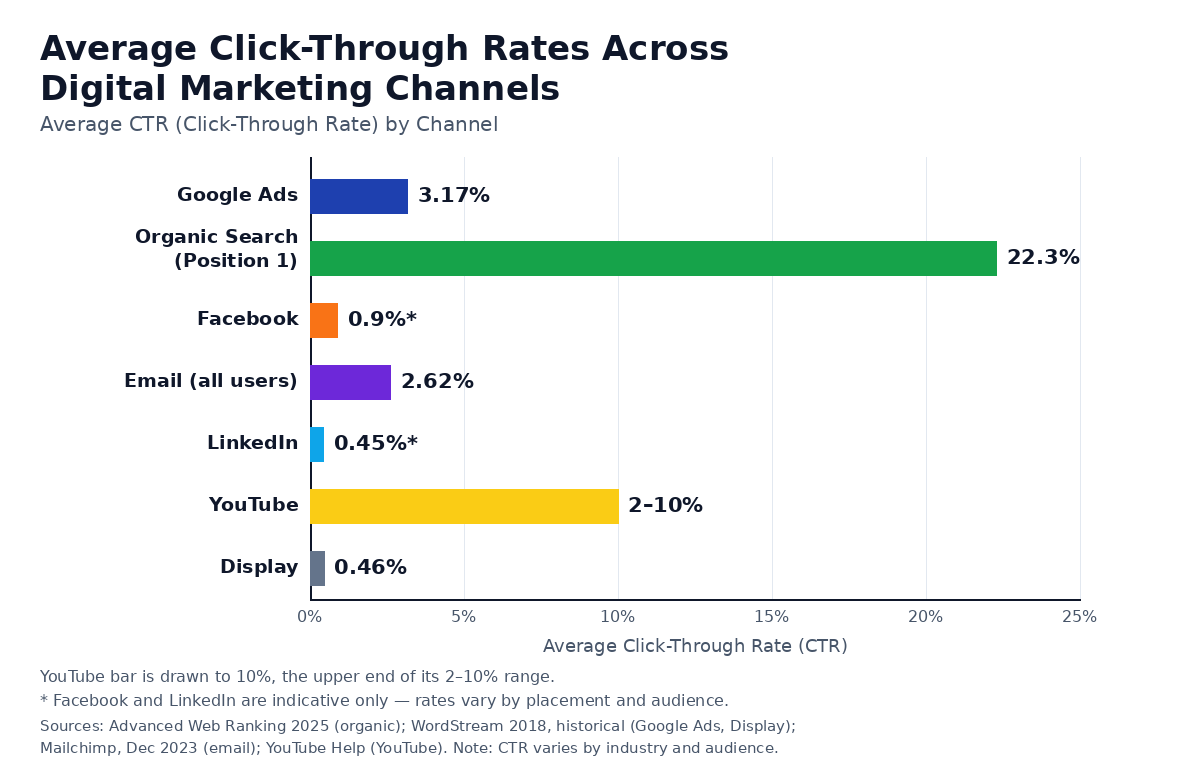
channels outperform social and display by 3-10x on average.
Email Marketing CTR Benchmarks
Mailchimp’s Email Marketing Benchmarks (data last updated December 2023, campaigns sent to at least 1,000 subscribers) report an average click rate of 2.62% across all users: Business + Finance 2.78%, Non-Profits 3.27%, Education + Training 3.02%, and Ecommerce 1.74%. Email CTR definitions differ by vendor: Mailchimp’s click rate uses successfully delivered emails as the denominator, while some vendors use opens, so compare like with like and judge your sends against your own past results.
Average email CTR varies significantly by industry, as the Mailchimp figures above show. Professional services and consulting sectors tend to perform at the higher end of the range, which is directly relevant to freelancers sending client outreach emails or newsletter sequences. Compare your results against your own past sends, not a single industry split.
If your freelance outreach emails are sitting below 2% CTR, the most common culprits are generic subject lines, a single overwhelming wall of text with no clear call to action, and sending to lists that have not been cleaned or segmented in months.
Social Media CTR Benchmarks by Platform
Social media CTRs are considerably lower than search-intent channels because social advertising interrupts passive audiences rather than reaching users who are actively searching. As an indicative guide only — rates vary by placement and audience — feed and sponsored-content CTRs typically sit around 0.4% to 1%: Facebook feed around 0.9%, LinkedIn Sponsored Content around 0.45%, Instagram feed around 0.5%, and Twitter/X around 0.9%. Treat these as indicative, not fixed benchmarks.
The lower CTRs on social are not a sign of failure they are the expected behavior of a channel targeting audiences who did not ask to see your content. The relevant benchmark comparison here is your CTR against other advertisers in the same placement and audience category, not against your organic search CTR.
| Platform | Average Ad CTR | Source |
|---|---|---|
| Facebook Feed Ads | Around 0.9% (indicative) | Indicative — varies by placement and audience |
| Instagram Feed Ads | Around 0.5% (indicative) | Indicative — varies by placement and audience |
| LinkedIn Sponsored Content | Around 0.45% (indicative) | Indicative — varies by placement and audience |
| Twitter / X Ads | Around 0.9% (indicative) | Indicative — varies by placement and audience |
YouTube CTR Benchmarks: What Is Normal?
YouTube CTR measures the percentage of viewers who click on a video after seeing its thumbnail in search results, the homepage feed, or suggested video panels. YouTube Help notes half of all channels and videos have an impressions CTR between 2% and 10%; compare a video against your own channel’s similar videos, not a fixed target.
For freelancers building a YouTube presence alongside their content business, a 2% CTR at the start is completely normal. It is not a sign that your content is poor. It is a sign that your thumbnail and title have not yet been refined through enough testing.
The two variables that drive YouTube CTR more than anything else are thumbnail clarity and title specificity. A thumbnail that communicates one clear emotion or outcome, paired with a title that matches exactly what the viewer is hoping to learn, will outperform a visually “impressive” but vague combination.
3. What Is a Good CTR? (Channel-by-Channel Breakdown)
A “good” CTR is defined entirely by channel, industry, content type, and SERP position. There is no single healthy CTR: judge a page against the average for its own position (about 22% at position 1, about 3% at position 5, desktop non-branded, per the study cited above) and against its own history. For Google Search Ads, a CTR above 3.17% is at or above the WordStream 2018 historical average. There is no single universal benchmark: CTR performance must always be evaluated against channel-specific averages and historical data for the specific account or domain.
The most common question about CTR is: “Is my CTR good?” The answer is always the same: good compared to what?
An 8% CTR at position 3 is well above the 6.8% average. It is merely average for a position 1 result on a branded query. It would be outstanding for a Facebook ad. An abrupt Display CTR jump with no change in targeting or creative is worth checking for tracking or invalid-traffic issues before celebrating, which brings up an important point about red flags that I will cover later.
Here is the cross-channel comparison table:
| Channel | Average CTR | Source |
|---|---|---|
| Organic Search (Position 1) | 22.3% | Advanced Web Ranking, 2025 |
| Organic Search (Position 3) | 6.8% | Advanced Web Ranking, 2025 |
| Organic Search (Position 6 to 10) | 1.2% to 2.4% | Advanced Web Ranking, 2025 |
| Google Search Ads | 3.17% | WordStream, 2018 |
| Google Display Ads | 0.46% | WordStream, 2018 |
| Email Marketing | 2.62% | Mailchimp, December 2023 |
| Facebook Feed Ads | Around 0.9% (indicative) | Indicative — varies by placement and audience |
| LinkedIn Sponsored Content | Around 0.45% (indicative) | Indicative — varies by placement and audience |
| YouTube Thumbnails | 2% to 10% | YouTube Help |
Pages in positions 3 through 8 with structured data markup and clearly benefit-oriented title tags generally outperform unstructured equivalents at the same position. That gap is driven largely by presentation rather than domain authority alone.
If you are evaluating whether to hire an SEO to help with this, I recommend reading through this guide on what SEO freelancers actually cost and the red flags to watch for before making any decisions.
4. Why CTR Matters for Freelancers Specifically
For freelancers, CTR is a diagnostic metric that operates across two primary channels: organic search performance (where a strong CTR means a title tag and meta description are connecting with user intent) and email outreach campaigns (where CTR on payment links, contract CTAs, and proposal follow-ups indicates client engagement levels). A low CTR on a high-impression freelance content page represents a direct revenue optimization opportunity that does not require new content creation or additional link building.
Most traffic optimization advice is written for enterprise marketing teams with dedicated analysts and six-figure ad budgets. Freelancers operate differently. You are the writer, the strategist, the analyst, and the publisher often all in the same afternoon.
That is exactly why CTR deserves more of your attention than most metrics. It is the one number you can improve without creating new content, building more links, or spending more money. You change a title tag. You rewrite a meta description. You test a different email subject line. And within weeks, you can see the direct traffic impact in your Search Console data.
How Low CTR Directly Reduces Your Freelance Income
A low CTR on a ranking page reduces visitor volume without any change in ranking position, which directly lowers ad revenue, lead volume, and client acquisition opportunities for freelancers who depend on organic traffic. Improving CTR from 2% to 4% on a page receiving 10,000 monthly impressions doubles the traffic from that page instantly, with no additional content creation, link acquisition, or ad spend required.
Let me make the math concrete.
Say you have a freelance services page that ranks at position 4 for a target keyword. That keyword generates 10,000 impressions per month in your Search Console data.
At a 2% CTR: 200 visitors per month.
At a 4% CTR: 400 visitors per month.
At a 6% CTR: 600 visitors per month.
If your page converts at 3%, those numbers translate to 6, 12, and 18 new client inquiries per month, respectively from the exact same ranking position, with zero additional effort on SEO or content.
The hidden cost of low CTR is not abstract. It is the clients who saw your listing and kept scrolling. That is real revenue leaving the table every single month.
For freelancers building a side hustle around content, I go deeper into the revenue math in this guide to building a freelance writing side hustle.
CTR on Freelance Invoices and Client Outreach Emails
CTR applies directly to freelance invoicing and client outreach when email platforms track link-level click data. A low CTR on a payment link inside a freelance invoice indicates that clients are opening the email but not clicking through to complete payment, which signals either a friction point in the payment process or a delivery issue with the invoice format itself. Monitoring email CTR on invoices and proposals is a simple diagnostic step that most freelancers overlook entirely.
If you are using a professional invoicing platform, some invoicing tools offer open and payment-link click tracking — check whether yours does before relying on this diagnostic.
A client who opened the invoice but did not click the payment link is a different follow-up situation than a client who never opened it at all. CTR data gives you that distinction. It removes the guesswork from your late payment follow-up strategy.
Does a High CTR Always Mean More Sales?
A high CTR does not automatically produce more sales or conversions. CTR measures engagement with a link or ad, not the quality of the experience that follows the click. A page or ad with a high CTR but low conversion rate typically indicates a mismatch between what the title or ad copy promises and what the landing page actually delivers. This disconnect is sometimes called the “clickbait gap” and results in high bounce rates, wasted ad spend, and poor Quality Scores on paid platforms.
The answer is no, and the distinction matters.
Consider a page pulling a 12% CTR from a featured snippet position: if the page itself is thin, loads slowly on mobile, and buries the actual answer three screens down, bounce rates can exceed 80% while conversions stay negligible.
The CTR got people in the door. The page failed them the moment they arrived.
High CTR paired with a high conversion rate is the goal. But chasing CTR in isolation through sensationalist titles, misleading promises, or clickbait formatting creates short-term clicks and long-term damage to your domain’s credibility with both users and Google.
5. How to Improve CTR in Google Search: Proven Tactics
CTR in Google Search is improved primarily through title tag optimization aligned with user intent, meta description rewriting to include a clear value proposition, schema markup deployment to earn rich result features, and Featured Snippet targeting through structured content formatting. Secondary improvement levers include using numbers and power words in titles, improving mobile SERP appearance to reduce title truncation, and systematically identifying high-impression, low-CTR pages in Google Search Console for priority rewriting.
These are not theoretical improvements. They are the specific levers that move CTR numbers inside Search Console, often within weeks, but timing varies with crawl and impression volume.
Title Tag Optimization: The Highest-Impact CTR Lever
Title tags are the single highest-impact lever for organic CTR improvement because they are the primary text element that determines whether a user chooses to click a search result. High-CTR title tags front-load the target keyword, include a specific number or year to signal freshness and relevance, use benefit-forward or curiosity-triggering language, and, since titles truncate by pixel width, not character count, treat 50–60 characters as a rough guide and front-load the keyword and benefit in the first ~50 characters; check the actual SERP rendering. Split-testing title variations using impression-to-click data from Google Search Console is the most reliable method of iterative CTR improvement.
Title rewrites can produce this kind of jump. For example, hypothetically, changing a descriptive title such as “Guide to Late Payment Fees for Freelancers” to a benefit-led title such as “Late Payment Fees: What Freelancers Can Actually Charge (2026)” — adding a benefit signal, a year stamp, and a conversational tone — may substantially improve CTR over time, depending on the query and SERP.
The elements that drove the improvement: a benefit signal (“what you can actually charge”), a year stamp for freshness, and a conversational tone that matched how the audience was actually thinking about the problem.
For a broader understanding of how title optimization fits into your overall SEO structure, Backlinko’s extensive research on Google CTR factors is one of the most cited data sources in the industry and worth reading in full.
You can also connect this to your broader SEO strategy using the framework I cover in this complete guide to backlinks and SEO for 2026.

Schema Markup and Rich Results as CTR Multipliers
Schema markup is structured data code added to a webpage that enables Google and other search engines to display enhanced SERP features such as star ratings, FAQ accordion dropdowns, article publish dates, and breadcrumb trails. Rich results can make a listing more visible and are widely reported to lift CTR, but reported lifts vary and schema alone does not guarantee a rich result — test on your own pages.
The CTR lift from rich results is one of the most reliable and underused improvements available to freelance content publishers. You do not need to move up in rankings to capture more clicks. You need to make your existing listing look more trustworthy and information-dense than the listings above and below it.
Star ratings, breadcrumb trails, and date stamps all add visual signals that communicate credibility at a glance. Google’s own developer documentation on structured data and rich results is the authoritative reference for understanding which schema types are currently eligible for rich result display.
The relationship between schema and Quality Score is also worth understanding if you are running paid campaigns alongside organic. A page with strong structured data performs better post-click, which feeds back into Google’s assessment of your ad landing page experience.
Featured Snippet Targeting for Position Zero CTR
Featured Snippets, also called position-zero results, capture approximately 8% to 12% of total search clicks for informational keywords and appear above all traditional organic results. To target a Featured Snippet, content must include a concise, direct answer of 40 to 60 words immediately below a question-phrased heading, formatted as a definition, numbered list, or comparison table. Google selects Featured Snippet content based on answer clarity, relevance to the query, and page authority signals. A snippet mainly helps pages ranked 2–10; for an existing position-1 page it may not add clicks: in Ahrefs’ featured-snippet study, the snippet itself got about 8.6% of clicks, the result below it about 19.6%, compared with about 26% for a clean position 1 with no snippet.
Position zero is not guaranteed. But it is targetable with the right content structure.
Pages that earn Featured Snippets consistently share three structural traits. First, the question is phrased in the H2 or H3 heading almost verbatim as the user would type it. Second, the answer appears in the first two sentences directly below that heading no preamble, no “great question, let’s explore…” opener. Third, the answer is formatted in a way that Google can extract cleanly: a short paragraph for definitional queries, a numbered list for process queries, a table for comparison queries.
For a position you currently hold at rank 2 through 5, Featured Snippet targeting is one of the fastest ways to take the most visible position-1 slot.
A/B Testing Headlines to Boost CTR
A/B testing headlines for CTR improvement involves creating two or more title tag variations for the same page, measuring the click-through rate for each variation over a statistically significant period, and permanently adopting the higher-performing version. Google Search Console provides the impression and CTR data needed to evaluate headline performance for organic results. Google Ads provides the same data at the ad copy level for paid campaigns. Run each variation until you have enough clicks for the difference you want to detect — for small CTR changes that usually means thousands of impressions per variation — and compare like-for-like periods to limit seasonality effects.
For organic CTR testing, the process is straightforward. Change the title tag of a page. Give it four to six weeks. Compare the CTR before and after using Google Search Console’s date comparison feature. If CTR improves and the ranking stays stable, the new title is working. If CTR drops, revert and test a different angle.
Five quick wins for CTR that you can implement today without any technical knowledge:
- Add the current year to any evergreen guide title that does not already include it
- Replace generic verbs like “learn” or “find out” with specific benefit language like “calculate” or “avoid”
- Add a number to any list-based guide that does not already have one in the title
- Rewrite any title that starts with “A Guide To…” into a direct question or benefit statement
- Check your title length: titles truncate by pixel width, not character count, so treat 50–60 characters as a rough guide and front-load the keyword and benefit in the first ~50 characters; check the actual SERP rendering.
Mobile vs. Desktop CTR: What Freelancers Need to Know
Mobile CTR benchmarks in organic search are generally lower than desktop CTR at the same SERP position because mobile SERPs display more features such as local packs, shopping results, and AI Overviews that push organic blue-link results further down the visible screen. Titles truncate by pixel width, not character count, so treat 50–60 characters as a rough guide and front-load the keyword and benefit in the first ~50 characters; check the actual SERP rendering. Freelancers should prioritize front-loading the most important keyword and benefit signal within the first 50 characters of every title tag to maintain full visibility on both desktop and mobile SERPs.
Google Search Console lets you filter CTR by device type under the Performance report. If you notice a significant gap between your desktop and mobile CTR at the same position, truncated titles are usually the first thing to check.
6. How to Track CTR in Google Search Console
Google Search Console is the most authoritative and freely available source of organic CTR data for any website. Under the Performance report, users can filter CTR data by query, page, country, and device to identify which pages and keywords are generating impressions without producing proportional clicks. Pages with high impression volume but below-average CTR at positions 1 through 10 represent the highest-priority optimization targets because small CTR improvements on high-impression pages produce disproportionately large traffic gains.
If you are not inside Google Search Console at least once a week, you are flying blind on your organic performance. The data is free, it is updated within 48 to 72 hours, and it tells you exactly which pages are underperforming relative to their ranking position.
Here is how to run a CTR audit inside Search Console for a freelance content site:

Finding Low-CTR, High-Impression Pages in GSC
In Google Search Console, the most actionable CTR audit begins by sorting all pages or queries by impressions in descending order. Flag pages with 1,000+ impressions whose CTR sits well below the average for their own position (see the position table above); treat that as a triage shortlist, not a Google threshold. These pages are the highest-priority candidates for title tag rewriting, structured data addition, and Featured Snippet optimization.
Step-by-step process:
- Open Google Search Console and click “Performance” in the left navigation panel
- Select “Search results” and make sure “Clicks,” “Impressions,” “CTR,” and “Average Position” are all toggled on at the top
- Click the “Pages” tab beneath the performance graph
- Click the “Impressions” column header to sort all pages from highest to lowest impressions
- Scan down the CTR column and flag pages with 1,000+ impressions whose CTR sits well below the average for their own position (see the position table above); treat that as a triage shortlist, not a Google threshold.
- Click into any underperforming page to see which specific queries are driving impressions
- Review those queries to understand the actual user intent, then rewrite the title tag and meta description to speak directly to that intent
- Set a reminder to check back in four to six weeks to measure the CTR change
This process costs nothing. It takes about 30 to 45 minutes for a site with 20 to 50 indexed pages. For most freelance content sites, this process surfaces a handful of pages where a single title rewrite can substantially improve CTR.
For the tools and AI resources that can speed up this analysis process, I have a full roundup on the site that covers what is genuinely useful versus what is just hype in 2026.
Non-Brand vs. Brand Keywords: CTR Differences in GSC
Branded keywords search queries that include a company name, personal name, or specific product name consistently produce significantly higher CTR than non-branded keywords at equivalent SERP positions. In Advanced Web Ranking’s July 2026 Google US cut, branded queries averaged 27.32% CTR at position 1, compared with 19.38% for unbranded queries at the same position (all devices; branded means queries for a brand or entity). Non-branded informational keywords at position 1 average 22.3% CTR in the 2025 desktop non-branded table above. Mixing branded and non-branded query data in a single CTR average produces a misleading inflated figure that does not reflect organic discovery performance accurately.
This distinction matters practically when you are evaluating your overall domain CTR in Search Console. If your site has any brand recognition at all, your blended CTR average will look healthy even if your non-branded informational content is underperforming significantly.
Always segment your CTR analysis by filtering out branded queries before drawing conclusions about your informational content performance. In Search Console, you can do this by adding a query filter that excludes your brand name.
ILLUSTRATIVE change log – the figures below are made-up examples showing how to record a CTR change, not real results:
| Date | Page | Change made | Impressions / clicks / CTR before → after | Position change | Caveat |
|---|---|---|---|---|---|
| Month 1 (illustrative) | Example guide page | Title rewritten to benefit-led wording | 10,000 impressions; 200 clicks (2.0%) → 350 clicks (3.5%) | Position 4 → 4 (unchanged) | Seasonality not controlled; small sample; no attribution claim |
| Month 2 (illustrative) | Example services page | Meta description rewritten | 8,000 impressions; 160 clicks (2.0%) → 240 clicks (3.0%) | Position 3 → 3 (unchanged) | Compare like-for-like periods; no attribution claim |
| Month 3 (illustrative) | Example blog post | Featured-snippet formatting added | 12,000 impressions; 360 clicks (3.0%) → 480 clicks (4.0%) | Position 2 → 2 (unchanged) | Sample size limited; ranking and SERP features also changed; no attribution claim |
Worked segmentation example (illustrative figures, not real results): take one example guide page at position 4. Split its Search Console queries and, in this made-up example, the branded slice shows 4,000 impressions, 1,200 clicks and a 30.0% CTR, while the non-branded slice shows 10,000 impressions, 350 clicks and a 3.5% CTR. Judged on the blended total alone (14,000 impressions, 1,550 clicks, about 11.1% CTR), the page looks far stronger than its non-branded discovery performance really is, which is why the branded slice must be filtered out before you judge informational content.
Benchmark sources used here do not break out geography, so no geography table is claimed.
7. CTR Mistakes Freelancers Make (And How to Fix Them)
The most common CTR mistakes freelancers make include writing title tags that describe content rather than addressing user intent, failing to update title tags after ranking improvements, using identical meta descriptions across multiple pages, ignoring mobile title truncation, and not segmenting branded from non-branded CTR data when evaluating performance. Each of these mistakes reduces click volume on pages that already have the ranking position to drive significant traffic.
Here are the specific mistakes that occur most often, and what the fix looks like in practice.

your existing search rankings.
Mistake 1: Descriptive titles instead of benefit-driven titles.
“Freelance Contract Guide” tells the user what the page is. “Freelance Contract: 7 Clauses That Protect Your Payment” tells the user what they will gain. One gets scrolled past. The other gets clicked.
Mistake 2: Setting the title tag once and forgetting it.
Your content ages. A title that mentioned “2024” is now two years old in the user’s eyes. Update year references annually at minimum. This alone can recover significant CTR on evergreen content that has slipped.
Mistake 3: Duplicate meta descriptions.
Google will sometimes rewrite your meta description anyway, but on platforms like Bing and in many AI-cited results, your written meta description still appears. Identical meta descriptions across ten pages signal low editorial effort and miss the opportunity to match each page to its specific audience intent.
Mistake 4: Chasing CTR with misleading titles. An inflated CTR from a clickbait title will spike your traffic for a few days and then traffic falls back as users stop clicking a disappointing result. This is the “red flag CTR” situation. If your CTR suddenly jumps from 3% to 15% without any change in content quality, ranking position, or SERP feature status, investigate before celebrating.
Mistake 5: Ignoring the mobile truncation problem.
A 72-character title looks fine in a desktop preview tool. On a mobile SERP, it cuts off mid-word. The user never sees your best selling point. Keep critical information within the first 50 to 55 characters.
For further guidance on building a content marketing operation that avoids these structural mistakes from the start, this content marketing tips guide for small businesses and freelancers is worth bookmarking.
8. CTR and Google Ads Quality Score: The Connection
CTR directly influences Google Ads Quality Score, which is a 1 to 10 rating assigned to each keyword in a paid campaign that reflects the expected relevance and usefulness of the ad and landing page to users searching that keyword. Quality Score is made up of expected CTR, ad relevance, and landing-page experience. A higher CTR component within Quality Score leads to a higher overall Quality Score, which in turn lowers the cost per click required to maintain a given ad position and improves the ad’s eligibility for top-of-page placement. The CTR to Quality Score to cost-per-click feedback loop means that improving ad CTR has a compounding financial benefit that extends well beyond the click itself.
This connection is one of the most practically important things a freelancer running any paid search campaign needs to understand. Google Ads does not charge everyone the same price for the same position. It charges based on what you are worth to users, and a better CTR can mean cheaper clicks.
Here is how the feedback loop works in plain terms:
Higher CTR → Higher Quality Score → Lower Cost Per Click → Same or Better Ad Position at Lower Cost
For example, hypothetically, a competitor with a 5% CTR and a Quality Score of 8 can consistently outbid you on ad placement even while spending less money per click than you spend with a 2% CTR and a Quality Score of 4. The ads platform rewards relevance. A better CTR can mean cheaper clicks, alongside ad relevance and landing-page experience.
I cover the cost-per-click side of this relationship in detail in the CPC guide on this site, which pairs directly with this article if you are running paid campaigns alongside your organic content.
Should you keep keywords with high CTR but a low conversion rate?
This is one of the more nuanced keyword strategy decisions in paid search. The general answer: yes, but investigate before making changes.
A keyword with a 7% CTR and a 0.5% conversion rate is sending interested, relevant traffic to a page that is failing post-click. The problem is the landing page, not the keyword. Pausing the keyword throws away a valuable CTR asset. Fix the landing page first.
What is the minimum CTR for a profitable PPC campaign?
There is no universal minimum, but a useful starting framework is this: if your Search Network CTR falls below 1% for a non-branded keyword after 500 or more impressions, the ad copy or keyword match type is almost certainly not aligned with user intent. That is the threshold at which a rewrite becomes urgent rather than optional.
How does Google predict expected CTR?
According to Google’s own documentation on Quality Score, expected CTR is calculated by comparing your keyword’s historical click performance to other ads showing for the same search terms, normalized for ad position and extension impact. It is essentially Google asking: “If we show this ad in the same position as other ads targeting this keyword, how likely are users to click it?”
The answer to that question is based on your account’s history, your ad copy quality, and your keyword to ad to landing page relevance chain.
9. Trending FAQs About CTR
What does CTR stand for?
CTR stands for Click-Through Rate. It is a digital marketing metric that measures the percentage of people who click on a link, advertisement, or search result after seeing it. The CTR formula is: (Clicks ÷ Impressions) × 100. CTR is used across organic search, paid advertising, email marketing, and social media to evaluate content and ad performance.
What is a good CTR for SEO?
A good CTR for organic SEO depends on SERP position. Position 1 averages 22.3% CTR for non-branded keywords. There is no single healthy CTR: judge a page against the average for its own position (about 22% at position 1, about 3% at position 5, desktop non-branded, per the study cited above) and against its own history. Flag pages with 1,000+ impressions whose CTR sits well below the average for their own position; treat that as a triage shortlist, not a Google threshold.
What is the average CTR for Google Ads?
The average Google Ads CTR on the Search Network is approximately 3.17% across all industries, according to WordStream 2018 historical benchmarks — for direction only, not current performance. Display Network campaigns averaged approximately 0.46% in the same 2018 benchmarks. There is no current WordStream display average in this table; do not treat these 2018 figures as current performance.
Does CTR affect Google rankings directly?
Google says CTR is not a direct ranking factor; low CTR still costs you traffic at the same ranking, which is reason enough to fix it.
How do I improve my email CTR?
Email CTR is improved through audience segmentation, personalized subject lines and content, strong and singular call-to-action buttons, mobile-optimized email templates, and send-time optimization based on historical open data. List hygiene removing inactive subscribers also improves CTR by ensuring sends reach only genuinely engaged recipients.
Is a 2% CTR on YouTube normal?
Yes. A 2% CTR on YouTube is within the normal range for most channels. YouTube’s own creator data indicates that the majority of channels see thumbnail CTRs between 2% and 10%, with newer channels often starting at the lower end. Improving thumbnail design and title specificity are the two highest-impact changes for YouTube CTR improvement at any channel size.
What is the difference between CTR and conversion rate?
CTR measures the percentage of users who click a link or advertisement after seeing it. Conversion rate measures the percentage of those users who then complete a desired action such as a purchase, sign-up, or contact form submission. CTR is a top-of-funnel engagement metric. Conversion rate is a bottom-of-funnel performance metric. High CTR with a low conversion rate typically signals a mismatch between the ad or title copy and the landing page experience that follows.
This article is part of the Gig Law Guide resource library for freelancers and independent contractors. Related reading:
CPC (Cost Per Click) Complete Guide | Best Invoicing Software for Freelancers 2026 | Complete SEO Guide for Freelancers | Freelance Taxes for Beginners


