
You grabbed a photo from Google Images for a client’s website. It looked perfect. Professional. Exactly the right vibe. Later, a licensing notice arrived.
This checklist is built to stop that outcome. It turns each image choice into a short, client-deliverable workflow: confirm the provider’s own terms, record the licence, check caps and releases, and hand over only licensed files with a completed ledger.
Stock photography is not just about pretty pictures. It is a licensing decision for every client deliverable: what the provider allows, for which client, in which media, and up to which cap.
This checklist covers that workflow only: the provider’s own terms, the print and audience caps, watermarked previews, licence ownership and handover, releases, editorial limits, and AI-generated images. Use it before you deliver, and hand the completed ledger to the client with the files.
What Is a Stock Photo? (And Why Freelancers Get It Wrong)
A stock photo is a professionally produced photograph that has been pre-licensed for specific types of use, allowing buyers to pay once and use the image within defined terms, rather than commissioning a custom shoot.
That one sentence contains the part most people miss: pre-licensed for specific types of use. The word “stock” does not describe quality, style, or creativity. It describes a legal and commercial framework. Understanding that distinction will save you from some very expensive mistakes.
The Simple Definition That Actually Makes Sense
Think of it this way. A photographer spends a day shooting lifestyle images of people working in a modern office. Rather than selling those shots exclusively to one company, they license them through a photo marketplace like Shutterstock or Getty Images. Hundreds of different buyers, from a startup in Austin to a marketing agency in Chicago, can each pay to use those images within the terms of the license.
The photographer earns royalties each time someone downloads the image. The buyer gets professional-grade visuals at a fraction of the cost of a custom shoot. The platform takes its cut in the middle. That is the stock photography model in its simplest form.
What freelancers often get wrong is assuming that finding an image online, even on a stock site, automatically grants permission to use it. It does not. Every stock image carries a license, and that license dictates exactly what you can and cannot do with it.
Stock Photo vs. Regular Photo: What Is the Real Difference?
A regular photo is taken for a specific purpose, owned outright by the photographer or the commissioning party, and not available for third-party licensing. When a client hires you to photograph their product launch, those images belong to the client under the terms you both agreed to. That is a commissioned photo, not a stock photo.
A stock photo, by contrast, enters a licensing marketplace. It is available to multiple buyers simultaneously. The same image of a smiling woman holding a coffee cup might appear on a healthcare website, a tech startup’s homepage, and a real estate flyer, all at the same time. Nobody owns exclusive rights to that image unless they paid for an exclusive license specifically.
This non-exclusive nature is exactly why stock photography is both affordable and, if misused, legally risky. You are not buying the image. You are buying permission to use it under specific conditions.
Why Is It Called a “Stock” Photo? The History Behind the Term
The term “stock” comes from the idea of keeping a supply of ready-made photographs on hand, much like a retailer keeps inventory in stock. The stock photo industry traces its roots to the 1920s, when agencies began maintaining archives of photographs that could be licensed to newspapers, advertisers, and publishers on demand.
Before the internet, these were physical archives. Editors would flip through binders of slides and prints, choose what they needed, and pay a licensing fee. When digital photography and the internet arrived in the 1990s, the model shifted entirely online, and the industry exploded. Platforms like Getty Images launched in 1995, and by the early 2000s, the microstock revolution led by sites like iStockphoto (later acquired by Getty) brought prices down from hundreds of dollars per image to just a few dollars.
Today, the industry includes giants like Shutterstock, Getty Images, Adobe Stock, and iStock, alongside free platforms like Unsplash and Pexels that operate on an entirely different model funded by donations, community contributions, and premium upsells.
Stock Photography as a Visual Asset Economy
The stock photo industry is not static. It is a living market shaped by trends in technology, culture, and buyer behavior. In 2026, three forces are rewriting the rules simultaneously:
- AI-generated images are being integrated into traditional stock platforms, raising fresh questions about copyright ownership and commercial usability.
- Getty Images and Shutterstock remain separate licensors with separate terms. See the dated note in the licensing section below.
- Demand for authentic, diverse imagery is pushing buyers away from the classic posed-handshake aesthetic and toward raw, lifestyle-driven visuals that feel genuinely human.
Understanding these forces is not just background knowledge. It affects which platforms you use, what licenses you purchase, and how you advise clients on their visual content strategy.
How Stock Photo Licensing Actually Works (This Is Where Most Freelancers Get Burned)
Stock photo licensing defines exactly how, where, when, and how many times you can use an image. The license type, not the price, determines your legal rights.
This is the section that separates freelancers who get sued from those who never have to worry about it. Licensing sounds dry. It is also the single most important thing to understand before you download anything.
What Is Royalty Free And What It Does NOT Mean
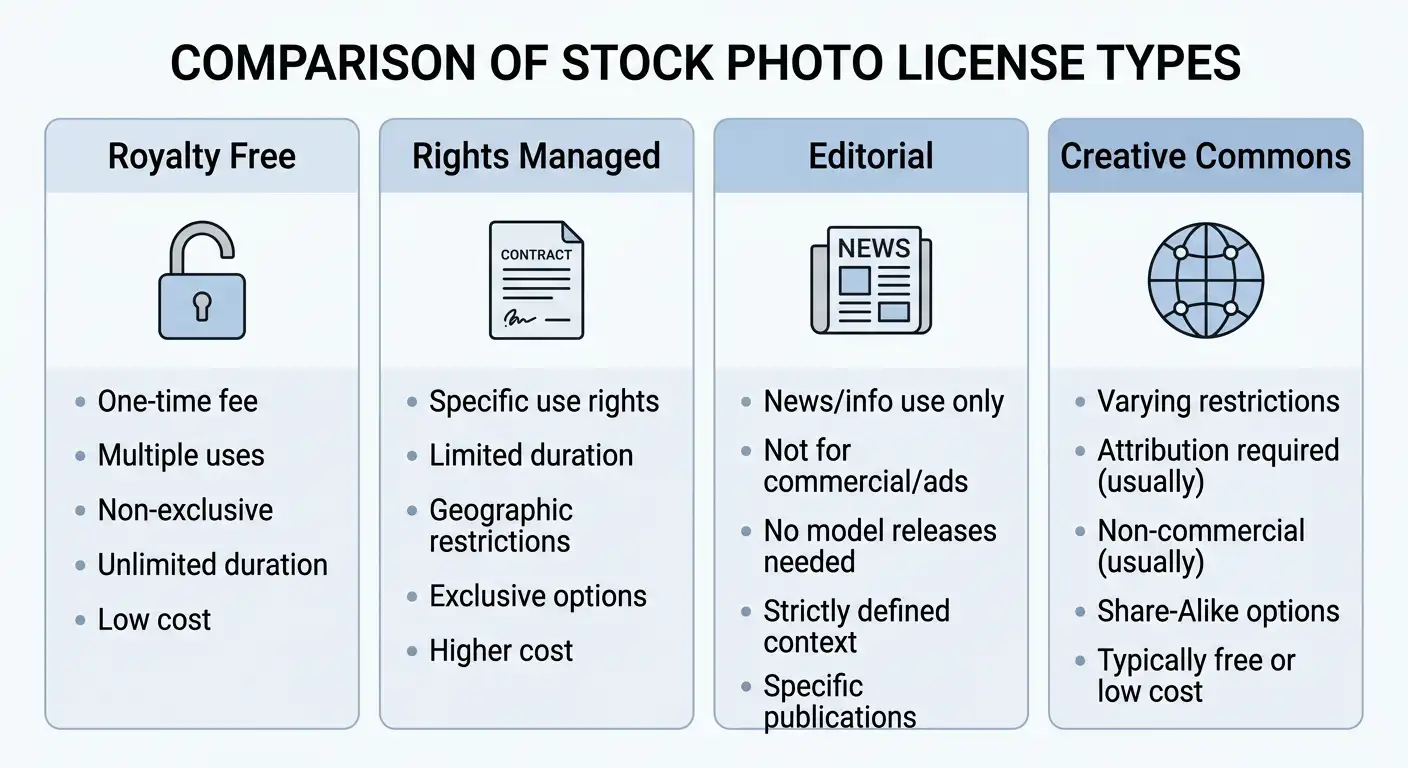
Royalty free is the most misunderstood term in the entire stock photography world. When people hear “royalty free,” they assume it means the image is free to use. It does not.
Royalty free means you pay a one-time fee to license the image and then do not owe additional royalties each time you use it. You still pay for it. You still operate under usage restrictions. You just do not pay again every time the image appears.
Here is what a standard royalty free license typically allows:
- Use in digital and print media (websites, blogs, social media, brochures, presentations)
- Use across multiple projects
- Use without ongoing payments or royalty fees per use
Here is what a standard royalty free license typically does NOT allow:
- Reselling or redistributing the image itself
- Using it on merchandise for resale (t-shirts, mugs, phone cases) without an extended license
- Using it in a way that implies endorsement by the people depicted
- Transferring the license to a third party
The practical implication for freelancers: do not assume a licence you bought is your client’s licence. Who holds the licence, and whether it can be transferred, depends on the provider. The handover rules in the licensing checklist below are mandatory, not optional.
Rights Managed Images: When Usage Terms Are Locked to Each Deal
Rights managed (RM) is the older, more restrictive licensing model. Unlike royalty free, rights managed images are licensed for a specific use case defined at the time of purchase. The price changes depending on:
- The size of the image used
- The medium (print, digital, broadcast)
- The geographic region of distribution
- The duration of use
- The circulation or audience size
A rights managed image used in a local print ad for one month in one city costs far less than the same image used in a national TV campaign for a year. The specificity protects both the photographer and ensures a fair price based on actual value delivered.
Rights managed images are less common in day-to-day freelance work but appear frequently in editorial publishing, advertising agencies, and large-scale campaigns. If a client sends you a brief that involves RM imagery, make sure the license they purchased matches the actual usage. Misusing an RM image, even accidentally, creates liability.
Editorial Stock Photos: What You Can and Cannot Do With Them
Editorial stock photos are images that can only be used to illustrate news, educational, or documentary content. They cannot be used for commercial, promotional, or advertising purposes.
What does that mean in practice? An editorial image of a celebrity attending a film premiere, a news event, or a branded product in a real-world setting may not have the necessary model releases or property releases for commercial use. The subjects photographed did not give commercial consent.
You can use editorial images in:
- News articles and blog posts reporting on real events (not a client blog promoting a product)
- Educational materials and textbooks
- Documentary-style content
You cannot use editorial images in:
- Paid advertising or sponsored content
- Product marketing materials
- Anything implying the depicted person endorses your brand or service
A commercial client blog that promotes a product or service is commercial use, not editorial use, even if it is written as a blog post. Editorial images are tagged as editorial or editorial use only on the provider’s image page. Check that tag on the specific image, and do not use an editorial image for advertising, product marketing, or anything implying endorsement.
Extended License vs. Standard License: The Difference in Plain English
There is no universal standard licence. The table below is per provider, from each provider’s own terms page checked on 26 October 2026. If a use is not in the provider’s row, do not assume it is allowed.
| Provider | Standard licence: scope and caps | Extended or additional licence: resale, templates, print |
|---|---|---|
| Shutterstock | Standard: digital, print and out-of-home use within the standard terms; 500,000 reproductions in aggregate; editorial use is separate and single-use. | Enhanced: no reproduction cap; merchandise for sale and digital templates for sale or distribution. |
| Adobe Stock | Standard: up to 500,000 copies across media; broadcast or digital programme with fewer than 500,000 expected viewers; web and social use with no viewer cap; no resale merchandise or templates. | Enhanced: above 500,000 copies or viewers. Extended: above 500,000 plus merchandise or products for resale where the content is the primary value. |
| Getty Images and iStock | Getty royalty-free: perpetual, worldwide, unlimited, any media; on-demand products and electronic templates need an additional licence. iStock standard: 500,000 print run; perpetual, worldwide, unlimited projects and media. | iStock extended: unlimited print run; resale products within caps (100,000 cards or stationery, 10,000 posters, calendars or mugs, 2,000 apparel) and unlimited electronic templates. Getty rights-managed and rights-ready: limited to the use, medium, period, print run and territory stated. |
| Unsplash | Unsplash License: free commercial and non-commercial use, no attribution required, no print cap stated in the licence; this is not CC0. | No extended tier: cannot sell unaltered images or compile them to replicate a competing service. |
| Pexels | Pexels License: free use, including commercial use and print marketing; attribution not required; no print cap stated. | No extended tier: cannot sell unaltered copies, imply endorsement, use in a trademark, or redistribute on other stock or wallpaper platforms. |
| Pixabay | Pixabay Content License: free use, no attribution required, modify or adapt allowed; this is not CC0. | No extended tier: cannot sell or distribute content on a standalone basis, or print trademarked content on merchandise for sale. |
Provider terms pages checked on 26 October 2026: Shutterstock licence terms, Adobe Stock licence terms, Getty Images licence terms, iStock licence agreement, Unsplash License, Pexels License, Pixabay licence summary. If you are creating assets that clients will resell or use in physical products, buy the extended or additional licence for that provider before delivery, and record it in the ledger below.
Creative Commons and Public Domain: Free Does Not Always Mean No Strings
Creative Commons (CC) is a licensing framework that allows creators to share their work under defined terms. There are several CC license types, and they are not interchangeable:
- CC0 (Public Domain Dedication): Completely free to use for any purpose, including commercial, with no attribution required. This is the most permissive option.
- CC BY (Attribution): Free to use commercially, but you must credit the creator.
- CC BY-SA (Attribution ShareAlike): Free to use, but any derivative must carry the same license.
- CC BY-NC (Attribution NonCommercial): Free for non-commercial use only. Using it in a paid client project could violate this license.
- CC BY-ND (Attribution NoDerivatives): You can use it but cannot modify it.
Public domain images have no copyright restrictions because the copyright has expired or was never attached. Works published in the United States before 1931 are generally in the public domain (U.S. Copyright Office, Circular 15A, Duration of Copyright).
Unsplash uses the Unsplash License, Pexels uses the Pexels License, and Pixabay uses the Pixabay Content License. None of these is CC0. Each licence allows commercial use without attribution, but each has its own resale, endorsement, trademark and redistribution limits, set out in the per-provider table above and on each platform’s own licence page.
Stock Photo for Commercial Use: The Legal Line Every Freelancer Must Know
A stock photo for commercial use is one where the license explicitly permits use in advertising, promotion, product packaging, or any content designed to generate revenue or promote a business.
The word “commercial” is broader than most people think. It includes:
- Client websites
- Social media ads
- Email marketing campaigns
- Product descriptions
- Presentation decks used in sales pitches
- YouTube thumbnails on monetized channels
Practically every piece of visual content a freelancer creates for a paying client qualifies as commercial use. This is non-negotiable. When you download a free image from a platform and deliver it as part of a paid project, you are using it commercially, even if the platform called it “free.”
The good news is that Unsplash, Pexels and Pixabay allow commercial use under their own licences, not under CC0. Check the resale and endorsement limits for the specific platform before using an image in client work.
For freelancers dealing with intellectual property questions more broadly, Gig Law Guide’s full breakdown of IP rights violations covers the legal landscape in practical terms.
Model Release and Property Release: Do You Actually Need One?
A model release is a legal document signed by a person depicted in a photograph, granting permission for the image to be used commercially. A property release is the equivalent document for privately owned locations, buildings, or objects.
When model releases are required:
- Anytime a recognizable person appears in an image used for commercial purposes
- Advertising, marketing, product packaging, and promotional content
When model releases are NOT required:
- Editorial use (news, educational, documentary)
- When faces are not identifiable
- Images of people in genuinely public spaces: only if the use is genuinely editorial and the image page shows it as editorial; a commercial use still needs a release check
Most stock photos sold for commercial use on reputable platforms include a model release obtained by the platform, but that release is specific to the image. Platforms display a ‘Model Released’ tag on images where a release is on file. Check the tag on the specific image page; never assume a release exists because other images on the same platform have one.
Handover tick-box: for commercial use with a recognisable person or property, the release status must be verified on the image page and recorded in the ledger. If no release is shown, do not deliver the image for that commercial use.
How to Check If a Stock Photo Is Copyrighted Before You Use It
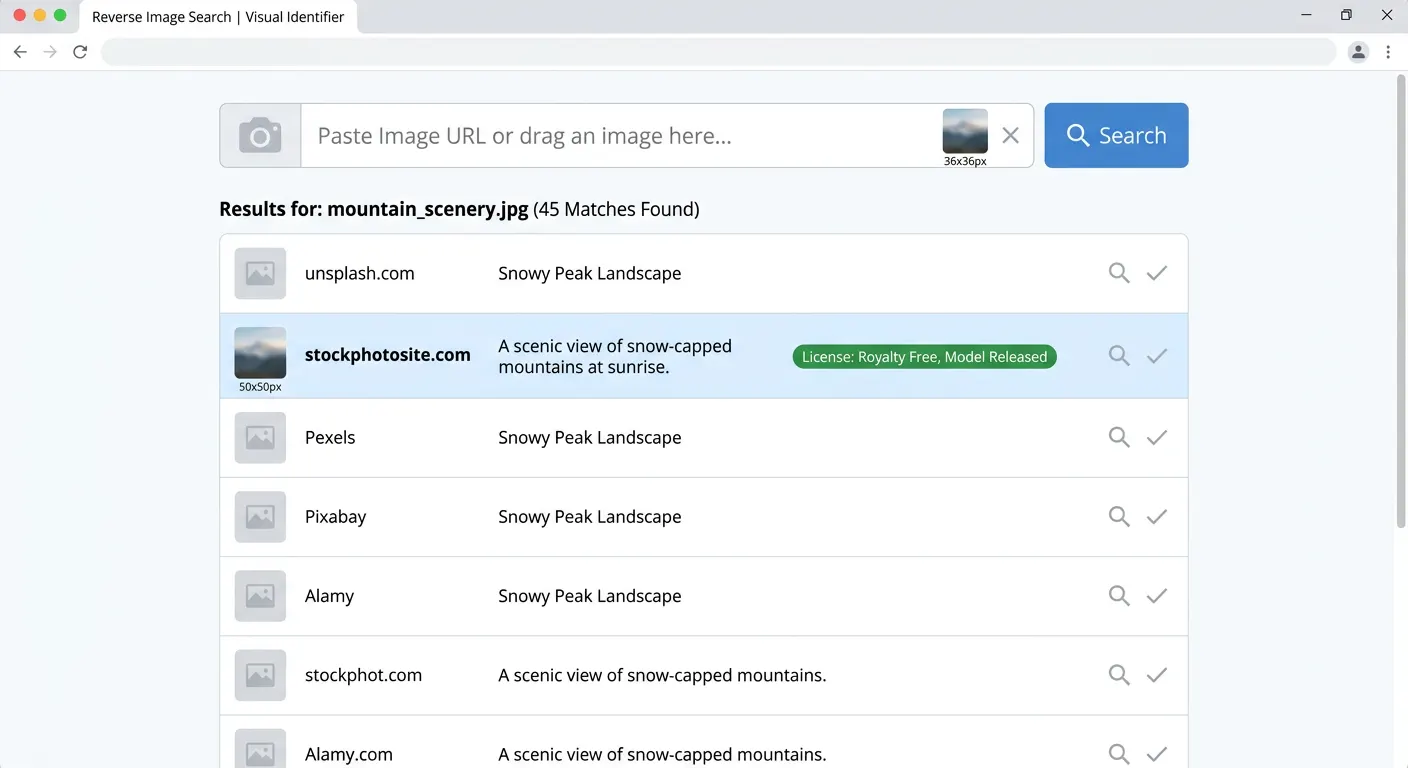
Never assume. A reverse-image search and a Copyright Office search are checks, not guarantees of permission or ownership.
Step 1: Run the image through Google Reverse Image Search or TinEye to identify where it originated and how it is currently being used.
Step 2: Check the source platform’s license information for that specific image. Look for “royalty free,” “editorial use only,” “model released,” and license type.
Step 3: If the image was found via a Google Image search, click “Image Licensing” under the image details to see what Google has identified as the license type. Note that this is not always accurate and should not be your only check.
Step 4: Search the U.S. Copyright Office database for registered works. A search result, or the absence of one, does not prove ownership, and it cannot establish that a licence is valid. If ownership is in doubt, do not use the image, or buy the licence from the provider.
Step 5: If you are unsure, contact the platform or buy the licence. When in doubt, do not use the image. A reverse search cannot establish permission, and a Copyright Office search cannot establish that the person offering the image is the rights holder.
Understanding DMCA protections and how they interact with stock image use is something every freelancer building a content business should know. The Gig Law Guide DMCA takedown notice guide covers both sides of this equation, whether you need to issue a notice or respond to one.
The Best Stock Photo Sites in 2026 (Free and Premium Options Ranked)
The best stock photo site depends entirely on your use case, budget, and licensing needs. No single platform wins every category, and smart freelancers maintain accounts on at least two or three.
The stock photo marketplace has never been more crowded or more competitive. That competition works in your favor as a buyer. It means better pricing, broader libraries, and more flexible licensing than at any point in the industry’s history. Here is how the major platforms stack up in 2026.
Best Free Stock Photo Sites for Freelancers
Free does not mean low quality anymore. Several platforms have built genuinely impressive libraries of high resolution images, all available at no cost and with licenses that cover commercial use. These are the ones worth bookmarking.
Unsplash
Unsplash operates on a model built around community contribution. Photographers upload their best work voluntarily, and the platform makes it available under the Unsplash License, which is similar to CC0 but with one key restriction: you cannot use Unsplash images to build a competing stock photo product.
For virtually every other freelance use case, including client websites, blog posts, social media content, presentations, and marketing materials, Unsplash images are free to use commercially without attribution. The image quality is genuinely high. The catalog skews toward lifestyle, travel, architecture, and technology, which covers the majority of what content creators need on a daily basis.
What Unsplash does well: Consistent quality, clean interface, strong search functionality, no watermarks, no attribution required.
Where it falls short: Limited diversity in some categories, fewer business and corporate images compared to premium platforms, and the library does not match the sheer scale of Shutterstock or Getty.
Pexels
Pexels is arguably the most practical free stock photo platform for working freelancers. It combines photos and videos in a single library, all available under the Pexels License, which permits commercial use with no attribution required.
The search experience on Pexels is strong. Filters for orientation, size, and color make it fast to find exactly what you need without scrolling through pages of irrelevant results. Pexels has also made a visible effort to include more diverse, authentic imagery, which matters when you are creating content for clients whose audiences expect genuine representation.
What Pexels does well: Combined photo and video library, excellent search, strong diversity in imagery, completely free for commercial use.
Where it falls short: Some categories are thinner than premium platforms, and very specific niche searches can return limited results.
Pixabay
Pixabay takes a broader approach than Unsplash or Pexels. In addition to photographs, it includes vectors, illustrations, and video clips, all under a CC0-equivalent license. For freelancers who work across multiple content formats, this versatility is genuinely useful.
The image quality on Pixabay is more variable than Unsplash. The library is massive, which means results for popular searches can include lower-quality submissions alongside genuinely excellent work. Invest a few extra seconds in filtering by resolution and community rating to surface the best options.
What Pixabay does well: Enormous library, includes vectors and illustrations, Pixabay Content License, no registration required to download.
Where it falls short: Quality is inconsistent, and the interface feels less curated than Unsplash or Pexels.
Kaboompics
Kaboompics is a smaller platform with a distinctive visual identity. The photography leans toward lifestyle, interiors, food, and business aesthetics with a warm, natural feel that avoids the corporate polish of traditional stock photography. Images on Kaboompics are free for commercial use, and the platform provides a color palette tool alongside each image, which is a genuinely useful feature for designers trying to maintain brand consistency.
What Kaboompics does well: Consistent aesthetic, curated collections, color palette tool, free for commercial use, authentic feel.
Where it falls short: Smaller library than the major platforms, niche subject coverage.
Other Hidden Gems Worth Bookmarking
Beyond the big four, several smaller platforms deserve space in your toolkit:
- Reshot: Curated, non-stocky images selected by an editorial team. Strong for authentic lifestyle and editorial content.
- StockSnap.io: Large library with built-in analytics showing download counts, which helps you identify popular images. Check its own licence page before client use.
- Gratisography: Quirky, creative, offbeat imagery from a single photographer. Not for every project, but genuinely memorable when the fit is right.
- Life of Pix: High-resolution photography gifted to the public domain by a Montreal creative agency, with a consistent quality floor.
- ISO Republic: Clean, modern imagery targeted at creative professionals, free for commercial use. Check its own licence page before client use.
Best Premium Stock Photo Sites Worth Paying For
When a client project demands a specific look, a niche subject, or a truly exclusive image, free platforms will not always cut it. Premium stock photo sites offer larger catalogs, better search tools, higher resolution options, and images you are far less likely to find plastered across a competitor’s website.
Shutterstock
Shutterstock is the largest stock photo marketplace in the world by catalog size, with over 400 million images, videos, and music tracks available for licensing. For freelancers, the platform’s subscription model offers predictable monthly costs, which makes it easier to build licensing expenses into client project budgets.
Shutterstock’s search algorithm is genuinely excellent. AI-powered visual search lets you upload a reference image and find similar content, which speeds up the process of finding exactly the right image for a specific brief. The platform also integrates directly with tools like Canva, Adobe Creative Cloud, and Google Slides, reducing the friction of incorporating licensed imagery into your workflow.
Pricing: Price the actual tier from the per-provider table above before quoting the client. Do not quote a plan price from this article.
What Shutterstock does well: Enormous catalog, strong search, platform integrations, reliable licensing documentation.
Where it falls short: Subscription pricing is not ideal if you only need images occasionally, and contributor royalty rates have faced criticism from photographers, which affects long-term catalog quality.
Getty Images and iStock
Getty Images sits at the premium end of the stock photography market. The catalog includes editorial content that simply does not exist anywhere else: exclusive imagery from major news events, sports, entertainment, and cultural moments. Getty is the platform of choice for publishers, advertising agencies, and large brands.
iStock is Getty’s more accessible brand, offering many of the same images at lower price points through a subscription model. For freelancers, iStock is typically the practical entry point into the Getty catalog.
What Getty and iStock do well: Exclusive content, editorial depth, rights-managed options for high-stakes campaigns, industry-leading model and property release documentation.
Where it falls short: Getty’s pricing is significantly higher than Shutterstock or Adobe Stock for comparable images, and the full Getty catalog requires direct licensing negotiations for premium content.
Adobe Stock
If you already work inside Adobe Creative Cloud, Adobe Stock is the most seamlessly integrated premium option available. Images can be licensed directly within Photoshop, Illustrator, InDesign, and Premiere Pro, with watermarked previews that can be placed in live documents before you commit to a purchase.
Adobe Stock’s catalog contains over 300 million assets including photos, videos, vectors, templates, and 3D assets. The platform also integrates Adobe Firefly AI-generated images, which we cover in detail in Section 5.
Pricing: Price the actual tier from the per-provider table above before quoting the client. Do not quote a plan price from this article.
What Adobe Stock does well: Native Creative Cloud integration, broad asset types, AI generation tools built in, consistent quality standards.
Where it falls short: Value is heavily tied to Creative Cloud subscription usage; standalone pricing is not particularly competitive for non-Adobe users.
Depositphotos
Depositphotos is a strong mid-tier option that frequently offers aggressive promotional pricing, making it attractive for budget-conscious freelancers who need premium-quality images without Shutterstock-level subscription costs. The catalog exceeds 250 million assets, and the platform’s licensing terms are clear and well-documented.
What Depositphotos does well: Competitive pricing, frequent discounts, solid catalog size, clear licensing terms.
Where it falls short: Less brand recognition than the top tier platforms, slightly less sophisticated search experience.
Death to Stock
Death to Stock deserves separate mention because it occupies a genuinely different market position. The platform exists explicitly to fight the generic, sanitized aesthetic that dominates traditional stock photography. Content is created by a curated network of photographers and filmmakers, and the editorial team rejects anything that looks too “stocky.”
For freelancers working with lifestyle brands, creative agencies, or any client whose brand identity depends on authentic visual storytelling, Death to Stock delivers images that simply do not look like stock photography. Memberships start at $20 per month and include unlimited downloads. No AI-generated content. Everything is produced by human creators.
What Death to Stock does well: Authentic aesthetic, trend-driven production, exclusive content, unlimited downloads per membership tier.
Where it falls short: Smaller catalog than major platforms, higher per-image effective cost for high-volume users, niche aesthetic that does not fit every client’s brand.
Best Stock Photo Sites for Small Businesses in 2026
Small business owners operating with limited budgets and without dedicated creative teams need platforms that balance cost, usability, and licensing simplicity. Based on these criteria, the strongest recommendations for 2026 are:
- Pexels for free commercial-use photography with no attribution requirement
- Canva Pro (which includes a licensed image library) for businesses already building visual content inside Canva
- iStock for affordable access to Getty-quality imagery with clear licensing
- Depositphotos for value-driven subscriptions when free platforms do not have niche-specific content
For freelancers advising small business clients on their visual content strategy, this breakdown pairs well with the content marketing tips for small businesses guide at Gig Law Guide, which covers how visual content fits into a broader marketing approach.
Stock Photo Subscription Plans vs. Credit Packs: Which One Saves More?
This question trips up a lot of freelancers, and the answer depends entirely on your usage patterns.
Choose a subscription plan if:
- You use stock images regularly, at least 5 to 10 per month
- You work with multiple clients simultaneously and need fresh imagery consistently
- You want predictable monthly costs you can bill back to clients
- You work within a platform like Adobe Creative Cloud where subscription integration adds workflow value
Choose a credit pack if:
- Your image needs are occasional, fewer than five per month
- You need high-resolution or specialized images that would consume multiple subscription slots
- You are working on a single large project with a defined end date
- You want flexibility across different platforms without committing to one
The math usually favors subscriptions for active freelancers. A Shutterstock subscription delivering 10 images per month at roughly $29 works out to about $2.90 per image. An on-demand credit pack for the same platform typically prices individual images at $10 to $15 each. If you are downloading more than three images per month, a subscription almost always wins on cost.
How to Price Stock Photos for a Client Quote
Do not quote prices from a table that goes stale. Price the actual licence tier from the per-provider table above, for the client’s actual media, print run and audience, and confirm the price on the provider’s site before quoting.
For freelancers building these costs into client budgets, the freelance hourly rate calculator at Gig Law Guide can help you factor licensing expenses into your overall project pricing so you never absorb these costs yourself.
Free Stock Photos: What “Free” Really Means and Where to Find Them Safely
Free stock photos are images available at no financial cost, but they still carry license terms that govern how they can be used. “Free” never means “use however you want.”
The word “free” in the stock photo world is doing a lot of heavy lifting. It means different things on different platforms, and treating it as a blanket permission to use images however you like is how freelancers end up with licensing problems.
Free Stock Photos for Blog Posts, Social Media, and Presentations
For these three use cases, the good news is straightforward: you have excellent options.
Blog posts: Unsplash, Pexels, and Pixabay all offer high resolution images suitable for featured images, in-content illustrations, and author headshots under licenses that explicitly permit use in published digital content including monetized blogs.
Social media: Both Pexels and Unsplash permit social media use under their standard licenses. This includes Instagram, Facebook, LinkedIn, Twitter, Pinterest, and TikTok thumbnails. The images can appear in both organic posts and, on most platforms, in paid social ad creative, though always verify the specific platform’s terms when running paid campaigns at scale.
Presentations: Pexels-licensed images work well in client-facing presentations, pitch decks, and internal documents, subject to the Pexels License limits in the table above.
Stock Photos Free Download: Where to Get High Resolution Images Without Watermarks
Watermarks mark an unlicensed preview. A watermarked file is not a licensed file. Never deliver or publish a watermarked file, and never remove a watermark to make it usable. Replace the preview with the licensed download at handover, and record the licensed file in the ledger.
To get high resolution images without watermarks legally and for free:
- Unsplash: Download directly in the original resolution captured by the photographer, typically 3,000 to 6,000 pixels wide, with no watermark, free of charge.
- Pexels: Full resolution downloads available immediately, no account required for basic downloads.
- Pixabay: Full resolution available after free registration.
- StockSnap.io: No registration required, full resolution. Check its own licence page before client use.
- Reshot: Free account required, full resolution, free for commercial use.
For premium platforms, watermarked preview versions are available for placement and approval purposes only. They are unlicensed previews: do not publish them, do not deliver them to the client, and replace them with the licensed download at handover.
Copyright Free vs. Royalty Free: Do Not Confuse These Two
These two terms are used interchangeably in casual conversation, and that casual usage creates real legal confusion.
Copyright free technically means an image has no copyright attached to it. This applies to works in the public domain, either because the copyright has expired or because the creator explicitly dedicated the work to the public domain using something like a CC0 license.
Royalty free means you pay once for a license and do not owe ongoing royalty payments per use. The image still has a copyright. The photographer still owns it. You have simply purchased a license that does not require per-use payments.
The practical difference: a copyright free image can theoretically be used by anyone for anything with no license required. A royalty free image still requires you to have purchased a valid license, and it still comes with usage restrictions defined by that license.
When someone tells you an image is “copyright free,” ask them to show you the specific license documentation. If they cannot, treat it as a protected image until proven otherwise.
Can You Use Free Stock Photos on Social Media Without a License?
Yes, with one important condition: the image’s license must explicitly permit social media use, and you must have downloaded it from its legitimate source rather than grabbing it from a third-party post.
Reposts and shares create a common misconception. When you see an image in someone else’s Instagram post, the fact that they posted it does not transfer any license rights to you. They may have licensed it. You have not. Saving and reposting that image without checking its license is a copyright issue regardless of how widely it has been shared.
For reliable social media use, stick to Pexels, Unsplash, and Pixabay images downloaded directly from those platforms. Keep a record of where you sourced each image and when. A simple spreadsheet works fine. This documentation protects you if a licensing question ever arises months or years later.
Stock Photos Without Attribution Required: The Sites That Actually Offer This
Attribution requirements can be awkward in professional contexts. Crediting a photographer in a client brochure or a corporate presentation is not always practical or appropriate. These platforms offer images with no attribution requirement under their standard licenses:
- Unsplash: No attribution required under the Unsplash License (though attribution is encouraged as a courtesy to photographers)
- Pexels: No attribution required under the Pexels License
- Pixabay: No attribution required for content under the Pixabay Content License.
- Kaboompics: No attribution required
- StockSnap.io: No attribution required, subject to its own licence page. Check that page before client use.
Platforms where attribution IS required unless you upgrade to a paid license include certain Creative Commons-licensed repositories and some smaller community platforms. Always check the specific license rather than assuming the platform’s default applies to every image in the catalog.
AI Generated Stock Photos in 2026: Game Changer or Legal Minefield?
AI generated stock photos are images created by artificial intelligence tools rather than human photographers, and they are reshaping the stock photography industry faster than any previous technological shift.
This is the section of the stock photography conversation that is moving the fastest and where the legal ground is least settled. If you are not paying attention to how AI-generated imagery intersects with licensing, copyright, and platform policy, you are flying blind on one of the biggest shifts in visual content since digital photography replaced film.
What Are AI Generated Stock Photos and How Do They Work?
AI image generators use machine learning models trained on vast datasets of existing images to produce new visual content from text prompts. You type “freelancer working at a standing desk in a sunlit modern apartment” and the model generates a photorealistic image that matches that description. No photographer. No model. No location permit.
The leading AI image generation tools in 2026 include:
- Adobe Firefly: Integrated directly into Adobe Stock and Creative Cloud tools. Trained exclusively on Adobe-licensed content and public domain imagery, which gives it a significant legal advantage over competitors.
- Midjourney: Accessed via Discord, produces exceptionally artistic and stylized imagery. Commercial use permitted under paid plans.
- DALL-E (OpenAI): Strong for realistic scene generation, integrated into ChatGPT Plus and the OpenAI API.
- Stable Diffusion: Open-source model with extensive customization options. Commercial use depends on the specific model version and terms.
- Shutterstock AI: Built into the Shutterstock platform, trained on licensed content, with contributor compensation built into the model.
- Google Gemini: Growing rapidly for photorealistic stock-style generation.
For freelancers using AI tools in their work, the Gig Law Guide resource on AI tools for freelancers and the Drovenio AI tools 2026 review are worth reading alongside this section.
1. Copyrightability
Pure AI output without meaningful human authorship is not eligible for copyright protection in the United States. Prompts alone are insufficient. The U.S. Copyright Office stated this in its March 2023 guidance and in Part 2 of its January 2025 report on copyright and artificial intelligence.
That framing is the starting point, not the whole answer. The next three questions decide whether you can safely deliver an AI image to a client.
Copyrightability alone does not answer permission, indemnity or third-party rights. Those are separate checks.
Human authorship thresholds: If a human makes substantial creative choices in directing, refining, and editing an AI-generated image, there is an argument for partial copyright protection. Where exactly that threshold sits is still being litigated.
Even if an AI image has no copyright protection, the platform that generated it may claim licence rights over the output, or restrict commercial use, redistribution or use in trademarks. Read the output licence for the tool and plan you used; do not assume an image is unrestricted because it is AI-generated.
An AI image is not in the public domain by default. Platform output-licence claims, trademark and personality rights in recognisable faces, brands or property, and the human-authorship threshold for edited work can all limit use, even when copyrightability is weak.
For client work, use only an output licence that expressly permits the client’s commercial use, and record the tool, plan and output licence in the ledger.
2. Permission: The Platform’s Output Licence
Shutterstock AI and Adobe Firefly outputs are licensed under their providers’ stock terms. Midjourney and OpenAI outputs are governed by their own terms of service. In each case, check whether the output licence permits commercial client use, redistribution to the client, and use in the client’s media, and whether it restricts trademarks, logos or resale.
Dated note (July 2026): the proposed Getty Images and Shutterstock merger was terminated in July 2026. Getty Images and Shutterstock remain separate licensors with separate terms. Do not apply one provider’s licence to the other’s images.
Check the output licence before delivery: who may use the output, whether the client may use it after handover, and whether the licence survives if you cancel your plan.
If the output licence does not cover the client’s use, do not deliver the image, or buy a licence that does.
Platform terms change. Recheck the output licence for the plan you actually hold at the time of delivery.
Record the tool, plan and licence in the ledger, so the client can see exactly what permission was bought.
3. Contractual Indemnity: What the Provider Actually Promises
Adobe Stock terms indicate that some generated results may include IP indemnification. The scope and tier depend on the plan and account terms, so check your own Adobe agreement before promising a client indemnity cover.
Shutterstock’s AI terms are part of Shutterstock’s licence terms. Do not describe Shutterstock AI output as covered by an indemnity unless the terms for your plan say so.
Midjourney’s terms of service, effective 27 May 2026, provide its services and assets ‘AS IS’, without warranties or guarantees, and require the user to indemnify Midjourney. No user-facing IP indemnity was found in the terms checked on 26 October 2026.
4. Third-Party Rights: Faces, Brands and Property
Copyrightability and a platform licence do not clear third-party rights. An AI output can still show a recognisable person, a trademark, a logo or identifiable private property.
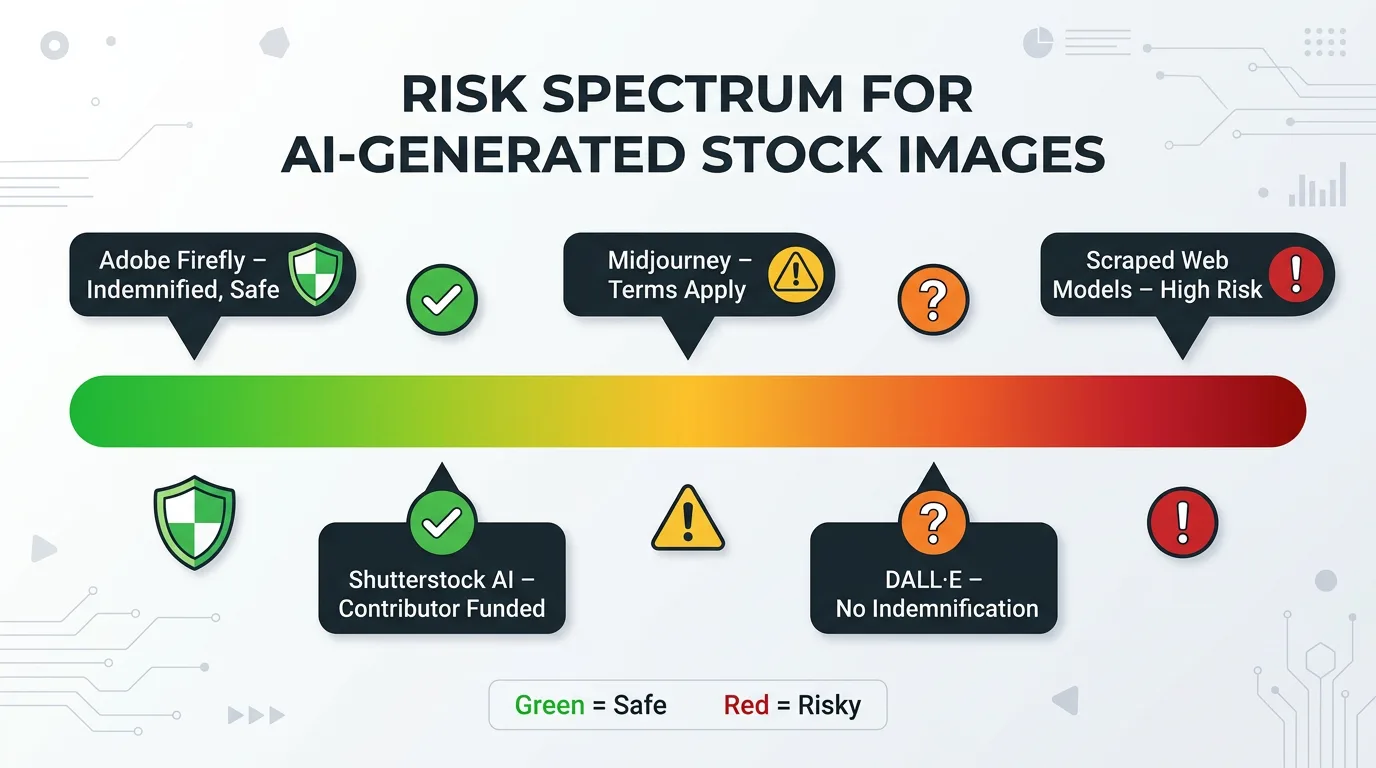
- Adobe Firefly: Adobe Stock terms indicate some generated results may include IP indemnification; scope and tier depend on your plan and account terms. Check your own agreement; do not call it commercially safe without that check.
- Shutterstock AI: Licensed under Shutterstock’s terms. No indemnity tier was verified from the terms checked on 26 October 2026; check your plan terms before relying on indemnity.
- DALL-E (OpenAI): No formal IP indemnity was found in the consumer-facing terms checked on 26 October 2026. Check your own paid or API agreement, which may differ.
- Midjourney: No formal IP indemnity for the user was found; the terms of service effective 27 May 2026 state assets are provided ‘AS IS’ and the user indemnifies Midjourney.
- Stable Diffusion base models: Commercially permissive but legally uncertain depending on which model version and fine-tuned variant you use.
- Scraped web content generators: High legal risk. Avoid for any commercial client work.
Note on sources: the plan source S28 was not supplied with this revision, so no S28 quotation is reproduced here. The sources checked for this section are the provider terms pages and the U.S. Copyright Office guidance and report cited above.
This is where understanding your freelance contract terms becomes as important as understanding image licensing. The Gig Law Guide overview of freelance contract essentials is a practical starting point for making sure your agreements address IP ownership clearly.
The Hidden Risk of Using AI Images Without Checking the Fine Print
Beyond copyright questions, AI-generated images carry a specific practical risk that traditional stock photos do not: they can contain visual artifacts that resemble real people, real logos, or real branded elements.
An AI model trained on millions of images may generate a face that looks strikingly similar to a real person, a logo that resembles a registered trademark, or architectural imagery of a real protected building. Using any of these commercially can create right of publicity claims, trademark infringement issues, or property rights disputes entirely separate from copyright.
Before deploying any AI-generated image in commercial client work, examine it carefully for:
- Recognizable faces that could be confused with real individuals
- Text or logos that resemble existing brands or trademarks
- Architectural features of identifiable, privately owned buildings
- Any element that looks specifically sourced rather than generated
The inspection is worth it. Running AI outputs through a reverse image search and a quick rights check before delivery is part of the handover checklist.
Stock Photo Copyright and DMCA: A Short Pointer
Copyright in stock photography means the original creator retains ownership of the image regardless of who licensed it, unless a written agreement says otherwise. This checklist does not repeat the full DMCA procedure.
For the full DMCA procedure, use the already-linked DMCA guides below. The distinctive core of this guide is the per-provider table and the completed ledger and handover checklist at the end.
Licence-Holder Rule (Summary)
Who holds the licence depends on the provider. The summary below is expanded in the licence ownership section and in the handover checklist.
Provider licence-holder rules:
- Shutterstock: single-seat licence only for the individual assigned to the account; if acting in an employment capacity, the employer is deemed the licensee. Team or Premier is needed for multi-person use. Non-transferable except as specifically provided.
- Adobe Stock: the standard licence may be transferred to a client or employer, but not to more than one employer or client unless a separate licence is held.
- Getty and iStock: rights are non-transferable and non-sublicensable, except where you buy on behalf of an employer or client, in which case that employer or client can use the content, and except for subcontractors or distributors for the licensed use.
- Free platforms (Unsplash, Pexels, Pixabay): the licence is granted to the downloader under that platform’s own licence. Record the platform, licence and download in the ledger, and do not present a free-platform download as a licence you bought in the client’s name.
Mandatory handover tick-box: licence-holder rule checked for this provider, and the exact handover step recorded: licence in the client’s name, transfer where the provider permits it, or client buys their own licence. If none of those applies, do not deliver.
For freelancers who need to understand DMCA processes from both the receiving and sending sides, the Gig Law Guide DMCA takedown notice guide covers the full procedure step by step. The companion guide on DMCA search and content protection explains how to monitor for unauthorized use of your own work.
DMCA Pointer
The DMCA procedure for issuing or responding to a takedown notice is set out in full in the two DMCA guides linked above. This guide does not repeat it.
If you receive a takedown notice for a client deliverable, check the ledger first: which provider, which licence, and whether the use was within that licence.
If your own photography is used without permission, the DMCA guides linked above cover issuing a notice.
Do not use a DMCA notice as a substitute for buying the correct licence.
Can Stock Photos Be Used in Print Advertising? What the License Says
Yes, in most cases, royalty free stock photos can be used in print advertising under the standard license. However, several important restrictions apply.
Print run limits: Shutterstock standard licences are capped at 500,000 reproductions in aggregate; Adobe Stock standard licences are capped at 500,000 printed materials and 500,000 expected viewers for a broadcast or digital programme; iStock standard licences are capped at a 500,000 print run, with unlimited print runs under an extended licence. Getty royalty-free licences, as summarised in its terms, carry no such 500,000 cap. A local business printing 5,000 brochures operates well within the Shutterstock, Adobe Stock and iStock standard caps, but the handover step is to count the client’s actual run against the cap for that provider before delivery, and buy the extended licence if the run exceeds it.
Outdoor advertising: Billboards, transit advertising, and large-format outdoor placements typically require an extended license rather than a standard royalty free license on most platforms.
Sensitive product categories: Some platforms restrict use of certain images in advertising for alcohol, tobacco, gambling, adult content, political campaigns, or other sensitive categories regardless of license tier. Always check the platform’s content use restrictions when the product or service being advertised falls into these areas.
Rights managed for high-stakes print campaigns: For major national print campaigns where exclusivity and controlled distribution matter, rights managed licensing is often more appropriate than royalty free. The ability to negotiate geographic exclusivity, time-limited exclusivity, and circulation-specific terms gives advertising agencies the protection their clients need.
Licence Ownership and Transfer: Provider Rules
When you deliver a design, website or marketing campaign that incorporates licensed stock images, the client does not automatically own the image licence. The provider’s holder rule decides.
Who holds the stock photo licence? Shutterstock: the single-seat licensee, or the employer if acting in an employment capacity. Adobe Stock: the licensee, with transfer to one client or employer permitted under the standard licence. Getty and iStock: the purchaser, or the employer or client on whose behalf the purchase was made.
Does a client’s commissioned work include transfer of image licences? Not automatically. Transfer is only available where the provider’s terms permit it, and for Getty and iStock the purchase-on-behalf route is the route to use, not a later transfer.
What should your contract say? Which party buys the licence, in whose name, which tier, and what happens at handover: licence in the client’s name, transfer where permitted, or client buys their own licence. Record the answer in the ledger.
This is the mandatory handover tick-box: licence-holder rule checked, handover step chosen, and the ledger entry completed before delivery.
How to Protect Your Own Photography From Unauthorized Stock Use
If you are a photographer whose work is being used without permission, several protective measures reduce your exposure and improve your ability to enforce your rights.
Register your copyright: In the United States, registering your images with the U.S. Copyright Office before infringement occurs (or within three months of publication) qualifies you for statutory damages and attorney’s fees if you pursue litigation. Registration costs $65 for a group of related photographs. Without registration, you can only recover actual damages, which are typically far lower and harder to prove.
Use EXIF data deliberately: EXIF metadata embedded in your image files includes camera settings, date and time of capture, and critically, copyright and contact information if you set it correctly in your camera or editing software. While EXIF data can be stripped by platforms during upload, it establishes provenance if a dispute arises.
Watermark preview versions: For any photography shared publicly that you want to license commercially, provide only watermarked preview versions publicly and reserve unwatermarked files for confirmed licensees.
Use image monitoring services: Tools like TinEye, Google Reverse Image Search, and commercial services like Pixsy continuously scan the web for unauthorized use of your images. Pixsy in particular specializes in identifying infringement and pursuing enforcement on behalf of photographers.
Include licensing terms in metadata: Add your name, copyright notice, and licensing contact information directly to the IPTC metadata fields in every image file you distribute. This information travels with the file and makes it easier for potential licensees to contact you for legitimate licensing.
The broader framework of protecting your creative work as a freelancer is covered in depth at the Gig Law Guide’s IP rights violation prevention guide.
The Client Handover Checklist and Completed Ledger Example
This is the distinctive core of the guide. Everything above feeds into this checklist and ledger. Hand both to the client with the licensed files.
A ledger is not a folder of images. It is a record, per image, of the licence that permits the client’s exact use.
How to Use This Checklist
Work through the checklist for every image, before delivery. If any box cannot be ticked, do not deliver that image for that use.
Client handover checklist:
- Licence checked on the provider’s own terms page for this image and use; editorial flag checked (a commercial client blog promoting a product is commercial, not editorial).
- Licence-holder rule checked: licence in the client’s name, transfer where the provider permits it, or client buys their own licence.
- Print run and audience counted against the provider’s cap; extended licence bought if the cap is exceeded.
- Watermarked preview replaced with the licensed download; release verified on the image page for commercial use with a recognisable person or property; no watermarked file delivered or published.
Completed Example Ledger
The example below shows the format with real provider permissions. For a real delivery, copy the licence reference from the provider’s account or invoice into the reference column; do not invent one.
Completed example ledger (copy this format for every client delivery):
IMAGE | PROVIDER | LICENCE + REFERENCE | PERMITTED USES | CAPS | MERCHANDISE / TEMPLATE | RELEASE | TERRITORY / EXPIRY | FILE DELIVEREDhero.jpg | Shutterstock | Standard licence; reference from account order | Client website, digital | 500,000 reproductions in aggregate | No resale merchandise; no templates for sale | Model Released tag verified on image page | Worldwide; perpetual, subject to terms | hero-licensed.jpg (licensed download, no watermark)brochure-cover.jpg | Adobe Stock | Standard licence; reference from account order | Print brochure, website | 500,000 printed materials; broadcast under 500,000 viewers | No resale merchandise or templates | Model Released tag verified on image page | Worldwide; perpetual, subject to terms | brochure-cover-licensed.jpg (licensed download, no watermark)social.jpg | Pexels | Pexels License; download record | Social media, website | No print cap stated | No sale of unaltered copies; no endorsement; no trademark use | No recognisable person; release not applicable | Worldwide; subject to Pexels License | social-licensed.jpgproduct.jpg | iStock | Standard licence; reference from account order | Client website, print | 500,000 print run | No products for resale; no electronic templates | Property release verified on image page | Worldwide; perpetual, subject to terms | product-licensed.jpg (licensed download, no watermark)Your licence documentation file for each project should be this ledger, with one row per image: image filename, provider, licence and reference, permitted uses, caps, merchandise and template position, release status, territory and expiry, and the file actually delivered.
Complete the ledger before handover, and hand it to the client with the licensed files. If a licensing question arises later, the ledger is the audit trail.
Stock Photos for Brand Imagery: When Generic Is Costing You Clients
There is a direct relationship between the quality and authenticity of stock photography used in a freelancer’s portfolio and the quality of clients that portfolio attracts. Generic stock photos in your own marketing materials signal that you cannot or will not invest in visual quality, which raises doubts in potential clients’ minds about the quality of work you will produce for them.
For freelancers who build websites, create content, or manage social media for clients, your own digital presence is your most powerful portfolio piece. Using authentic, well-selected imagery that genuinely reflects your brand personality is worth the investment in premium licensing or the time invested in finding exceptional free alternatives.
Specific situations where stock photo quality directly affects client acquisition:
- Your own website hero image: The first image a potential client sees communicates your aesthetic judgment before they read a single word of copy.
- Case study and portfolio pages: Using high-quality contextual imagery to frame client work adds professional polish that competitors using generic imagery cannot match.
- Proposal documents: A proposal delivered with thoughtful, brand-appropriate imagery signals professionalism and attention to detail before the client reads your pricing.
- Social media presence: Consistent, high-quality visual content in your own social channels demonstrates to prospective clients that you can execute on what you propose.
Freelancer Tools That Integrate Stock Photos Into Your Content Creation Pipeline
Several tools that freelancers already use for other purposes have built-in stock photo access that streamlines the licensing and deployment process.
Canva: Canva Pro includes a licensed image library from Getty Images, Shutterstock and others. Check the licence that applies inside Canva for the specific image and use before client delivery.
Adobe Creative Cloud: Adobe Stock integrates directly with Photoshop, Illustrator, InDesign, Premiere Pro, and After Effects. Watermarked comps can be placed in live documents, licensed with a single click, and automatically replaced with the high-resolution, watermark-free version without relinking files. For freelancers working in Adobe tools, this is the most seamless stock photo integration available.
WordPress: Several WordPress plugins, including Envira Gallery and the Pexels WordPress integration, allow you to search and insert licensed stock photos directly from your WordPress dashboard without leaving the content editor. This is particularly useful for content creators who manage multiple client blogs.
Figma: Unsplash integrates directly with Figma as a plugin, allowing designers to search and insert free commercial-use stock photos without leaving the design environment.
Slack and project management tools: For freelancers managing client projects with visual deliverables, integrating stock photo platforms with project management tools through Zapier or similar automation reduces the administrative overhead of tracking image sources and license documentation.
For freelancers evaluating which tools belong in their professional stack, the Gig Law Guide freelance project management tools overview covers the broader landscape of tools worth considering alongside your stock photo workflow.
Trending FAQs About Stock Photos (From Real User Searches in 2026)
What is a stock photo and how does it work?
A stock photo is a pre-produced image available for licensing through a marketplace platform. Photographers upload images, buyers pay a licensing fee to use them within defined terms, and the platform handles distribution and payment. The photographer retains copyright while buyers receive permission to use the image commercially or editorially depending on the license type purchased.
Are stock photos free to use commercially?
Some stock photos are free for commercial use, under the Unsplash License, Pexels License or Pixabay Content License. None of these is CC0. Check each platform’s resale and endorsement limits before client use.
Can I use stock photos on social media without a license?
You can use stock photos on social media if the image’s license explicitly permits social media use. Platforms like Pexels and Unsplash permit social media use under their standard free licenses. For paid social advertising, always verify whether the standard license covers paid ad placements or whether an extended license is required.
How much do stock photos cost in 2026?
Do not rely on a fixed price table. Price the actual licence tier from the per-provider table in this guide, for the client’s actual media, print run and audience, and confirm the price on the provider’s site before quoting.
What is the difference between royalty free and rights managed?
Royalty free means you pay once and can use the image multiple times within the license terms without additional fees. Rights managed means the license is negotiated for a specific use, and the price reflects the scope of that use including medium, geography, duration, and audience size. Rights managed images offer more exclusivity control but cost more and require renegotiation for each new use.
Are AI generated images considered stock photos legally?
AI-generated images are not stock photos in the usual licensed sense. Copyrightability, the platform’s output licence, any contractual indemnity, and third-party rights are separate checks, set out in the AI section above. Pure AI output without meaningful human authorship is not eligible for copyright protection in the United States.
What size stock photos do I need for a website?
Website hero images should be at minimum 1920 x 1080 pixels. Blog post featured images work well at 1200 x 630 pixels. All web images should be saved at 72 DPI since screen resolution does not benefit from higher DPI settings. Compress images to under 200KB for standard content and under 500KB for hero images to maintain page load performance without visible quality loss.
Can stock photos be used in print advertising?
Yes, subject to the provider’s cap. Shutterstock standard: 500,000 reproductions in aggregate. Adobe Stock standard: 500,000 printed materials and 500,000 expected viewers for broadcast. iStock standard: 500,000 print run, unlimited under an extended licence. Count the client’s actual run against the cap before delivery.
Where to find free stock photos without watermarks?
Unsplash, Pexels, Pixabay, StockSnap.io, and Kaboompics all offer high-resolution downloads without watermarks at no cost under licences that permit commercial use. Watermarked images are unlicensed previews: never deliver or publish them, and replace them with the licensed download at handover.
How to check if a stock photo is copyrighted?
Run a reverse image search, then check the provider’s licence page for that image. A reverse search cannot establish permission, and a Copyright Office search cannot establish ownership or licence validity. If in doubt, do not use the image, or buy the licence.
Do I need a model release for stock photos?
For commercial use with a recognisable person or property, verify the release on the image page and record it in the ledger. Never assume a release exists. A commercial client blog promoting a product is commercial, not editorial, use.
For freelancers navigating the legal side of visual content, intellectual property, and client contracts, explore the complete resource library at Gig Law Guide, covering everything from stock photo copyright for freelancers to DMCA protection strategies and freelance contract essentials that keep your business legally protected.


4 Comments on “Using Stock Images for Client Work: A Licensing Checklist”