You spent weeks building it. A logo design, a written article, a photography portfolio, a music track, maybe a full brand identity package you delivered to a client. Then one morning you search your own work online and find it sitting on someone else’s website, credited to someone else, possibly being sold by someone else.
That feeling is not just frustrating. It is a legal violation, and you have real, enforceable rights to fight it.
Here is the thing most freelancers do not realize: you do not need a lawyer on retainer, a corporate legal team, or hundreds of dollars to get stolen content removed from the internet. The DMCA takedown notice is a free, federally backed legal mechanism that gives individual creators the same content removal power that billion-dollar companies use every single day.
This guide covers everything. What a DMCA takedown notice actually is, exactly how to write one that gets results, where to send it for every major platform, what to do if someone sends one to you, how to handle counter notifications, and what the law says about AI-generated copies of your work in 2026.
If you care about protecting your freelancer rights and legal protections, this is the one guide you need to read all the way through.
What Is a DMCA Takedown Notice?
A DMCA takedown notice is a formal written request submitted to an online service provider demanding the removal of content that infringes your copyright. It is authorized under the Digital Millennium Copyright Act and gives copyright holders a direct, legal path to force content removal without going to court.
That one-paragraph definition covers the basics, but it leaves out the part that actually matters for freelancers: the notice works because platforms are legally motivated to comply. Under U.S. law, if a hosting provider, search engine, or social media platform receives a valid DMCA notice and fails to act quickly, they lose their legal immunity from copyright infringement liability. That immunity, called the safe harbor provision, is worth billions of dollars to companies like Google, YouTube, and Meta. They are not going to risk it over your stolen blog post or image.
So when you send a properly written DMCA takedown notice, platforms take it seriously. Not because they particularly care about your rights as an individual, but because complying protects their own legal standing.
Where Does the DMCA Actually Come From?
The Digital Millennium Copyright Act was signed into law in 1998 under President Bill Clinton. It was designed to modernize U.S. copyright law for the internet age, creating a workable framework for digital content protection that had not existed before.
The most relevant section for freelancers is Section 512 of Title 17 of the United States Code. This section establishes the notice and takedown system, defines what a valid notice must contain, and outlines the safe harbor protections that platforms can claim when they respond to notices promptly and in good faith.
The law was written before YouTube, smartphones, and social media existed, which is why there is so much ongoing legal debate about how it applies to modern platforms, AI-generated content, and global copyright disputes. But at its core, the framework is still the one most creators and platforms operate under today, and understanding why copyright law matters for freelancers is the first step to using it effectively.
What Types of Copyrighted Work Does It Protect?
The DMCA covers any original work of authorship that qualifies for copyright protection under U.S. law. For freelancers, that list is longer than most people assume:
- Written content: Blog posts, articles, copywriting, scripts, email sequences, white papers
- Visual art: Logos, illustrations, graphic design, infographics, photographs
- Music and audio: Original tracks, voiceovers, podcast episodes, sound design
- Video: Short films, tutorials, explainer videos, social media video content
- Code: Original software code, website themes, custom scripts
- Design files: UI/UX mockups, brand style guides, architectural drawings
- Other creative works: Course content, templates, research documents
One important distinction: ideas are not protected by copyright. Only the specific, fixed expression of those ideas is. So if a client takes your concept and executes it themselves, that is a different legal issue than if they copy your actual deliverable word for word or pixel for pixel.
Who Can File a DMCA Takedown Notice?
Only the copyright owner or their authorized legal representative can file a valid DMCA takedown notice. This is a harder rule than most people expect.
As a freelancer, you typically own the copyright to your work by default unless your contract specifically transferred it to a client. Written works, design files, photography, and code you create are yours under U.S. copyright law the moment you create them, whether or not you formally registered the copyright.
However, if your freelance contract included a work-for-hire clause or an intellectual property assignment clause, you may have signed away those rights. Before you file a DMCA notice for any project-related content, go back and read your contract. If you are unsure what your contract actually says about IP ownership, check out this breakdown of how bad contractor non-disclosure agreements can cost you your rights.
If you do own the copyright, you can file the notice yourself at no cost. You can also authorize someone else, like an attorney or a copyright management service, to file on your behalf.
How Does a DMCA Takedown Work? The Full Process Explained
The DMCA takedown process works in four main stages: you identify the infringing content, locate the correct platform or hosting provider, submit a written notice that meets legal requirements, and the platform removes the content or notifies you of a counter-notice. The entire process can take as little as 24 hours on major platforms.
Understanding the process end to end saves you from making mistakes that get your notice rejected, ignored, or flagged as abusive. Here is exactly how it works.
Step 1: Identify the Infringing Content and Platform
Before you write a single word, do your homework. You need to document the infringement clearly and completely, because your notice will require specific details.
What to capture:
- The exact URL where the infringing content lives (screenshot it immediately, timestamps matter)
- A description of your original work and where it was first published
- Evidence that you created it first (file metadata, original drafts, client emails, upload timestamps)
- The name of the platform or website hosting the content
Use a tool like the Wayback Machine or a screenshot tool with timestamps to preserve evidence. Platforms move fast when they receive takedown notices, and sometimes infringing content disappears before you can prove it was there. Document everything before you send anything.
If the infringing content is appearing in Google search results but hosted on a third-party site, you may need to file two separate notices: one to the hosting provider to remove the page, and one to Google to remove it from the search index. These are different requests sent to different places.
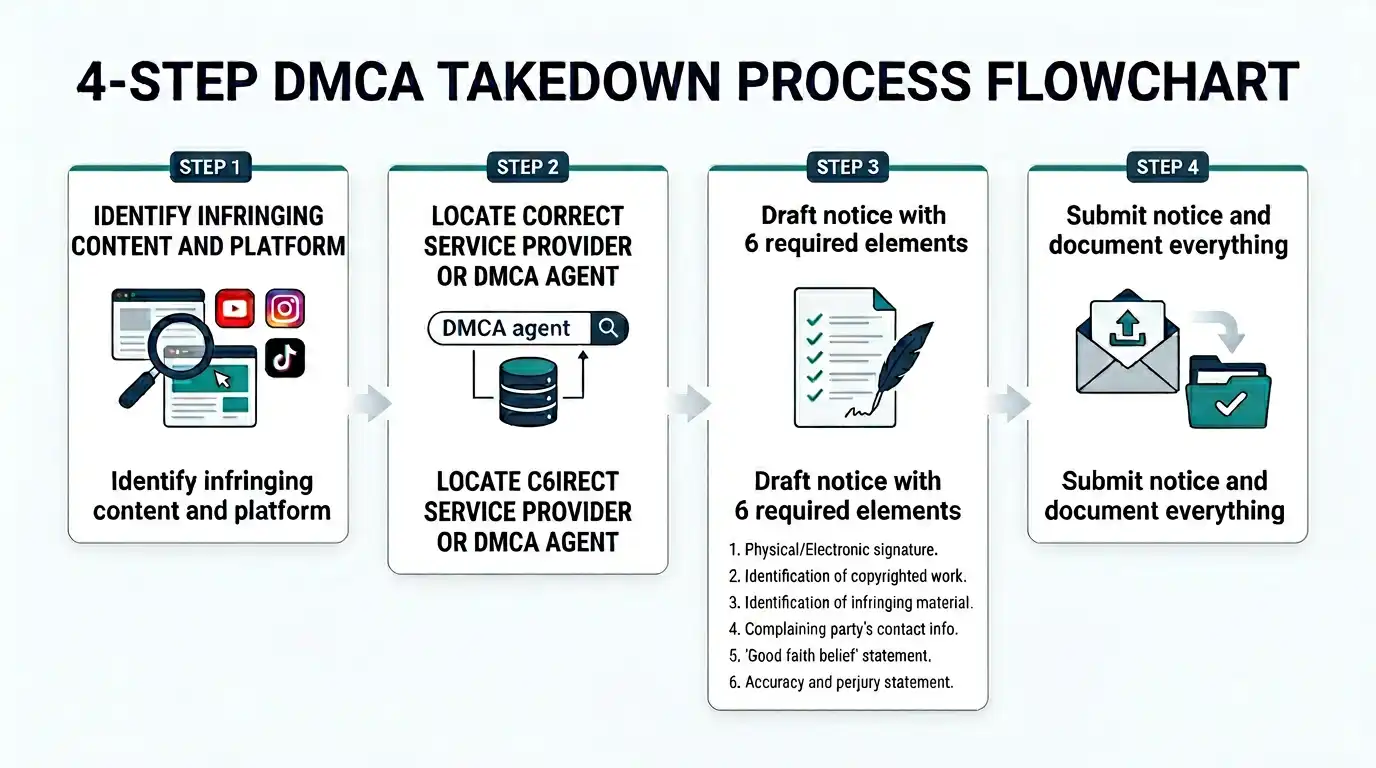
Step 2: Locate the Right Service Provider or DMCA Agent
This is where most freelancers get stuck. Sending a DMCA notice to the wrong party wastes your time and accomplishes nothing.
Here is how to find the right recipient:
If the content is on a major platform like YouTube, Instagram, TikTok, or GitHub, those platforms all have dedicated online copyright reporting forms. Use those forms. They are designed for this exact purpose and get processed faster than any other method.
If the content is on a smaller or obscure website, you have two options:
- Check the website’s footer or legal pages for a “Copyright” or “DMCA” link. Many sites list their designated copyright agent or have a contact form specifically for legal notices.
- Look up their designated DMCA agent in the U.S. Copyright Office’s online agent directory. Any service provider that wants to claim safe harbor is required to register a designated agent there, and that directory is publicly searchable.
If you cannot find a designated agent and the site has no copyright contact information, you can send the notice directly to the web hosting company. Use a tool like Whois.domaintools.com to find out who hosts the infringing site, then look up that hosting company’s abuse or DMCA contact.
Step 3: Draft the Notice with Every Required Element
Section 512(c)(3) of the DMCA specifies exactly what a valid takedown notice must contain. Missing even one required element gives the platform legal cover to ignore your notice entirely.
The next section of this guide covers every required element in detail, but at a high level, your notice needs to clearly identify your original work, pinpoint the infringing content, assert your ownership, and include both a good faith statement and a perjury acknowledgment.
Do not wing this. Use a proper template, which we provide below, or get help from a service that specializes in copyright enforcement.
Step 4: Submit the Notice and Document Everything
Once your notice is drafted and ready, submit it through the appropriate channel. Save a copy of everything: the notice itself, confirmation emails, submission receipts, and any correspondence you receive in response.
After submission, the platform is required under DMCA law to act “expeditiously.” In practice, that means:
- Major platforms (Google, YouTube, Meta): Often within 24 to 72 hours
- Mid-size platforms: Typically 3 to 10 business days
- Smaller hosting providers: Up to 14 business days, sometimes longer
If the platform does not act within a reasonable time and has no legitimate reason to delay, they lose their safe harbor protection, which creates potential legal liability for them. Most platforms know this and take incoming notices seriously.
What Happens After You Submit Your DMCA Takedown Notice?
One of three things will happen after you submit:
Scenario A: The content gets removed. This is the most common outcome when your notice is properly written and the infringement is clear. The platform removes or disables the content, and the process ends there unless the infringer files a counter-notice.
Scenario B: The infringer files a DMCA counter notification. If the person who posted the content believes your takedown was wrong, they can fight back by filing a counter-notice. If that happens, the platform forwards the counter-notice to you, and you have 10 to 14 business days to file a federal copyright infringement lawsuit if you want the content to stay down. If you do not file, the content gets restored. We cover the counter-notice process in depth below.
Scenario C: The platform rejects your notice. This happens when the notice is incomplete, when the platform determines the use qualifies as fair use, or when the content does not actually infringe your copyright. If this happens, review what was missing or incorrect and resubmit.
For a deeper look at what to do when someone ignores your legal requests entirely, this guide on how to invoice a client who ignores you and what legal steps to take covers the escalation mindset that applies here too.
DMCA Takedown Notice Response Time: What to Realistically Expect
Let’s be honest about timelines, because the internet is full of vague answers on this.
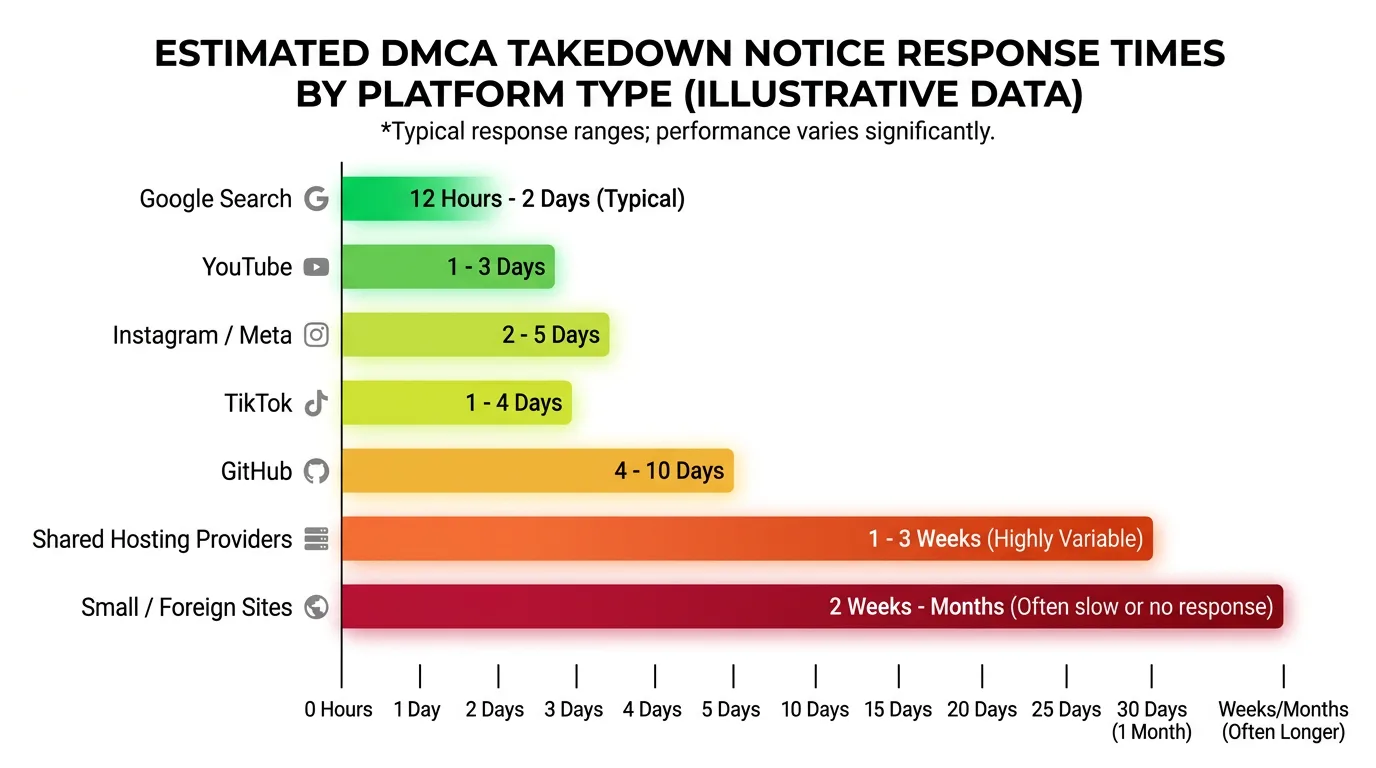
| Platform Type | Typical Response Time |
|---|---|
| Google Search (URL removal) | 24 to 72 hours |
| YouTube | 24 to 48 hours |
| Instagram / Meta | 1 to 5 business days |
| TikTok | 2 to 7 business days |
| GitHub | 3 to 10 business days |
| Shared hosting providers | 5 to 14 business days |
| Small or foreign websites | 14+ business days, sometimes no response |
If a platform completely ignores a valid, properly formatted DMCA notice for an unreasonable period of time, consult a copyright attorney. At that point, you may be looking at direct legal action against the infringing party rather than working through the platform.
DMCA Notice Requirements: Every Element Your Notice Must Include
A valid DMCA takedown notice must contain six legally required elements under Section 512(c)(3) of the Digital Millennium Copyright Act. Any notice missing even one of these elements is considered legally deficient, and platforms are not obligated to act on it.
This is the section most guides skim over with a quick bullet list and move on. That approach costs creators their cases. Each element carries specific legal weight, and understanding why each one exists helps you write a notice that holds up under scrutiny, especially if the infringer pushes back with a counter-notice or threatens legal action for filing a bad-faith claim.
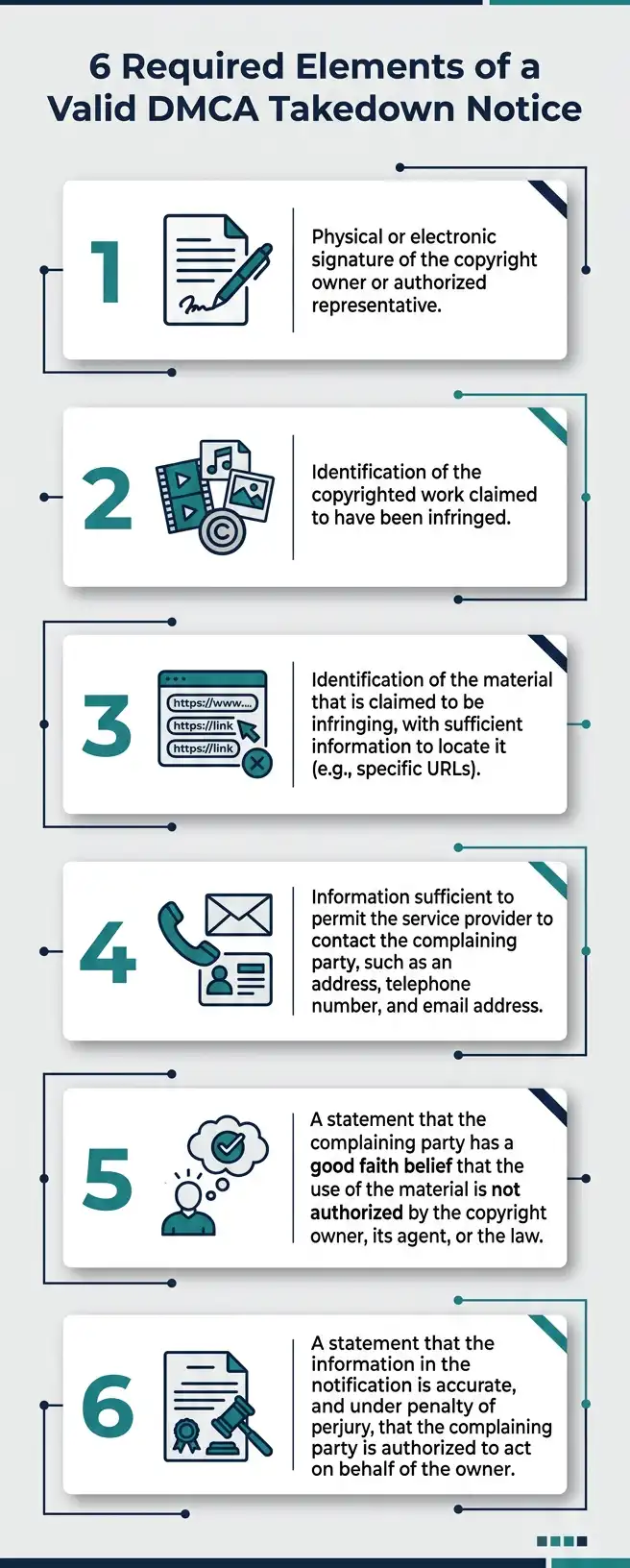
Elements of a Valid DMCA Notice (Legal Checklist)
Here are the six required elements, pulled directly from the statutory language of Section 512(c)(3) of Title 17 of the United States Code:
2. Identification of the Infringing Material
Provide the exact URL or location of the infringing content. Vague descriptions like “somewhere on their website” do not meet this requirement. The platform needs enough information to locate and remove the specific material without conducting its own investigation.
3. Your Contact Information
Include your full legal name, mailing address, phone number, and email address. This is not optional. Platforms need to be able to contact you, and the infringer needs to be able to serve you legal documents if they file a counter-notice.
4. The Good Faith Belief Statement
A written statement declaring that you have a good faith belief that the use of the material in the manner complained of is not authorized by the copyright owner, the copyright owner’s agent, or the law. We will break this down further in the next section because freelancers often misunderstand what “good faith” legally means here.
5. The Accuracy and Authority Statement (Penalty of Perjury)
A statement that the information in the notice is accurate and, under penalty of perjury, that you are the copyright owner or are authorized to act on behalf of the copyright owner. This is the line that makes the notice legally binding and that makes false claims potentially criminal.
6. Your Physical or Electronic Signature
The notice must be signed. An electronic signature, meaning your typed full name at the bottom of the notice preceded by “/s/” or a similar indicator, is legally acceptable and fully sufficient for DMCA purposes.
The Good Faith Belief Statement: What It Means and Why It Matters
The good faith belief requirement trips up a lot of freelancers, particularly when fair use could theoretically be in play.
Here is what you need to understand: you are not required to be certain that no legal defense exists. You are required to genuinely believe, based on reasonable consideration, that the use is not authorized. The U.S. Court of Appeals for the Ninth Circuit established in Rossi v. Motion Picture Association of America that the good faith standard is subjective, meaning courts look at what you actually believed, not what a perfect legal expert would have concluded.
However, a 2015 ruling in Lenz v. Universal Music Corp. (commonly called the “dancing baby case”) added an important nuance: before sending a DMCA notice, you must actually consider whether the use qualifies as fair use. You cannot simply ignore the possibility. If you send a takedown notice without genuinely considering fair use and a court later finds that the use was clearly fair, you could face liability for misrepresentation under Section 512(f) of the DMCA.
In practical terms for freelancers: if someone copied your entire article, used your photo in a commercial ad without permission, or redistributed your design file for profit, fair use is almost certainly not a defense for them. Proceed with confidence. But if someone used a short quote from your writing to comment on it or used a thumbnail of your image in a review, pause and think before you file.
The Perjury Statement: The Line You Should Never Cross
The penalty of perjury statement is the legal backbone of the entire DMCA notice system. When you sign a DMCA notice, you are making a sworn statement under federal law. Filing a knowingly false DMCA notice is not just a civil matter. It can expose you to criminal liability for perjury and civil liability for damages under Section 512(f).
Section 512(f) states that anyone who knowingly materially misrepresents that material is infringing can be held liable for any damages, costs, and attorney’s fees incurred by the alleged infringer as a result of the takedown.
Real cases have resulted in significant damage awards against people and organizations that sent mass, automated, or bad-faith DMCA notices. The system is designed to protect both copyright owners and people who are wrongly accused.
The takeaway for freelancers is simple: only file a DMCA takedown notice when you genuinely own the copyright, you have actually checked whether the use might be licensed or fair, and you are certain the content you identified is the one infringing your work. When those three conditions are met, sign with confidence.
Electronic Signatures: Are They Legally Acceptable?
Yes, fully and completely. The Electronic Signatures in Global and National Commerce Act (E-SIGN Act) and the DMCA itself both recognize electronic signatures as legally valid for copyright notices.
In practice, an electronic signature on a DMCA notice is simply your typed full legal name at the end of the document, typically formatted as:
/s/ [Your Full Legal Name]
That is it. You do not need a DocuSign account, a notary, or any special software for this specific purpose. However, if you are using a platform submission form rather than sending a written notice directly, the act of submitting the form with your verified account credentials typically constitutes a valid signature.
If you regularly sign legal documents digitally across your freelance business, this guide on how to generate a digital signature certificate covers the broader topic of legally binding digital signatures for all your contracts and correspondence.
How to File a DMCA Takedown Notice: Platform-by-Platform Guide
Every major platform handles DMCA takedown notices differently. Some have streamlined online forms that process notices in under 24 hours. Others route everything through a designated legal contact. Knowing which channel to use for each platform is the difference between a fast resolution and weeks of frustrating back-and-forth.
Here is a breakdown of the most relevant platforms for freelancers, with exactly what to do on each one.
DMCA Takedown Notice: Google Search (Removing URLs from Index)
Google receives more DMCA takedown notices than any other entity on the planet. According to the Lumen Database, which tracks online takedown requests, Google processes millions of removal requests per year.
Filing with Google removes the infringing URL from Google’s search index. It does not take down the page itself, which still exists on the web. To fully address the problem, you typically need to file with both Google and the hosting provider.
How to file with Google:
- Go to Google’s copyright removal tool at reportcontent.google.com
- Select “Web Search” as the product
- Choose “Copyright” as the legal issue
- Fill out the form with your contact information, a description of your original work, and the specific infringing URLs
- Sign and submit
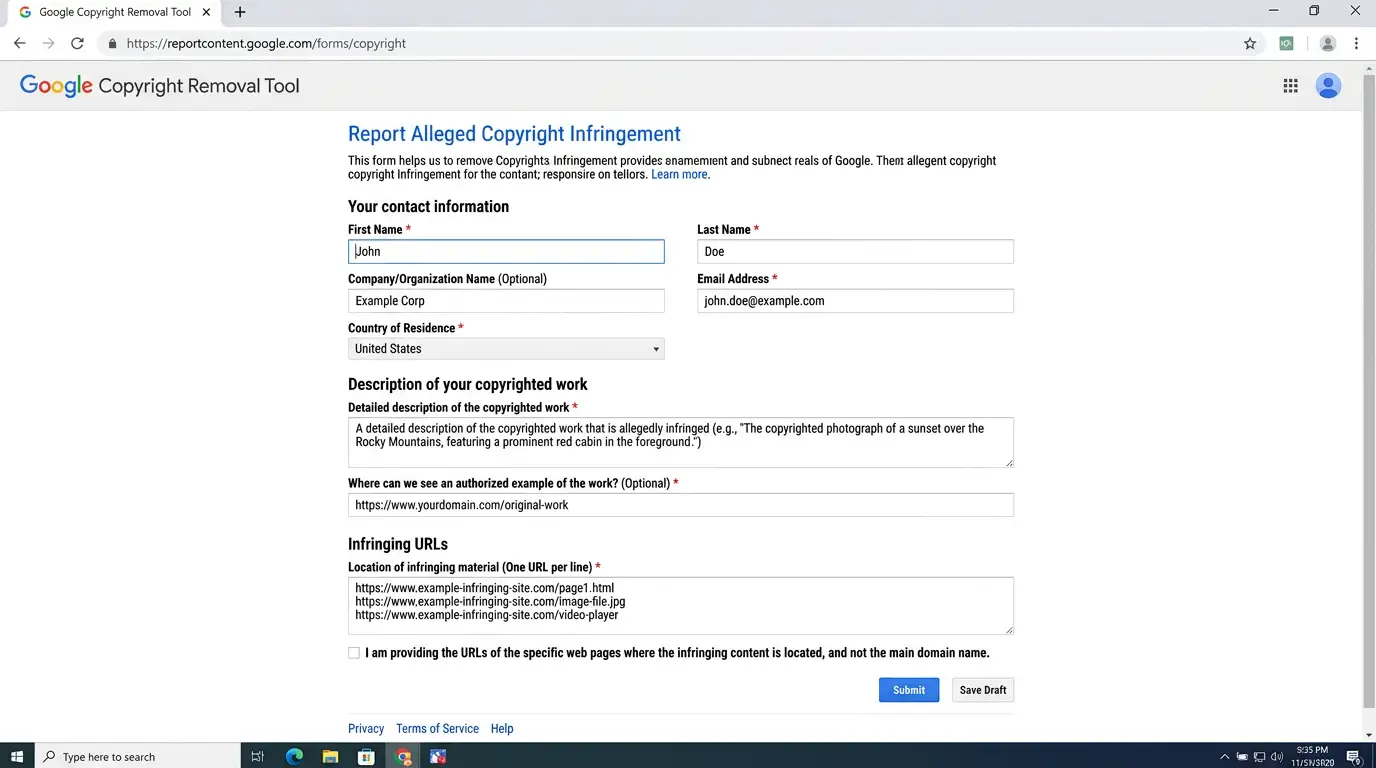
Google’s form is thorough and walks you through each required element. Most URL removal requests are processed within 24 to 72 hours. You can track the status of your request through Google Search Console if you have your site verified.
One thing to know: Google will publish your takedown notice, with your personal information potentially visible, in the Lumen Database unless you request redaction. If privacy is a concern, note that in your submission.
DMCA Takedown Notice: YouTube (Video Copyright Claims)
YouTube operates two separate copyright enforcement systems, and understanding the difference between them matters.
YouTube’s Content ID system is an automated tool available only to large rights holders and media companies. As an individual freelancer, you almost certainly do not have access to Content ID. Do not spend time trying to get it.
YouTube’s Copyright Complaint Webform is what individual creators use. This is a manual DMCA notice process, and it is fully available to anyone who owns a copyright.
How to file with YouTube:
- Sign into your YouTube account
- Navigate to youtube.com/copyright_complaint_form
- Select “Web form” as your submission method
- Identify the type of content being infringed (video, audio, image, written content within a video)
- Provide the URL of your original work and the URL of the infringing YouTube video
- Complete all required fields and submit
When YouTube receives a valid copyright complaint, they remove the video and issue a “copyright strike” against the uploader’s channel. Three strikes result in permanent channel termination. This is why YouTube copyright complaints are taken seriously by creators on the receiving end, and it is also why abusing the system has serious consequences.
If your music, voiceover, or original audio is being used in someone else’s YouTube video without your permission, this process applies to audio infringement as well.
DMCA Takedown Notice: Social Media (Instagram, TikTok, Facebook, Reddit)
Each major social platform has its own copyright reporting mechanism, though they all ultimately follow the same DMCA framework.
Instagram / Meta:
Use Meta’s dedicated copyright reporting form at facebook.com/help/contact/634636770043106. The same form covers both Instagram and Facebook content. Meta typically responds within 1 to 5 business days.
TikTok:
TikTok has a copyright infringement report form accessible through their Intellectual Property Policy page. TikTok’s response times have improved significantly and most valid notices are processed within 2 to 7 business days.
Reddit:
Reddit handles copyright complaints through their Copyright Infringement form. Reddit is generally responsive to valid DMCA notices, though response times vary by subreddit and content type.
X (formerly Twitter):
Use X’s Copyright Policy page to submit a copyright complaint. X processes most straightforward complaints within a few business days.
For all social platforms, always use the platform’s official reporting channel rather than trying to contact the infringing user directly. Direct contact can complicate the legal process and sometimes gives bad actors a heads-up to move the content elsewhere before the platform acts.
DMCA Takedown Notice: GitHub (Code and Developer Projects)
GitHub is a frequent target for code theft, and freelance developers deal with this more often than people realize. Copied code repositories, stolen themes, and redistributed software packages are all legitimate grounds for a DMCA takedown notice on GitHub.
GitHub follows the DMCA rigorously and has one of the most transparent takedown processes of any major platform. They publish all received takedown notices publicly in their GitHub DMCA repository, so be aware that your notice, including your identifying information, will be publicly visible.
How to file with GitHub:
- Review GitHub’s DMCA Takedown Policy carefully before filing
- Email your notice to copyright@github.com
- Include all six required DMCA elements in your written notice
- Clearly identify the original repository or code file you own and the infringing repository URL
GitHub will typically respond within 3 to 10 business days. They may reach out for clarification before acting. If the infringing repository is a fork of a legitimate project or if fair use arguments exist, GitHub may decline to act and explain why.
DMCA Takedown Notice for Images (Stolen Photos and Artwork)
Image theft is the single most common copyright infringement issue freelance photographers, illustrators, and graphic designers face. A reverse image search on Google Images or TinEye can reveal where your images are being used without permission.
For stolen images, your strategy depends on where they are hosted:
If the image is on a website: File with the hosting provider using the process described in Step 2 above. Also file with Google to have the image removed from Google Image Search results.
If the image is on a stock photo site being sold: This is a more serious matter. Contact the platform’s legal team directly rather than using a standard copyright form, and consider involving a copyright attorney if significant commercial damage is occurring.
If the image is being used in someone’s social media posts: Use the platform-specific reporting forms described above.
For background on how stock photo copyright specifically works for freelancers and when you can and cannot use images you find online, this guide on stock photo copyright rules for freelancers is worth reading before you file.
DMCA Takedown Notice for Music and Audio Content
Freelance composers, musicians, voiceover artists, and podcast producers face specific challenges with audio copyright because automated detection systems like YouTube’s Content ID can actually flag your own original work if it has been redistributed elsewhere first.
Key steps for audio copyright takedowns:
- Before filing, document the original creation date of your audio work using file metadata, Digital Audio Workstation (DAW) project files, or original upload timestamps
- If your music appears in a YouTube video, use YouTube’s copyright complaint webform as described above
- If your audio track appears on Spotify, Apple Music, or another streaming service without your authorization, contact the distributor directly and report through the platform’s content policy team
- For podcasts redistributed without permission, file with the hosting platform (Buzzsprout, Spotify, Apple Podcasts all have copyright reporting mechanisms) and with any directories where the stolen episode appears
One point that catches audio creators off guard: if you licensed a beat, sample, or sound library element in your original track, make sure you have the rights to enforce copyright on that specific element before including it in your DMCA notice. Only include content you fully own or control.
DMCA Takedown Notice for Blog and Written Content
Content scraping, where automated bots or humans copy entire articles and republish them on other sites, is rampant in 2026. Freelance writers, bloggers, and content strategists deal with this constantly.
How to identify scraped content:
Use tools like Copyscape, Grammarly’s plagiarism checker, or a simple Google search of distinctive phrases from your article in quotation marks. If you find your content on another site, note the URL, check when their version was published versus yours, and document the extent of copying.
Filing strategy for written content:
If the scraper site ranks above you in search results for your own content, this is particularly damaging and urgent. File with Google Search to have the infringing URL de-indexed, and simultaneously file with the hosting provider to have the page removed entirely.
Most content scraper sites are run for ad revenue and have no legitimate legal defense for copying full articles. Response times from hosting providers on scraper site complaints tend to be fast because these sites frequently violate multiple terms of service simultaneously.
If you are protecting not just copyright but also the business relationships and deliverables within your freelance work, understanding what a proper statement of work covers and how it protects your intellectual contributions can prevent disputes before they escalate to takedown territory.
DMCA Takedown Notice Template (Copy, Customize, and Send)
Finding a reliable, legally sound DMCA takedown notice template online is harder than it should be. Most templates floating around legal forums and blog posts are either stripped-down to the point of being legally insufficient or so dense with legalese that they read like they were written for a federal courtroom. Neither extreme serves a working freelancer.
The template below is built directly on the six statutory requirements of Section 512(c)(3) of the DMCA. It is written in plain, professional language that satisfies every legal requirement while remaining readable to any platform’s content moderation team.
Free DMCA Takedown Notice Template
[Your Full Legal Name]
[Your Mailing Address]
[Your City, State, ZIP Code]
[Your Phone Number]
[Your Email Address]
[Date]
To the Designated Copyright Agent of [Platform or Hosting Provider Name]:
I am writing to notify you of copyright infringement occurring on your platform in violation of the Digital Millennium Copyright Act, 17 U.S.C. § 512.
1. Identification of Copyrighted Work
I am the copyright owner of the following original work:
[Describe your original work clearly. Include the title, type of work, date of creation or first publication, and the URL where your original work appears, if applicable.]
Example: “An original photographic image titled ‘[Photo Title],’ first published on [Date] at [Your Website URL]. The image depicts [brief description] and was created by me in [Year].”
2. Identification of Infringing Material
The following material, which I believe infringes my copyright, is located at the URL(s) listed below:
[List each infringing URL on a separate line. Be as specific as possible, linking directly to the infringing content rather than just the homepage of the site.]
Infringing URL(s):
- [Full URL of infringing content #1]
- [Full URL of infringing content #2, if applicable]
3. Contact Information
My contact information is as follows:
- Full Name: [Your Full Legal Name]
- Mailing Address: [Your Address]
- Phone Number: [Your Phone]
- Email Address: [Your Email]
4. Good Faith Statement
I have a good faith belief that the use of the copyrighted material described above is not authorized by the copyright owner, any agent of the copyright owner, or the law, including as a fair use.
5. Accuracy and Authority Statement
I swear, under penalty of perjury, that the information in this notification is accurate and that I am the copyright owner, or am authorized to act on behalf of the copyright owner, of the work described above.
6. Signature
/s/ [Your Full Legal Name]
[Your Full Legal Name]
[Date]
Feel free to copy this template directly. The bracketed sections are the only parts you need to customize for each specific situation. Keep the legal language in sections 4 and 5 exactly as written. Those phrases track the statutory language of the DMCA and should not be paraphrased.
Save a copy of every notice you send. Create a folder in your email or cloud storage labeled with the infringer’s domain name and the date you filed. If the situation escalates to a legal dispute, that documentation trail is evidence.
For an even more detailed walkthrough of the specific steps tied to this template, the guide on DMCA takedown notice proven steps to protect your work goes deeper into the filing process from a freelancer’s perspective.
DMCA Takedown Notice Example: Filled-In Version
Seeing the template in action makes the requirements much clearer. Here is a realistic filled-in example based on a common freelancer scenario: a graphic designer whose logo work was stolen and posted on a competitor’s website.
Jordan Rivera
1204 Maple Street
Austin, TX 78701
(512) 555-0194
jordan.rivera@designstudio.com
June 15, 2026
To the Designated Copyright Agent of SiteGround Hosting:
I am writing to notify you of copyright infringement occurring on a website hosted on your platform in violation of the Digital Millennium Copyright Act, 17 U.S.C. § 512.
1. Identification of Copyrighted Work
I am the copyright owner of an original logo design created for personal portfolio use, titled “Apex Brand Identity Mark,” first published on my portfolio website at www.jordanrivera.design/portfolio/apex on March 3, 2026. The design consists of a geometric mountain icon with custom sans-serif typography in a teal and charcoal color palette. I created this work independently and retain full copyright ownership.
2. Identification of Infringing Material
The following URL contains an unauthorized reproduction of my copyrighted logo design, presented as an original work and used in a commercial context without my permission:
3. Contact Information
- Full Name: Jordan Rivera
- Mailing Address: 1204 Maple Street, Austin, TX 78701
- Phone Number: (512) 555-0194
- Email Address: jordan.rivera@designstudio.com
4. Good Faith Statement
I have a good faith belief that the use of the copyrighted material described above is not authorized by the copyright owner, any agent of the copyright owner, or the law, including as a fair use.
5. Accuracy and Authority Statement
I swear, under penalty of perjury, that the information in this notification is accurate and that I am the copyright owner of the work described above.
6. Signature
/s/ Jordan Rivera
Jordan Rivera
June 15, 2026
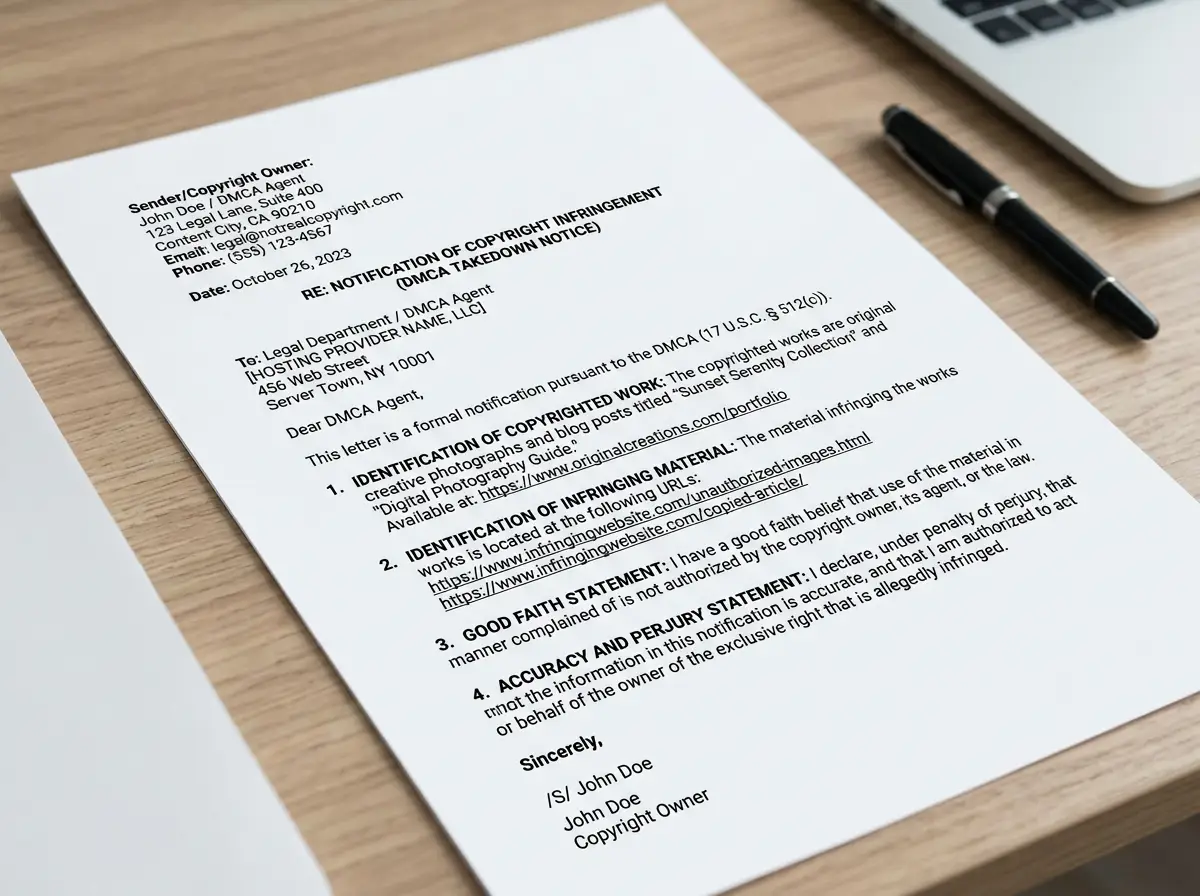
That is a complete, legally valid DMCA takedown notice. It is specific, professional, and contains every element required by statute. A hosting provider receiving this notice has everything they need to act immediately.
Common Mistakes That Get DMCA Notices Rejected
Even well-intentioned freelancers make errors that render their notices legally deficient. Here are the mistakes that appear most often, pulled from real forum discussions on Reddit, Quora, and legal Q&A sites:
Mistake #1: Vague identification of the infringing content
Writing “my images are being used on their site” without providing specific URLs is one of the fastest ways to get a notice rejected. Platforms cannot act on vague descriptions. Give exact URLs every time.
Mistake #2: Missing or incomplete contact information
Leaving out your phone number or mailing address makes the notice deficient. Some freelancers skip the mailing address for privacy reasons, but legally it is required. If you have a P.O. box or use a registered agent service, use that address instead.
Mistake #3: Paraphrasing the statutory language
The good faith statement and perjury statement need to closely track the language established in Section 512(c)(3). Paraphrasing them in casual language can undermine their legal validity. Use the exact phrasing from the template above.
Mistake #4: Filing against the wrong party
Sending a notice to Google when the infringing content is hosted on Squarespace only removes the URL from search results. The page still exists. Sending to Squarespace without also filing with Google leaves the page findable via search. In most cases, you need both.
Mistake #5: Filing without owning the copyright
If you signed a work-for-hire agreement or an IP assignment clause in your freelance contract, the client owns the copyright, not you. Filing a DMCA notice for work you do not own exposes you to liability under Section 512(f). Always verify your ownership before filing.
Mistake #6: Sending one notice for multiple platforms
Each platform requires its own separate notice sent through its own channel. A single notice addressed to “YouTube, Instagram, and Google” will not be processed by any of them. File separately with each platform where infringement occurs.
Mistake #7: No evidence documentation
While the notice itself does not require you to attach evidence, you need that evidence if the infringer files a counter-notice and the matter proceeds toward litigation. Screenshot everything before you file. Metadata, timestamps, and original file properties are your best friends.
How to Send a DMCA Takedown Notice: Your Delivery Options
Writing a perfect notice means nothing if you send it to the wrong place through the wrong channel. The delivery method you choose directly affects how fast the platform acts and whether your notice is processed at all.
Using the Platform’s Own Online Form (Fastest Method)
For any major platform with a dedicated copyright reporting form, use it. These forms are purpose-built for DMCA compliance, they prompt you for every required element, and they route your submission directly to the platform’s legal or trust-and-safety team.
The platforms with the most streamlined online copyright forms in 2026 include:
- Google: reportcontent.google.com
- YouTube: youtube.com/copyright_complaint_form
- Meta (Facebook + Instagram): facebook.com/help/contact/634636770043106
- TikTok: tiktok.com legal IP policy page
- X (Twitter): help.twitter.com copyright policy page
- GitHub: copyright@github.com (email-based)
- Pinterest: pinterest.com/about/copyright/dmca
- Etsy: help.etsy.com intellectual property policy
- Shopify: legal@shopify.com or their IP policy submission page
- WordPress.com: automattic.com/dmca
When a form is available, it is always faster than sending a written notice by email or mail. Forms also reduce the risk of your notice being misrouted or lost in a general inbox.
Contacting the DMCA Designated Agent Directly
When a platform does not offer an online copyright form, or when you are dealing with a smaller website, you need to contact their designated DMCA agent directly.
Every online service provider that wants to qualify for safe harbor under Section 512 is required to register a designated copyright agent with the U.S. Copyright Office and list that agent’s contact information publicly on their website.
How to find a designated DMCA agent:
Option 1: Check the website’s footer, Terms of Service page, or Privacy Policy page. Many sites include a “Copyright” or “DMCA Policy” link that provides their designated agent’s contact information.
Option 2: Search the U.S. Copyright Office’s online DMCA agent directory at copyright.gov/dmca-directory. This searchable database lists every registered designated agent by company name.
Once you have the agent’s contact information, send your written DMCA notice directly to that person or department via email. Use a subject line like: “DMCA Takedown Notice Copyright Infringement at [Infringing URL].” Keep the subject line clear and professional. Legal inboxes receive high volumes of mail and clear subject lines get processed faster.
Sending a DMCA Notice to a Web Hosting Provider
When the infringing content lives on a website that does not have a visible DMCA form or registered agent, or when you want to go directly to the source and get the page taken down entirely rather than just de-indexed, the hosting provider is your target.
How to identify the hosting provider:
- Go to a Whois lookup tool such as whois.domaintools.com or who.is
- Enter the infringing domain name
- Look for the “Name Server” or “Registrar” information, which often indicates the hosting company
- If the Whois data is privacy-protected, look for the hosting provider’s nameservers, which typically include the provider’s brand name (e.g., ns1.bluehost.com tells you the site is hosted on Bluehost)
Once you identify the hosting provider, go to their website and search for their “Abuse” or “DMCA” contact page. Every reputable hosting company has one. Common hosting providers and their DMCA contact methods include:
| Hosting Provider | DMCA Contact Method |
|---|---|
| GoDaddy | abuse.godaddy.com |
| Bluehost | bluehost.com/cgi/dmca |
| HostGator | hostgator.com/abuse |
| Cloudflare | cloudflare.com/abuse |
| SiteGround | siteground.com/abuse |
| Amazon AWS | aws.amazon.com/aup (abuse form) |
| DigitalOcean | digitalocean.com/legal/dmca-policy |
Send your complete written DMCA notice to the hosting provider’s designated abuse or copyright contact. Most reputable hosting providers act within 5 to 14 business days for valid notices.
One important note about Cloudflare specifically: Cloudflare is a CDN and DDoS protection service, not a hosting provider. If a site uses Cloudflare, the infringing content is hosted somewhere else and Cloudflare is just passing traffic through. Cloudflare will forward your notice to the actual hosting provider when you file through their abuse form, but it adds a step. Look past Cloudflare to find the origin host when possible.
Sending a DMCA Takedown Notice to Google Search
We covered the basic process of filing with Google earlier, but there are a few additional details that matter for freelancers specifically.
What Google can and cannot do:
Google can remove infringing URLs from its search index, meaning they will no longer appear in Google Search results. Google cannot remove the actual page from the internet. That requires a separate action against the hosting provider.
Google’s Transparency Report:
Every URL removal request Google receives is logged in its Transparency Report, and the specific notices are published in the Lumen Database. Your notice, including your name and contact details, becomes part of the public record unless you request redaction. If you are filing a sensitive takedown, such as for content involving your personal image or private work, submit a redaction request alongside your notice.
Google Search Console and DMCA notifications:
If your website has been hit by someone else’s DMCA notice, Google Search Console is where you will see the notification. The message will include a link to the specific Lumen Database entry for the notice filed against you. That link contains the filer’s identity and the claimed infringement details, which you need to review before deciding how to respond.
Bulk URL removal for scraper sites:
If a scraper site has copied dozens or hundreds of your pages, Google’s copyright removal tool allows you to submit multiple URLs in a single request. Use a spreadsheet to compile all infringing URLs before you begin the filing process, then paste them into the form. This is far more efficient than filing individual requests for each page.
When protecting your content across search engines also involves tracking how your protected work appears online, this guide to DMCA content search and online media protection walks through the monitoring tools and strategies that complement the takedown process.
The DMCA Safe Harbor Provision: What Freelancers Need to Know
The safe harbor provision is the single most important concept in DMCA law that most freelancers do not understand. Understanding it changes how you think about takedown notices entirely. It explains why platforms are so responsive to DMCA notices even though they have no inherent obligation to care about your copyright. And it explains why filing a bad-faith or false notice can backfire on you legally.
Safe harbor is not actually about protecting freelancers. It is about protecting platforms. But that protection only works if platforms comply with the notice and takedown system correctly, which is where freelancers come in.
How Safe Harbor Protects Platforms (and Why That Affects You)
Here is the core legal principle: under Section 512 of the DMCA, online service providers (hosting companies, search engines, social media platforms, etc.) are not liable for the copyright infringing activities of their users if they meet three specific conditions.
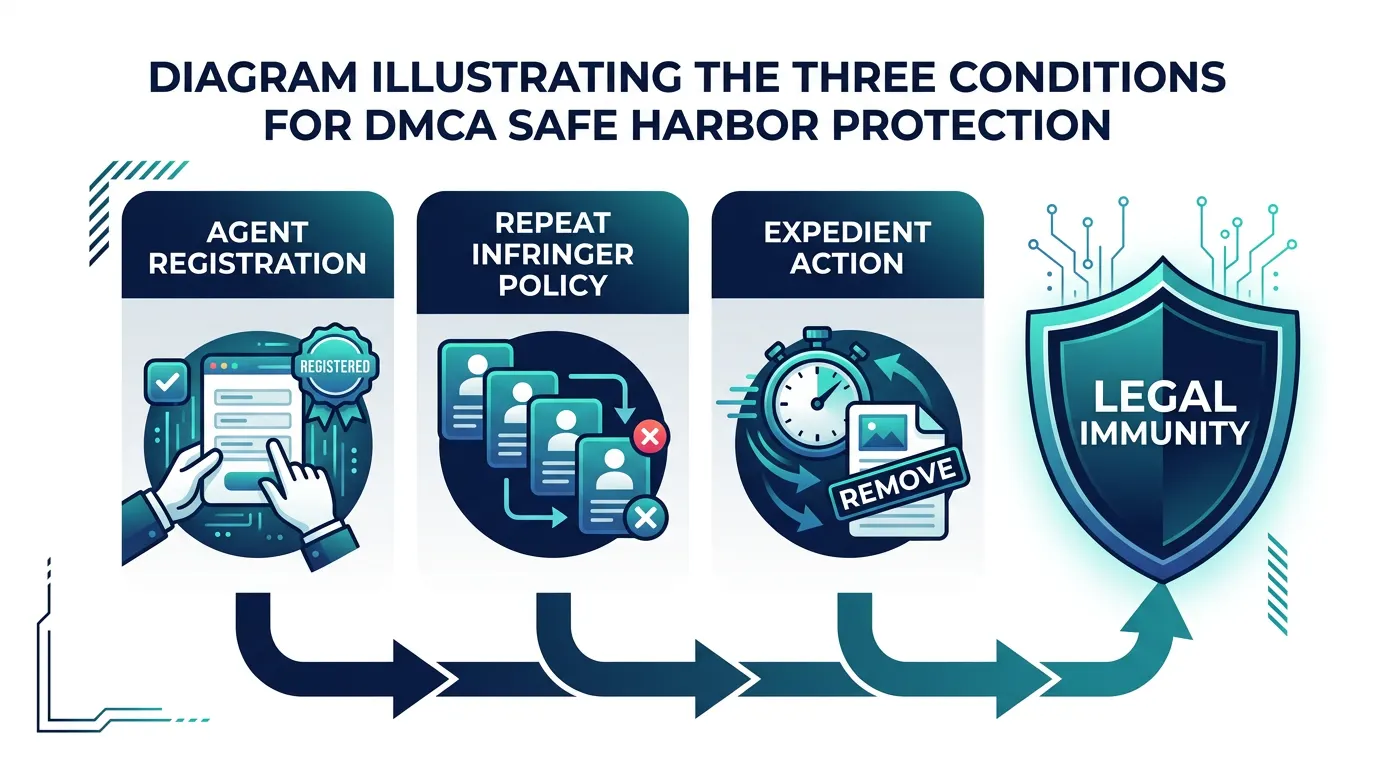
Condition 1: They must have a designated DMCA agent registered with the Copyright Office
This is administrative. Platforms are required to register their copyright agent so that people like you know exactly who to send notices to. This is why the Copyright Office maintains that searchable directory. Every legitimate platform you have heard of is registered.
Condition 2: They must have implemented a policy that terminates repeat infringers
Platforms must document that they take action against users who repeatedly infringe copyright. This is why platforms have “three strikes” policies, channel termination policies, and account suspension procedures. These are not acts of corporate benevolence. They are legal requirements to maintain safe harbor.
Condition 3: They must act expeditiously upon receipt of a valid DMCA notice
This is the condition that directly impacts you as a freelancer filing a takedown notice. When you send a valid notice, the platform is legally required to act fast. If they ignore your notice or fail to act quickly, they lose safe harbor protection. That means they could be sued directly for copyright infringement for allowing the infringing content to remain on their platform.
Platforms take this incredibly seriously because the liability they face without safe harbor is potentially in the millions of dollars. A single copyright lawsuit against a platform can cost hundreds of thousands in legal fees alone, not counting settlement or judgment amounts.
When Safe Harbor Does NOT Apply
Safe harbor is powerful, but it is not absolute. There are specific circumstances where platforms lose their protection and become directly liable for the infringing content on their platforms.
Safe harbor does not apply when:
- The platform has actual knowledge of the infringement
If a platform is aware that infringing content exists on its platform and takes no action, safe harbor does not protect them. However, “awareness” is a high bar legally. Platforms argue that random complaints or user reports do not constitute actual knowledge. An official DMCA notice, however, definitely constitutes notice. - The platform is aware of facts suggesting infringement but deliberately ignores them
This is called “willful blindness” in legal terms. If a platform sees clear evidence of systematic infringement patterns and chooses not to investigate, they cannot claim safe harbor. In 2020, a federal court found that YouTube’s failure to act on obvious patterns of music infringement in certain accounts suggested willful blindness. YouTube’s response was to implement more aggressive Content ID systems. - The platform receives financial benefit directly attributable to the infringing activity AND has the right and ability to control it
This is narrow but important. If a platform is earning advertising revenue specifically from infringing content and has the power to remove or disable that content, and chooses not to, safe harbor may not apply. This is why YouTube removes Content Creator channels that violate music rights, even though they earn YouTube money through ad revenue. - The infringement is in response to obvious copyright notices or statements by the copyright holder
If a copyright holder clearly marks content as protected or includes visible copyright statements, and the platform proceeds anyway, safe harbor is compromised.
In reality, for major platforms in 2026, the most common route to losing safe harbor is simply failing to act quickly on valid DMCA notices. Because safe harbor protection is so valuable, platforms err heavily on the side of taking action.
The Repeat Infringer Policy and Why It Matters for Creators
Every platform’s repeat infringer policy is its legal shield. If a user keeps uploading infringing content despite multiple takedowns, the platform is required to eventually take permanent action, or they lose safe harbor.
As a freelancer, this policy works in your favor. If someone is repeatedly stealing your work and uploading it to YouTube, Instagram, or another platform, document each instance. After two or three valid DMCA takedowns against the same account, report the pattern to the platform’s legal team. Provide evidence that this is a repeat infringer. Platforms will often terminate accounts entirely rather than process multiple takedowns from the same user and risk the appearance of enabling infringement.
You can mention the repeat infringement pattern in your DMCA notices themselves. Write something like: “This is the third takedown notice filed against this same account for copyright infringement within the past 90 days. The user appears to be a systematic infringer.” Platforms note this and it accelerates action.
However, be factual. If this is actually the first or second notice, do not claim it is the third. False statements in DMCA notices expose you to Section 512(f) liability, as we discussed earlier.
How to Respond to a DMCA Takedown Notice (If You Receive One)
Now we reverse perspective entirely. What happens when you receive a DMCA takedown notice? Maybe someone filed a notice against your work incorrectly. Maybe they misidentified content. Maybe they are abusing the system to silence a legitimate competitor. Or maybe they are right and you need to take action.
The response differs based on the situation, but the first step is always the same: stay calm and read the notice carefully.
Step 1: Do Not Panic. Read the Notice Carefully First
Receiving a DMCA takedown notice is jarring. Your immediate instinct might be to panic, delete your account, or fight back aggressively. Resist those impulses.
When a platform notifies you that a DMCA notice has been filed against your content, they will typically provide:
- The name and contact information of the person or organization that filed the notice
- A description of the content they claim is infringing
- The specific URLs or content identifiers involved
- A link to the actual notice text (usually in the Lumen Database)
- A statement that you have the right to file a counter-notice
Read all of this carefully. Do not skim it. Print it or save it.
Now review your own work. Is the content they describe actually yours? Did you create it, or did you receive it from someone else? When did you post it or publish it? Is there any legitimate explanation for why your content matches theirs?
This is your moment of honest evaluation. If you genuinely believe the takedown is correct and your content does infringe someone else’s copyright, you now know, and you can decide whether to accept the removal, fight it, or reach out to settle with the rights holder.
If you genuinely believe the takedown is wrong, that is when you move to the next step.
Step 2: Check If the Claim Is Valid or Abusive
Not all DMCA notices are legitimate. Some filers:
- Misidentify content (file a notice about someone else’s work by accident)
- Have no actual copyright ownership (claim ownership of work they do not own)
- Abuse the system for competitive reasons (file notices to suppress competitors)
- File notices on works that use licensed content or fair use
The Lumen Database, maintained by UC Berkeley’s Internet Archive, is the comprehensive record of all DMCA takedown notices filed against major platforms. When a platform notifies you of a takedown, search the Lumen Database for the specific notice. You can read the exact text of what was filed, see the filer’s claims in detail, and assess whether their legal reasoning is sound.
Check these specific points:
Is the identified work actually copyrighted?
Some people file DMCA notices on ideas, facts, titles, or names. None of those are protected by copyright. Copyright only protects fixed, original creative expression. A notice that claims your article’s topic is infringing is not legally valid, even if the filer is angry about it.
Did they actually identify your content correctly?
Read the infringing URLs they listed. Do those URLs actually contain your content? Or did they misidentify a similar work? If a notice lists the wrong URL or a different creator’s content, it is misfiled. This happens more often than you would think.
Do they actually own the copyright they are claiming?
Look for evidence in the notice that they own the right they are claiming. Legitimate notices typically include registration information or documentation of ownership. Notices that simply assert “this is my work” without evidence should raise red flags.
Is there a licensing agreement you are unaware of?
If you used stock music, stock photos, fonts, or any other third-party elements in your work, did you pay for a license? Did you read the license terms? If the licensor did not give you permission to redistribute or use content in the way you have, a DMCA notice might be valid even if you thought you had permission.
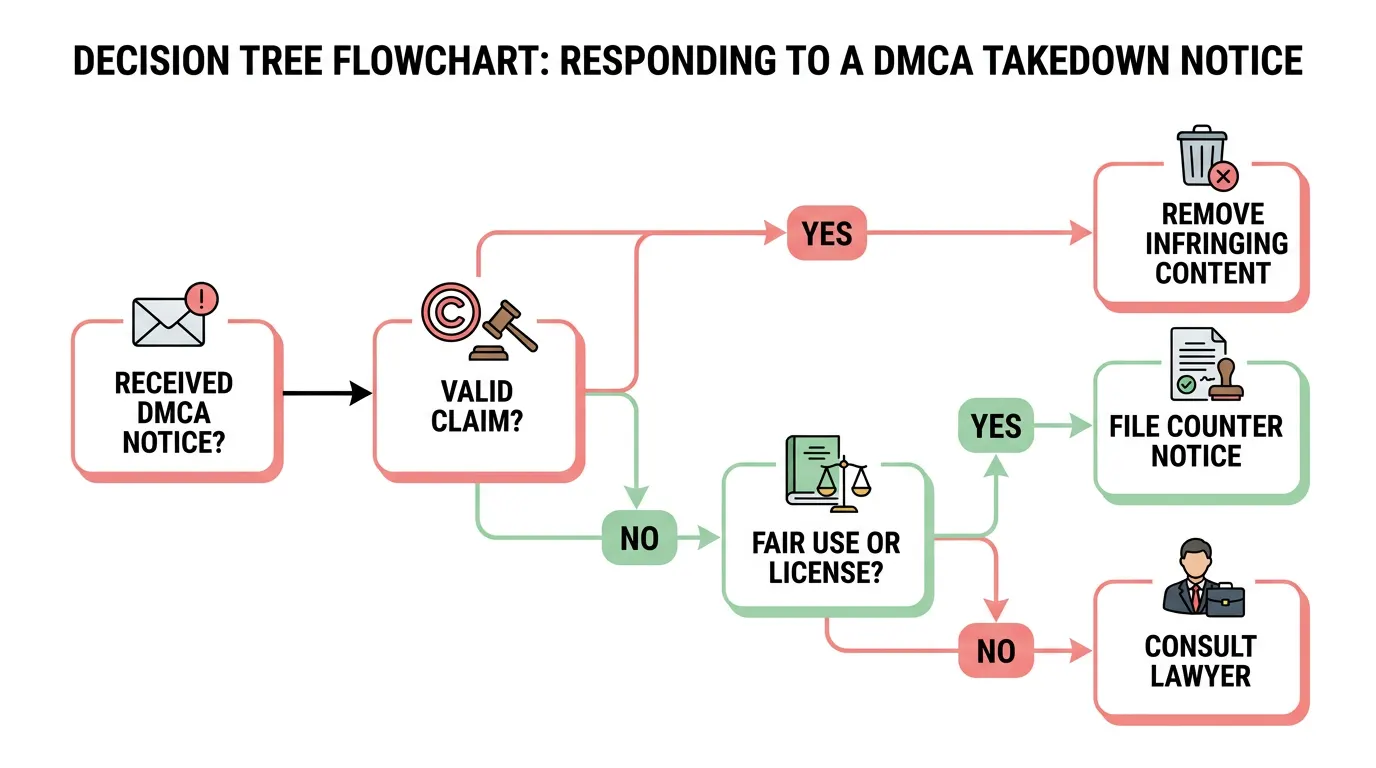
If your honest review suggests the notice is invalid, misfiled, or abusive, move to step three.
Step 3: Evaluate Your Fair Use Defense
Fair use is a legal defense against copyright infringement under Section 107 of Title 17 of the U.S. Copyright Code. It is not a guarantee, and it is fact-specific, but it is a real defense if your use qualifies.
Fair use allows limited use of copyrighted material without permission for purposes like:
- Criticism and comment
- News reporting
- Teaching and scholarship
- Parody
- Reverse engineering for interoperability
The key question is not “Did I use someone’s work?” It is “Did my use of someone’s work transform it into something new that serves a different purpose?”
For example:
NOT fair use: Copying a photographer’s image directly and republishing it with a different caption.
Potentially fair use: Using a screenshot of that image in a blog post where you critique the photographer’s composition and explain how they could have improved it.
NOT fair use: Copying a competitor’s product description word for word on your own e-commerce store.
Potentially fair use: Quoting specific phrases from their description in a detailed comparison article that analyzes multiple competitors.
Courts evaluate fair use using a four-factor test:
- The purpose and character of the use (commercial vs. educational, transformative vs. derivative)
- The nature of the copyrighted work
- The amount and substantiality of the original work used
- The effect of your use on the market value of the original work
If you genuinely believe your use qualifies as fair use, you have grounds to file a counter-notice. However, fair use is not a slam-dunk defense. If you are uncertain, consult a lawyer before filing.
Step 4: File a DMCA Counter Notification
If you believe the takedown notice is invalid, misfiled, or that your use qualifies as fair use, you can fight back by filing a counter-notification under Section 512(g) of the DMCA.
A counter-notification is your formal rebuttal. When you file one, you are saying: “This takedown was wrong, and here is why I believe the content should be restored.”
Here is what a counter-notification must contain:
- Your identification (name, address, phone, email)
- Identification of the material that was removed and the original location where it appeared
- A statement, under penalty of perjury, that you believe the removal was mistaken or that the material qualifies as fair use
- A statement that you consent to the jurisdiction of federal court in your district or where the service provider operates
- Your signature (electronic signature is acceptable)
The counter-notification process works like this:
- You file your counter-notification with the platform (not the original filer)
- The platform forwards it to the person who filed the original DMCA notice
- That person has 10 to 14 business days to file a federal copyright infringement lawsuit
- If they file a lawsuit, your content stays down during the litigation
- If they do NOT file a lawsuit, the platform is required to restore your content
This is important: filing a counter-notification is not risk-free. When you file a counter-notification, you are making statements under penalty of perjury. If the original filer sues you and wins, you could be liable for damages, attorney’s fees, and court costs. Only file a counter-notification if you are genuinely confident your use is legitimate and legal.
What Is a DMCA Counter Notification? (Full Breakdown)
Counter-notifications are the underdog tool in the DMCA system. They do not get as much attention as takedown notices, but they are equally important for protecting creators from bad-faith claims.
When to file a counter-notification:
- Your content was wrongly identified as infringing
- The person who filed the notice does not actually own the copyright they claimed
- Your use qualifies as fair use
- You have a license that the filer was not aware of
- The notice is clearly retaliatory or abusive
When NOT to file a counter-notification:
- You actually did copy someone else’s work without permission
- You licensed content but violated the license terms
- You are uncertain about whether your use is legal (consult a lawyer first)
- The filer has a legitimate, documented copyright claim
Counter-Notification Template:
[Your Full Legal Name]
[Your Mailing Address]
[Your City, State, ZIP Code]
[Your Phone Number]
[Your Email Address]
[Date]
To the Designated Copyright Agent of [Platform Name]:
I am submitting a counter-notification under Section 512(g) of the Digital Millennium Copyright Act in response to the takedown notice received on [Date of Notice] regarding content located at [Original URL].
1. Identification of Removed Material
The material that was removed or disabled is located at:
[Exact URL where content appeared]
The material consists of:
[Description of your original content]
2. Statement of Good Faith and Fair Use
I have a good faith belief that the removal of this material was the result of mistake or misidentification. [OR: I believe this use qualifies as fair use under 17 U.S.C. § 107 because [explain how it qualifies: criticism, transformative use, etc.]].
[Include detailed explanation of why you believe the takedown was wrong, if applicable.]
3. Jurisdiction Statement
I consent to the jurisdiction of Federal District Court in [Your District] and will accept service of process from the claimant.
4. Accuracy and Authority Statement
I swear, under penalty of perjury, that I am the copyright owner or authorized agent of the copyright owner of the material, that the information in this notification is accurate, and that the removal of this material was in error.
5. Signature
/s/ [Your Full Legal Name]
[Your Full Legal Name]
[Date]
Submit this to the platform’s designated copyright agent. The platform will forward it to the original filer. Then wait 10 to 14 business days. If no lawsuit is filed, your content gets restored.
What Happens After You File a Counter Notice?
Once you file a counter-notification, three possible outcomes emerge:
Outcome 1: No lawsuit is filed within 10 to 14 days
The platform is required to restore your content. Your piece goes back live, your channel remains active, your post is visible again. The incident is closed unless the original filer pursues private litigation outside the DMCA framework.
Outcome 2: The original filer files a federal copyright infringement lawsuit
This is the legal enforcement mechanism built into the DMCA. If the filer believes you are actually infringing and wants to keep your content down, they must file a lawsuit in federal court. Until the lawsuit is resolved, your content remains removed. If they win the lawsuit, your content stays down and you could owe damages. If you win, your content is restored and you could potentially recover your attorney’s fees.
Outcome 3: The original filer responds with additional information or clarification
In some cases, the filer will respond to your counter-notification with additional evidence, clarification, or proof of ownership. If their response convinces you that they were right, you can choose not to pursue the matter further. Your content remains removed by mutual agreement.
The key thing to understand: filing a counter-notification does not automatically restore your content. It starts a process that may lead to restoration, but only if the original filer does not follow up with a lawsuit.
How to Appeal a DMCA Takedown Notice That Was Wrongful
The DMCA itself does not have a built-in appeal process. The counter-notification system is essentially the appeal mechanism. But there are other steps if a counter-notification does not resolve the issue:
Step 1: Request expedited consideration
Contact the platform’s legal team directly and explain that the takedown is clearly erroneous. Some platforms will expedite restoration if you make a compelling case without requiring a formal counter-notification.
Step 2: Gather documentation
Collect evidence that you created the content first, or that you have a license to use it, or that your use qualifies as fair use. Document everything.
Step 3: File a formal counter-notification
If informal requests do not work, file the counter-notification as described above.
Step 4: Consult a copyright attorney
If the situation involves significant financial impact, ongoing harassment by a bad-faith filer, or complex fair use questions, lawyer up. A copyright attorney can evaluate whether you have grounds for a Section 512(f) claim against the filer for filing a knowing, materially false DMCA notice.
Section 512(f) and False DMCA Claims:
Here is the reciprocal protection in the DMCA system: if someone files a DMCA notice knowing that it is false or materially misrepresenting facts, they are liable to you for damages, including attorney’s fees and court costs. This is Section 512(f).
In the 2015 Lenz v. Universal Music Corp. case we mentioned earlier, Universal filed a DMCA notice on a home video of a baby dancing to music in the background. The mother sued under Section 512(f) and won. The case established that you cannot just assume infringement exists and file a notice without considering fair use.
If you are hit with repeated, clearly abusive DMCA notices from the same filer, document them and consult a lawyer about whether you have a 512(f) claim. Some bad actors have been successfully sued and ordered to pay damages for abusing the takedown system.
Copyright Infringement Takedown: When DMCA Is and Is Not the Right Tool
The DMCA takedown notice is powerful, fast, and free. But it is not always the best tool for every copyright infringement situation. Understanding when to use a DMCA notice, when to use other legal mechanisms, and when to combine multiple approaches is the difference between solving a problem and creating new ones.
DMCA Takedown vs. Cease and Desist Letter: Which Should You Send?
A cease and desist letter is a formal demand from you (or your attorney) telling someone to stop doing something illegal or face legal consequences. It is not specific to copyright. It can address trademark infringement, defamation, contract breach, harassment, and dozens of other legal violations.
A DMCA takedown notice is specific to copyright infringement and targets the platform hosting the infringing content.
Key differences:
| Aspect | DMCA Takedown Notice | Cease and Desist Letter |
|---|---|---|
| Target | The platform/hosting provider | The person or company doing the infringing |
| Purpose | Remove content from the internet | Demand the infringer stop the illegal behavior |
| Speed | Fast (24 hours to 2 weeks) | Slow (recipient has no legal deadline to comply) |
| Cost | Free | Free to write yourself, $200-500 if attorney-drafted |
| Enforcement | Platform must comply to keep safe harbor | You must sue if they ignore it |
| Effectiveness | High for content removal | Medium to high for behavior change |
When to use a DMCA takedown notice:
- Someone has copied your work and posted it online
- You want the content removed from the internet fast
- You want to remove it from search results or multiple platforms simultaneously
- The platform’s safe harbor compliance works in your favor
When to use a cease and desist letter:
- You want to address the infringer directly and demand they stop
- You are dealing with a business competitor or someone you have an ongoing relationship with
- You want to create a paper trail before pursuing litigation
- Copyright infringement is part of a broader legal dispute (contract breach, trademark issues, etc.)
- You want to give them a final warning before you sue
In practice: Many freelancers do both. File a DMCA takedown notice to get the content removed immediately, then send a cease and desist letter to the infringer directly, making clear that you are aware of their infringement and will pursue legal action if they do it again.
For context on how cease and desist relates to other freelancer legal protection strategies, understanding how to properly structure your freelance contract and what non-disclosure agreements should cover helps you prevent infringement disputes before they start.
Does a DMCA Takedown Notice Require a Lawsuit?
No. The DMCA takedown notice is an alternative to litigation, not a step within it.
Here is the distinction: filing a DMCA takedown notice with a platform does not obligate you to sue anyone. The platform removes the content, the infringer’s counter-notification period expires (if they file one), and the matter ends. You have accomplished your goal: content removal.
A lawsuit becomes necessary only if:
- The infringer files a counter-notification and you want to keep the content down permanently, or
- You want to recover damages from the infringer beyond just content removal, or
- The same infringer keeps uploading your content repeatedly despite multiple takedowns, and you want a court order to stop them
The DMCA system is designed so that most cases resolve at the takedown stage without ever reaching a courtroom. That is its genius and its purpose.
However, if you are dealing with a serious, repeated, or high-value infringement, consult a copyright attorney. There are situations where combining a DMCA takedown with a cease and desist letter and the threat of litigation is more effective than relying on takedowns alone.
DMCA Takedown Abuse: The Growing Problem of Bad Faith Notices
The DMCA system works because platforms trust that filers are making good-faith claims. But that trust is being eroded by systematic abuse.
Bad actors use DMCA notices for purposes the law never intended:
Competitive silencing: Businesses file DMCA notices against competitors’ legitimate content to suppress their search rankings and remove their content from the internet.
Retaliation: After business disputes, people file DMCA notices on each other’s content as retaliation.
Extortion: Some bad actors file DMCA notices threatening to keep content down unless the website owner pays money.
Harassment: Abusive ex-partners, angry clients, or vengeful competitors file notices on each other’s content knowing they have no legal claim.
Mass automated notices: Bots and scripts file thousands of DMCA notices on legitimate content, gambling that most will not be challenged.
The consequences are real. Legitimate creators have lost income, their platforms have suspended accounts, and their online presence has been damaged by false DMCA claims.
In response, platforms have started defending legitimate creators more aggressively. YouTube, for example, now penalizes accounts that file multiple bad-faith DMCA claims. Google discloses filer information more readily to accused infringers. Platforms are more skeptical of notices that come from obvious bad actors or competitors.
If you are hit with an abusive DMCA notice:
Document everything. Collect all the notices, all your evidence of legitimate creation or licensing, and any communications from the filer. If the pattern is clear and systematic, consult a copyright attorney about filing a Section 512(f) claim for damages against the bad-faith filer.
You can also report abusive DMCA filing to the platform’s legal team directly. Many platforms have policy against accounts that systematically abuse the takedown system, and they will suspend or terminate those accounts if you provide evidence.
Does a DMCA Takedown Notice Work Internationally?
This is where the DMCA’s reach ends and international copyright law begins.
The DMCA is U.S. law. It applies to U.S.-based platforms, U.S. hosting providers, and U.S. copyright disputes. If infringing content is hosted on a server outside the United States, run by a company outside the United States, DMCA law does not directly apply.
However:
Practical reality: Most major platforms that host user content are either U.S.-based or have U.S. subsidiaries. YouTube, Meta, Instagram, TikTok, and most others comply with DMCA even for content hosted on their international servers. So in practice, DMCA notices work across most of the internet because the platform receiving the notice is U.S.-based.
Exceptions: If the infringing content is hosted on a server in a country with weaker copyright enforcement (some jurisdictions in Asia, Eastern Europe, or regions with unstable legal systems), a DMCA notice may have no effect. In those cases, you are looking at international copyright enforcement, which is far more complex and expensive.
If content is hosted internationally:
- First, check where the platform’s legal entity is based. If it is U.S.-based, DMCA still applies.
- If the platform is not U.S.-based, research the copyright laws in that country and file according to their local procedures.
- Some countries are signatories to international copyright treaties (WIPO agreements, etc.) that provide similar protections. Consult a lawyer who handles international copyright.
For a U.S. freelancer protecting work online, the good news is that most of the internet you care about is reachable through DMCA. But if you are dealing with a foreign infringer on a foreign platform, expect to need additional legal tools beyond DMCA.
DMCA Takedown Notice for AI-Generated Content (2026 Update)
This is the fastest-growing, most legally unsettled area of copyright law in 2026. AI-generated copies of your work, training data copyright disputes, and deepfakes involving your likeness all raise questions the DMCA was never designed to answer.
Can You File a DMCA Notice Against AI-Generated Copies of Your Work?
Yes, but with important caveats.
If someone trained an AI model on your copyrighted work without permission and that model now generates outputs that closely replicate your style or content, you have several potential legal claims. But the DMCA takedown notice is not always the most effective tool.
Scenario 1: Your work was used as training data
Large language models like ChatGPT and image generators like DALL-E and Midjourney were trained on massive datasets that included copyrighted work without explicit permission from the copyright holders. In 2024 and 2025, multiple lawsuits were filed against these companies by authors and artists claiming this training constitutes copyright infringement.
As of early 2026, the law on this issue is still developing. Courts have not definitively ruled whether using copyrighted data to train AI models without permission is copyright infringement. Until that legal question is resolved, filing a DMCA notice against the AI company for “training infringement” is premature. However, you can and should:
- Document that your work was used to train the model (many AI companies are now being transparent about training data sources)
- Join class action lawsuits if they exist in your field
- Monitor the legal developments closely
- Consider licensing your work to AI companies if that becomes standard practice
Scenario 2: Someone used an AI tool to generate content that copies your style or specific work
This is different. If someone used DALL-E, Midjourney, or similar tools to generate an image that closely replicates your copyrighted artwork, or if someone used ChatGPT to generate text that closely mimics your writing, you likely have a valid DMCA claim against the platform hosting the infringing AI-generated content.
The AI generator itself did not infringe. Your copyright exists in the original work, and the person who prompted the AI tool to replicate it is the infringer. The platform hosting or distributing the AI-generated content is your DMCA target.
Filing a DMCA notice in this scenario:
- Provide your original work (the source material)
- Provide the AI-generated content that replicates it
- Explain how the AI-generated version infringes (too close to be coincidental, clear intent to replicate, no fair use)
- File against the platform hosting the AI-generated content, not the AI company that created the tool
Example: If someone used DALL-E to generate a realistic copy of your original illustration and posted that generated image on Instagram without permission, file a DMCA takedown with Meta/Instagram. Do not file with OpenAI. Instagram is the hosting provider. OpenAI is the tool provider.
Deepfake Content and DMCA: What Freelancers Should Know
Deepfakes are synthetic media created using AI to convincingly depict someone doing or saying something they did not actually do. For freelancers and creators, deepfakes raise two distinct copyright issues:
Deepfake Issue #1: Someone created a deepfake using your likeness or voice
If someone created a deepfake video of you saying something you never said, or your voice narrating content you never created, you have potential claims under:
- Right of publicity laws (varies by state)
- Defamation laws (if the deepfake makes false, harmful claims)
- Copyright infringement (if they used audio or video you created and modified it without permission)
The DMCA is not the primary tool here. Those other legal theories are more direct. However, if the deepfake was created using your copyrighted audio or video (your own recorded voice, for example) and was modified without your permission, a DMCA notice is valid.
Deepfake Issue #2: Someone deepfaked your copyrighted content onto someone else
If someone created a deepfake by taking your copyrighted video or audio and imposing it onto another person’s image, that is copyright infringement and a valid DMCA target.
Filing a DMCA notice for deepfakes:
The complication with deepfakes is proving infringement when the content is synthetically generated. Standard DMCA notices assume you can identify the original copyrighted work. With deepfakes, the “copy” may be so transformed by AI that identifying the original is harder.
Document everything:
- Your original audio, video, or likeness (with timestamps and metadata proving creation date)
- Screenshots or recordings of the deepfake
- Technical analysis showing how the deepfake was created from your original (if you have access to forensic analysis)
- The platform where the deepfake is hosted
Then file your DMCA notice focusing on the use of your original copyrighted material as the basis for the synthetic content.
If the platform declines to act, arguing that the deepfake is sufficiently transformed to be a new work, consult a copyright attorney. This is frontier legal territory in 2026, and the outcome may depend on state-specific laws and the specific facts of the case.
AI Art, ChatGPT Output, and Copyright Where the Law Stands Right Now
This is the practical answer to the question many creators are asking: “If I use ChatGPT to write something or DALL-E to generate an image, do I own the copyright?”
Current legal status (as of 2026):
The U.S. Copyright Office has stated that AI-generated content created without significant human creative contribution may not be eligible for copyright protection. However, content that represents human creative choices and modifications can be protected.
In practice:
If you: Prompted ChatGPT with detailed instructions, edited and significantly modified the output, and added your own creative direction, you likely own copyright in your work, even though it was AI-assisted.
If you: Ran an image prompt through DALL-E with minimal specificity and published the result with no modifications, copyright ownership is murky. The Copyright Office may not register it.
For freelancers: This means you can use AI tools to speed up your work, but you need to add genuine creative contribution to own the copyright in the final product. A logo design you created in Illustrator is yours. A logo you generated with AI and used completely unmodified is legally ambiguous.
Do not rely on AI-generated content alone for deliverables you are selling. Modify it, improve it, add your creative direction. That transforms it into your work.
DMCA Takedown Notice Costs: Free vs. Paid Services
The core DMCA takedown process is free. You can file your own notices, using templates like the one in this guide, at zero cost. But there are paid alternatives at various price points depending on what you need.
Can You File a DMCA Takedown Notice Yourself for Free?
Absolutely, and most individual freelancers should. If you follow the template in this guide and target the right platform with the correct contact information, you can file an effective DMCA notice without paying anyone.
The only requirements are:
- Time to research the infringement and identify the platform
- Access to email or a web form
- Willingness to learn the statutory requirements (which we have covered exhaustively)
Cost: $0
When to Use a Professional DMCA Takedown Service
Professional DMCA service companies like DMCA.com, Takedown Strike, and others offer several advantages if you are dealing with large-scale infringement, repeated theft, or want hands-off management:
What they do:
- Monitor the internet for copies of your content
- Handle the entire takedown process for you
- Track compliance and follow up if platforms do not act
- Manage counter-notifications and disputes
- Maintain records and documentation
Cost: Typically $100 to $500 per month for ongoing monitoring, or $200 to $1,000 per infringement for one-off takedowns. Bulk services (removing 100+ URLs) may cost $500 to $5,000.
When it makes sense:
- You are losing income to content theft (significant commercial impact)
- Your work is frequently stolen and you cannot keep up with DIY takedowns
- You want to focus on creating rather than fighting infringement
- You are managing copyright for a team or organization
- You need detailed reporting and statistics on infringement
For most individual freelancers dealing with occasional infringement, DIY is the right choice. For creators whose business is significantly impacted by content theft, a service becomes cost-effective.
Important caveat: Even if you hire a service, you are still responsible for the accuracy and good faith of the notices they file on your behalf. Bad notices filed under your name still expose you to liability. Review their process and make sure they have proper verification procedures.
When to Hire a Copyright Attorney Instead
A copyright attorney becomes cost-justified when:
- You receive a counter-notification and want legal advice on your options
- You are considering filing a federal copyright infringement lawsuit
- You have been hit with a bad-faith DMCA notice and want to pursue a Section 512(f) claim
- The infringement involves trade secrets, patents, or trademarks in addition to copyright
- You are setting up your business to understand and protect your IP from the start
- You want to register your copyrights strategically before publishing
Cost: Most copyright attorneys charge $200 to $500 per hour, with simple consultations running $500 to $2,000 and litigation starting at $5,000 to $25,000+.
Cost-benefit analysis:
If the infringing use cost you $10,000 in lost revenue, hiring an attorney to pursue a copyright lawsuit or a Section 512(f) claim might make financial sense. If the infringing use cost you $100, it does not.
However, many copyright attorneys will consult with you inexpensively or even for free to evaluate whether you have a viable case. Use that consultation before deciding whether to pursue legal action.
For freelancers building their practice long-term, consider consulting with an IP attorney at least once to understand the intellectual property assignment clauses in your contracts and how to set them up so you retain ownership of your creative work. That upfront investment prevents far larger disputes later.
DMCA Agent Registration: What If YOU Are the Platform?
If you run a website, host user-generated content, or operate any kind of online service where users can upload or publish material, you might need to register a designated DMCA agent with the U.S. Copyright Office. This section applies if that is you.
Who Needs to Register a Designated DMCA Agent?
You need to register a designated DMCA agent if you:
- Operate a website that hosts user-generated content (Etsy shop, membership site, community forum, podcast platform)
- Run a hosting company or provide web hosting services
- Operate a social media platform or content sharing platform
- Have an e-commerce site where vendors upload product content
- Run a SaaS application where users store or share files
- Manage a cloud storage service
You do NOT need to register if you:
- Have a personal blog or freelance portfolio where only you post content
- Operate a simple informational website with static content
- Run a small business website with your own content only
- Do not host or facilitate others’ content
The purpose: Registration allows copyright holders to know exactly who to contact when they discover infringing content on your platform. It is part of the safe harbor framework. Platforms that want safe harbor protection must register an agent.
How to Register with the U.S. Copyright Office
Registration is straightforward and costs $105 as of 2026 (the fee may increase).
Steps:
- Go to the U.S. Copyright Office’s DMCA agent directory at copyright.gov/dmca-directory
- Click “Register a Designated Agent”
- Fill out the online form with:
- Your service provider name (the name of your platform or company)
- Your agent’s name (can be you or someone on your team)
- Mailing address
- Email address
- Phone number
- Most effective means of contact
- Pay the $105 registration fee
- Submit the form
- Your agent will be listed in the public directory within days
Once registered, your designated agent information is publicly searchable. Anyone can look up your company and find exactly who to contact with a copyright complaint.
What Happens If You Skip Agent Registration?
If you operate a platform that hosts user content and you have NOT registered a designated DMCA agent, you lose safe harbor protection under Section 512 of the DMCA.
Without safe harbor, you become potentially liable for copyright infringement occurring on your platform. If someone posts infringing content to your site, and the copyright holder sues you instead of the actual infringer, you have no legal shield. Your liability could be significant.
Additionally, copyright holders cannot file valid DMCA notices against you if you do not have a publicly listed agent. They have to pursue other legal remedies instead, which often means lawsuits against your company directly.
If you operate any platform with user content, register your DMCA agent immediately. The 15-minute process and $105 cost are trivial compared to the liability exposure you face without it.
Protecting Your Freelance Work Before You Ever Need a DMCA Notice
The best takedown notice is the one you never have to file. Preventing theft is always easier than fighting it after the fact. This section is about the practical steps you can take before your work is stolen, so you have evidence, documentation, and legal standing if you need to file a DMCA notice later.
Register Your Copyright Before You Publish
Copyright protection exists the moment you create a work. You do not need to register anything, file anything, or pay anyone. Your original work is automatically copyrighted under U.S. law.
However, registering your copyright with the U.S. Copyright Office gives you several legal advantages that matter if you ever need to pursue litigation:
Advantage 1: Legal presumption of ownership
A registered copyright gives you legal presumption that you own the work and that the registration is valid. If someone disputes your ownership, the burden shifts to them to prove otherwise.
Advantage 2: Statutory damages eligibility
If you register your copyright before infringement occurs, you are eligible to recover statutory damages of $750 to $30,000 per work (or up to $150,000 if the infringement is willful). Without registration, you can only recover actual damages, which are far harder to prove and often small.
Advantage 3: Attorney’s fees recovery
If you register before infringement and win a copyright lawsuit, you can recover your attorney’s fees from the infringer. Without registration, you cannot.
Advantage 4: Stronger DMCA standing
While registration is not required to file a DMCA notice, having a registered copyright strengthens your position if the infringer files a counter-notice and the matter escalates to litigation.
How to register:
- Go to copyright.gov/registration
- Choose “Literary Works” for writing, “Visual Arts” for images/design, “Sound Recordings” for audio, or the appropriate category
- Fill out the online form with your work description and your information
- Upload a copy of the work (PDF, image file, etc.)
- Pay the registration fee ($45 to $65 depending on the work type)
- Submit and receive a registration certificate within weeks
Strategic timing:
Register your copyright before you publish the work, or as soon as practical after publication. Registration provides maximum legal protection. However, you can register a work years after creation if you discover infringement later. The registration will not give you statutory damages for infringement that occurred before registration, but it still gives you advantages for ongoing infringement.
Many freelancers register high-value work (logos, signature pieces, major content projects) but not every single minor deliverable. Make a judgment call based on the commercial value of the work.
Use Watermarks, Metadata, and Digital Fingerprinting
Visible deterrents do not stop determined thieves, but they make casual theft harder and send a clear message about your ownership.
Watermarks:
A visible watermark on images, designs, and visual work makes copying less appealing because the thief has to remove or modify the watermark, adding effort and legal risk.
For photos: Use watermarking software like Photoshop, GIMP, or cloud tools like Pixlr to add your name or logo to the lower corner of your images before publishing.
For graphic design: Embed your watermark or branding into the design itself, or add a thin transparent watermark that does not ruin the visual but identifies your work.
For digital documents: Many PDF tools allow you to add visible or invisible watermarks to PDFs before you share them with clients or publish them.
Watermarks are not foolproof. Sophisticated thieves can remove them. But they reduce casual theft and give you clear evidence in a DMCA notice that the work is yours.
Metadata:
Metadata is the hidden information embedded in digital files that includes copyright owner information, creation date, camera info (for photos), and other details.
Whenever you create or publish a digital work, add metadata that includes:
- Copyright notice: “© 2026 [Your Name]. All rights reserved.”
- Creator name
- Creation date
- Contact information (email or website)
- License information (if applicable)
When someone steals your work, that metadata travels with the file (usually). If they post it without removing metadata, your ownership is documented automatically in the file itself.
How to add metadata:
- Photos in Photoshop: File > File Info, fill in the copyright and author fields
- Images in macOS: Right-click > Get Info > More Options, look for copyright fields
- PDF documents: Use Adobe Acrobat or a free tool like PDFtk to embed copyright info
- Web content: Use HTML meta tags like
<meta name="copyright" content="© 2026 [Your Name]">
Metadata is invisible to normal viewers but visible to anyone examining the file properties. It is a free, permanent ownership marker.
Digital fingerprinting:
Digital fingerprinting (also called content fingerprinting or image recognition) uses algorithms to create a unique mathematical signature for your content. Services like Google’s Content ID for YouTube, or third-party tools like TinEye for images, use fingerprinting to identify copies of your work automatically.
As a freelancer, you can use:
- TinEye (tineye.com): Upload your images to their database so they can scan the internet for copies
- Google Images: Use reverse image search to find copies of your photos
- YouTube Content ID: If your work is video or music, YouTube’s Content ID system can identify copies automatically (available to certain creators)
These tools are not foolproof, but they help you discover theft before it becomes large-scale.
Build an Evidence Trail for Every Client Project
Documentation is everything if a copyright dispute arises. The moment you start a freelance project, begin documenting your creative process.
What to document:
- Project emails and communications
Save all client correspondence about the project scope, deadlines, deliverables, and intellectual property ownership. If your contract specifies that you own the work, that email history proves it. - Work-in-progress files
If you create digital work, save draft versions, revision history, and work-in-progress files with timestamps. In Photoshop, Word, or most creative software, you can view file creation dates and modification dates. This proves when you created the work. - Invoices and payment records
Your invoice showing that you were paid for the work is evidence that you created it. The invoice date establishes when the work was completed. - Copyright registration certificates
As discussed above, register high-value work and keep the registration certificate. - Design files with your metadata
Every file you create should contain metadata with your name, copyright notice, and creation date embedded. - Original versions of deliverables
Before you deliver the final work to a client, save your original files. If a client later modifies the work and republishes it under their own name (claiming your design is theirs), your original version proves you created it first. - Screenshots of first publication
Screenshot the moment you publish your work to your portfolio, your website, or the client’s site (with their permission). The timestamp on the screenshot proves the publication date.
Where to store all this:
Use cloud storage (Google Drive, Dropbox, OneDrive) or an external hard drive to maintain an organized archive of every project you complete. Create folders by client name and project, and include all related documentation.
This archive serves three purposes:
- Proof of creation: If someone claims they created the work, you have timestamped, dated evidence proving you did
- DMCA evidence: When you file a takedown notice, you can reference this documentation to prove infringement
- Business records: Your archive is a legal business record that protects you in disputes with clients
If a client later disputes who owns a piece of work, or if someone steals it, you can retrieve your evidence file immediately.
For deeper understanding of how intellectual property ownership is established in freelance contracts and what clauses protect your creative work, review this guide on how to set up your contract to prevent intellectual property violations and theft.
Trending FAQs About DMCA Takedown Notices
Q: How long does a DMCA takedown notice actually take to work?
Most major platforms (YouTube, Google, Instagram, Meta) process valid DMCA notices within 24 to 72 hours. Mid-size platforms typically take 3 to 10 business days. Smaller hosting providers can take up to 14 business days. If a platform does not act within a reasonable time, contact their legal team directly and reference the notice number. Most platforms beat their own internal deadlines because safe harbor protection is so valuable to them.
Q: What if the person who stole my work files a counter-notice? Do I have to go to court?
Not automatically. If they file a counter-notice, your content stays removed for 10 to 14 business days while they have the opportunity to file a federal copyright lawsuit. If they do NOT file a lawsuit within that window, your content is automatically restored. Most infringers do not file lawsuits because they cannot afford attorneys or they know they have no legal defense. You only go to court if you want to keep the content down permanently and the infringer fights back by suing.
Q: What if my client is claiming they own the copyright to my work?
Go back to your contract. What does it say about intellectual property ownership? If your contract explicitly states that you retain copyright ownership, you own it, full stop. If it says the client owns it or the contract is silent (no IP clause), the client likely owns it under work-for-hire doctrine. You cannot file a valid DMCA notice for work you do not own. This is why IP clauses in contracts matter so much. If you are regularly delivering work without clarity on ownership, fix your contract immediately.
Q: Is it illegal to file a false DMCA notice?
Yes. Filing a DMCA notice that you know is false, or filing it with reckless disregard for whether it is true, violates Section 512(f) of the DMCA. You can be sued for damages, including the infringer’s attorney’s fees and court costs, and potentially significant monetary damages. In extreme cases, false DMCA filing can be criminal. Only file notices when you genuinely believe the infringement is real and you have good faith basis to file.
Q: Can I file a DMCA notice on a YouTube video that uses my music in the background?
Yes, if you own the copyright to the music. YouTube has a separate music copyright system, but you can also file a manual DMCA notice through their copyright complaint webform. However, YouTube’s Content ID system often catches music infringement automatically. If your music is on YouTube’s Audio Library or registered with a performing rights organization, Copyright ID might handle it for you. If not, file a manual DMCA notice.
Q: What happens to the person who posted my stolen work?
When you file a DMCA takedown notice, the platform is required to notify the uploader that their content has been removed for copyright infringement. Depending on the platform’s policy, they might receive a “copyright strike” or warning. Multiple strikes can result in account suspension or termination. However, you are not responsible for what happens to them. Your goal is to remove the infringing content. What happens to their account is the platform’s decision.
Q: Can I file a DMCA notice if someone used my design without changing it much?
Yes. DMCA protection covers the copyrighted design, not just exact pixel-for-pixel replicas. If someone used your design as a foundation and modified it slightly, but it is still clearly recognizable as a copy of your work, you have a valid infringement claim. However, if they transformed it substantially into a new work, or if they licensed the design from you and are using it within the scope of the license, DMCA might not apply. Use judgment about whether the unauthorized use is close enough to your original to constitute infringement.
Q: Do I need to serve a cease and desist before filing a DMCA notice?
No. The DMCA process does not require you to give the infringer a warning first. You can file a DMCA notice immediately upon discovering infringement. However, some freelancers choose to send a cease and desist letter first, giving the infringer a chance to remove the content voluntarily before involving the platform. This is optional and depends on your risk tolerance and whether you think the infringer will comply with a warning.
Q: What if the infringing content is in another country?
If the infringing content is hosted on a major platform (YouTube, Instagram, Google, etc.), those platforms are U.S.-based and DMCA applies even if the content is being accessed from another country. File your DMCA notice through the platform’s normal channels. However, if the infringing content is hosted on a server in a foreign country and the hosting provider is not U.S.-based, DMCA does not directly apply. You would need to file according to that country’s copyright laws. In practice, this is rare for most freelancers’ work.
Q: Can I sue for copyright infringement without filing a DMCA notice?
Yes. DMCA takedown is one tool for copyright protection, but it is not the only one. You can file a federal copyright infringement lawsuit directly without going through the DMCA process. However, filing a lawsuit is expensive (thousands to hundreds of thousands in attorney’s fees) and slow (years to resolve). DMCA is faster, free, and usually more effective for getting content removed. Save the lawsuit for situations where DMCA has failed or where you want to recover significant damages.
Q: What if someone claims fair use when I file a DMCA notice?
The platform will consider fair use arguments if the infringer raises them. If the platform believes your notice is targeting fair use, they might reject it or inform you that they are not removing the content because it qualifies as fair use. If you believe fair use does not apply, you can respond to their determination and provide additional information. If the disagreement persists, consult a copyright attorney to determine if you have grounds for litigation based on copyright infringement.
Q: How many DMCA notices can I file against the same infringer?
You can file as many valid DMCA notices as needed each time you discover new infringement. However, if you are filing repeated notices against the same account or person, mention the repeat infringement pattern in your notices. Platforms track this and use repeat infringement as grounds for account termination. Do not file false notices just to accumulate complaints. Only file notices for actual, valid infringement.
Q: Will a DMCA notice damage my relationship with a client?
Only if the client is the one infringing your work. If an unrelated third party stole your work and you file a DMCA notice against them, your clients have no involvement and no reason to object. However, if a client is using your work outside the scope of your license or contract, and you file a DMCA notice against them, yes, that will damage the relationship. Before filing against a client, review your contract, send them a cease and desist letter, and give them a chance to comply. DMCA should be your last resort with clients, not your first move.
Q: Can I file a DMCA notice anonymously?
No. Your DMCA notice must include your full legal name, mailing address, phone number, and email address. These details are required by statute and you must include them for the notice to be valid. In some cases, you can request that the platform redact your information when publishing the notice in the Lumen Database, which protects your privacy from the general public. But the platform and the accused infringer will see your information regardless.
Q: What if I find my work being sold on Etsy or Amazon?
File a DMCA notice through the platform’s intellectual property reporting process. Etsy has a dedicated IP report form. Amazon has an abuse contact and IP policy. Both platforms take copyright infringement seriously, especially for commercial sales. If someone is reselling your work without permission and you own the copyright, you have a strong case for DMCA removal and potentially account termination of the seller.
Closing: Protecting Your Work Is an Ongoing Practice
You have now read a comprehensive guide to DMCA takedown notices, copyright protection, counter-notifications, and the legal landscape around creative work in 2026. You know how to file a notice. You know how to respond if you are hit with one. You understand the system.
But understanding the system is not the same as living without the need for it.
The most important takeaway from this entire guide is not the technical process of filing a DMCA notice. It is the mindset that your creative work has value and deserves protection from the moment you create it.
That means:
Start with your contract. When you take on a new client, make sure your freelance contract is crystal clear about who owns the intellectual property. You cannot protect something you do not own legally. If you do not have a solid contract template, establish one now that protects your IP rights. This guide on understanding statement of work versus scope of work covers the broader framework. Combine it with explicit IP ownership language.
Document as you go. Create an archive of every project you complete. Save drafts, invoices, communications, and final files. This archive is your legal evidence if a dispute arises. It takes five minutes per project. The protection is priceless.
Register important work. If you create high-value work (logos, signature pieces, course content, original photography), register the copyright with the U.S. Copyright Office. The $45 to $65 cost and 15-minute process give you statutory damages eligibility and attorney’s fees recovery if litigation becomes necessary. For lower-value work, registration is optional but still worthwhile if your budget allows.
Monitor your work. Use reverse image search tools like TinEye, Google Images, and YouTube’s search to periodically check whether your work is appearing anywhere without your permission. The earlier you catch theft, the easier it is to address. Set up monthly or quarterly monitoring for your most important work.
Know your rights. You own what you create. You have the right to control how it is used. You have legal recourse when someone violates those rights. Many freelancers do not assert these rights out of uncertainty or fear of confrontation. Do not be one of them. When your work is stolen, you have every right to file a DMCA takedown notice and to pursue other legal remedies.
Seek help when you need it. For simple, straightforward infringement, file a DMCA notice yourself using the template in this guide. For complex situations, counter-notifications, or significant commercial damage, consult a copyright attorney. Legal expertise is an investment that pays for itself when you are protecting high-value creative work.
The system exists to protect you. Use it.
Additional Resources for Freelancers Protecting Their Work
As a freelancer operating in the gig economy, copyright protection is just one piece of your larger legal and business framework. These related guides on Gig Law Guide dive deeper into the specific protections and strategies that apply to your situation:
- Why copyright law matters: 5 wins for freelancers: Understand the broader context of why copyright protection exists and how it benefits individual creators
- How to end intellectual property rights violations and theft: Beyond DMCA: other legal tools and strategies for protecting your work
- The 3 bad contractor non-disclosure agreement fails: Structure your contracts to prevent IP disputes before they start
- Statement of work vs. scope of work: 5 epic wins: Craft deliverables and IP ownership language that protects your work from the start
- How to collect unpaid invoices as a freelancer: When clients do not pay AND steal your work, use both contract enforcement and copyright law
- DMCA search: How to protect your content online: Tools and strategies for monitoring your work across the internet
- Stock photo copyright for freelancers: Protect yourself when using third-party images in your work
- How to generate a digital signature certificate: Legally sign your DMCA notices and other important documents electronically
Your freelance career is built on the unique value of your creative work. Protecting that work legally is not just about fighting back against thieves. It is about establishing your professional standing, building trust with clients, and ensuring your livelihood is not undermined by someone stealing your output.
You now have the knowledge and the tools to protect yourself. Use them.